
My Wealthy Affiliate Review: Building an Affiliate Business with AI in One Place

Affiliate Disclosure: This post contains affiliate links. If you purchase through one of my links, I may earn a commission at no additional cost to you. Read the full Affiliate Disclosure for details.
Every Wealthy Affiliate review you’ve read so far describes Jaaxy, a step-by-step course and a $49 Premium plan. Then you open the Wealthy Affiliate homepage, and it’s all about Ace, Agents and credits. You’re trying to line up two descriptions that don’t match, and you can’t tell which one is the real platform.
You haven’t misread anything. Wealthy Affiliate relaunched as a new platform in October 2026, and the reviews still ranking for this search were written about the old one, so being confused is a reasonable reaction.
Underneath that sits the older question of whether the whole thing is legit, and being wary of it is fair if you’ve ever paid for a subscription that didn’t deliver.
You’re here to decide whether to pay, and for which plan. I’ll go through what each plan buys now, what a month of credits is worth in finished posts, what the AI still leaves to you, who should skip it and what leaving costs. First, though, I’ll tell you what I earn if you join, because you should know that before you weigh anything else.
TL;DR: Wealthy Affiliate Review
What I Earn If You Join, and What This Review Is Built On
Wealthy Affiliate pays me about 40% of each membership payment, monthly or yearly, for as long as the member keeps paying. Your price is the same whether you join through my link or not.
I’m putting that number first because most people doubt a Wealthy Affiliate review is in it for the referral money. Under the FTC’s endorsement guidance, you’re entitled to know about that relationship, so here it is as a plain figure you can weigh against everything that follows.
The next question is usually whether anyone makes money with Wealthy Affiliate except by promoting it. I can’t tell you what most members earn, and I won’t guess.
What you can check is that Wealthy Affiliate’s own FAQ says recommending it through the affiliate program is optional, and this review judges the platform as a tool for building your own site, not as something to resell.
Wealthy Affiliate relaunched on 8 October 2026. Everything I describe behind the login comes from my own account, read on 10 October, and every price, credit rule and term comes from Wealthy Affiliate’s own pricing page, FAQ and terms, read the same day.
None of it comes from other reviews. The ones still ranking for this search were written before the relaunch, which is why they describe Jaaxy, the old course, the old prices and Image Studio.
What Wealthy Affiliate Is Now: One Account Where AI Plans and Makes the Work
The new Wealthy Affiliate works in three layers. Ace, which Wealthy Affiliate calls an AI co-founder, plans the work and answers your questions. Two Agents, the Writer and the Artist, make the articles and images. Hosting, your websites and the community sit underneath.
That’s what “everything in one place” means here. The planning, the writing, the images, and the site they end up on all live in one account, instead of a set of separate subscriptions you have to connect yourself.
Ace sits in a side panel on every page. Ask it what to do next, and it answers from your Gameplan. It also explains how things work and looks up billing questions, and once you say yes, it can tick off Gameplan steps, stage an article, or make a picture or a short post.
The Writer, which replaced the old AI writing tool, plans, writes and edits articles. You can highlight a passage to have it rewritten and go back through version history.
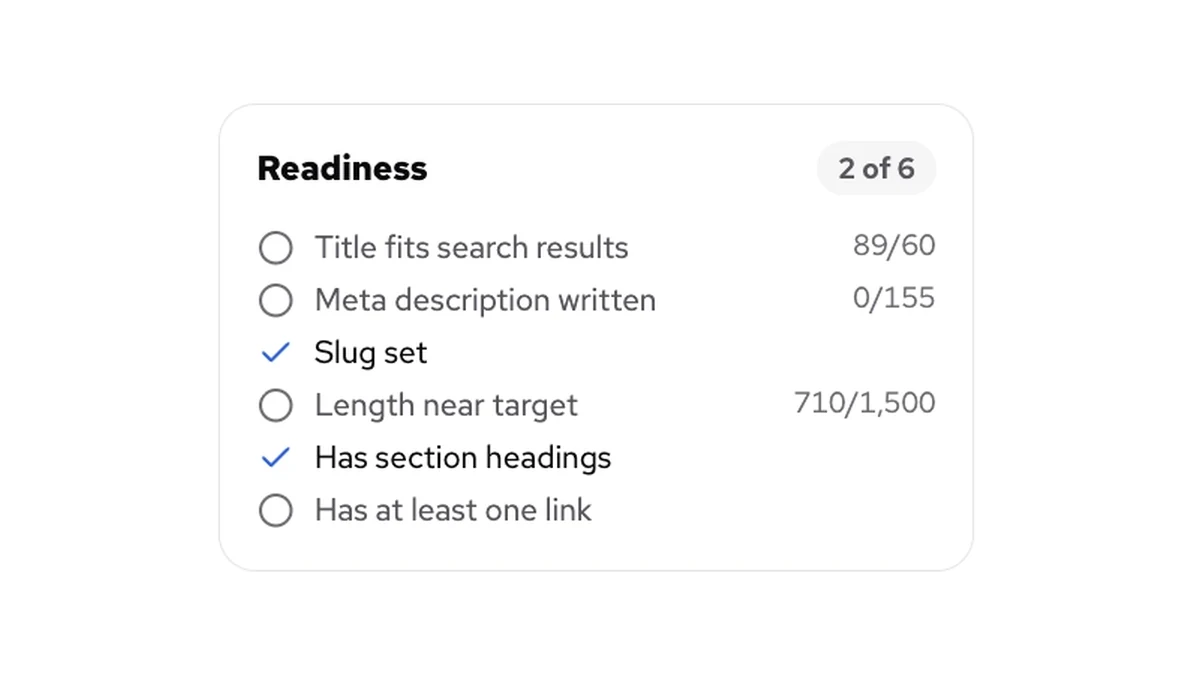
Two details matter most to a part-timer: a readiness card that checks the title, meta description, slug (the end part of a post’s web address), length, headings and links, and the option to publish, schedule or update a post straight to WordPress.
The Artist, which replaced Image Studio, makes covers, pins, logos and thumbnails, plus images that sit inside an article. You can edit the image brief as often as you like for free. Only making the image costs credits.
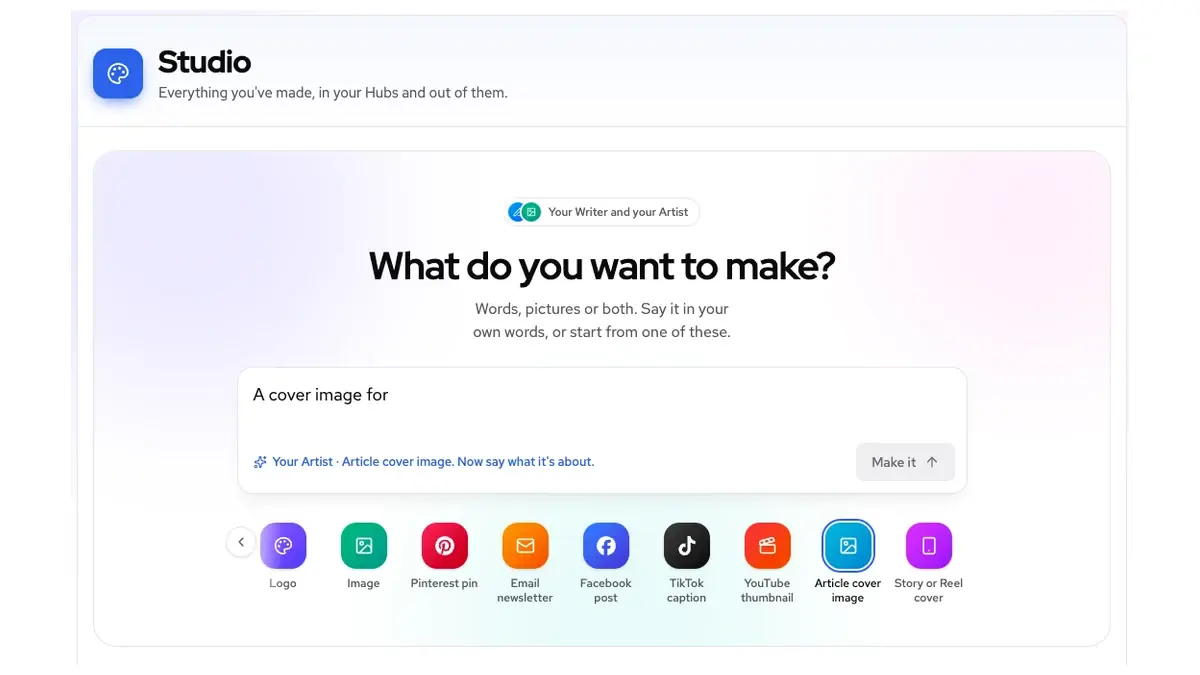
Each business gets its own Hub with its own Gameplans. Sites from before the relaunch carry over into Hubs, and Ace drafts a Gameplan for each channel.
Every plan, the free one included, gets all of this. What changes between the plans is capacity, and that’s where the money question starts.
The Plans: What Changes Between Them and What Stays the Same
Every plan gets every Agent, every channel and Ace. The plans differ in three things: how many credits you get, how many websites you can run, and how many messages Ace answers per day. There’s no features column in the table below because there’s nothing to compare there.
I checked these figures against Wealthy Affiliate’s pricing page in October 2026.
Plan
Price
Credits
Websites
Ace messages a day
Starter
$0, no card
4,000 once, never expire (your first few pieces)
1 practice site
Up to 20
Builder
$29 a month or $290 a year
20,000 a month (about 25 articles)
1
Up to 100
Premium
$49 a month or $490 a year
40,000 a month (about 50 articles)
3
Up to 100
Premium Plus+
$99 a month or $990 a year
100,000 a month (about 125 articles)
5
Up to 200
Starter
Price: $0, no card
Credits: 4,000 once, never expire (your first few pieces)
Websites: 1 practice site
Ace messages a day: Up to 20
Builder
Price: $29 a month or $290 a year
Credits: 20,000 a month (about 25 articles)
Websites: 1
Ace messages a day: Up to 100
Premium
Price: $49 a month or $490 a year
Credits: 40,000 a month (about 50 articles)
Websites: 3
Ace messages a day: Up to 100
Premium Plus+
Price: $99 a month or $990 a year
Credits: 100,000 a month (about 125 articles)
Websites: 5
Ace messages a day: Up to 200
The article counts are Wealthy Affiliate’s own estimates, based on a 1,400-word article and an average brief. Yearly billing is described as two months free.
Against twelve monthly payments, that saves $58 on Builder ($348 against $290), $98 on Premium ($588 against $490) and $198 on Premium Plus+ ($1,188 against $990).
Every plan includes two email accounts per site. Extra websites cost $9 a month each on any paid plan, and Starter has to upgrade first.
Builder includes 1 website. Starter includes only a practice site, so you can build a first site and learn the setup before you pay for anything.
Starter costs nothing and needs no card. You get 4,000 credits once, and they never expire, which is about five articles at Wealthy Affiliate’s own estimate. You also get a practice site, your first Hub, Ace for up to 20 messages a day and access to the community.
That’s where Starter stops. When credits run out, new AI work waits until you top up or upgrade, but the account stays open as long as you keep it.
If you were a member before the relaunch, you keep your current price for as long as your membership stays active, and your old account still works with your original email.
Whether one subscription beats paying for hosting and separate tools depends on how long you stay, and the three-year cost breakdown runs those numbers side by side.
If you’d rather see the credit meter for yourself than read about it, the free Starter account needs no card.
What a Month of Credits Buys at Two Posts a Week
Everything the AI makes uses credits: Ace’s replies, articles, images and answers in Learn. Each one is charged at what it actually took to make, failed work costs nothing, and the account warns you when you’ve used 90% of your balance.
Wealthy Affiliate’s credits guide puts articles at about half a credit per word, so a 1,400-word post uses roughly 700 credits, or about 800 once you count the brief. That lines up with the article counts on the pricing page.
Images show an estimate before you confirm, and you pay what the image actually took, which can be well under the estimate: my first article cover showed about 900 and cost 434. Ace’s replies use credits too, more than you might expect from a chat, so check the usage breakdown after your first few conversations.
Here’s what that means at a part-time pace. Two posts a week is 8 or 9 articles a month. At about 800 credits each, that’s roughly 6,400 to 7,200 credits, around a third of Builder’s 20,000.
Images are the wildcard. At what my first cover cost, a cover on every post still leaves room, but a post with several images can use more credits than its article does.
Costs also vary from piece to piece and may change as Wealthy Affiliate adjusts its pricing, so once you know your own numbers, images, not articles, are what decide whether Builder is enough.
The catch is that monthly credits expire at the end of the month, and that’s true on yearly plans too. A month where you barely write is a month of credits you lose.
Top-ups and Starter’s 4,000 never expire. The account spends whichever credits expire soonest first, so your monthly allowance gets used before anything you’ve bought separately.
Running out is less dramatic than it sounds. Everything you’ve already made stays, and new AI work waits until you top up or upgrade. Top-ups are one-time purchases at $10 per 10,000 credits, available in any whole-dollar amount from $20, and available on every plan, including Starter.
Ace also has a daily message cap that runs alongside your balance. Whichever you reach first, the cap or the balance, pauses Ace.
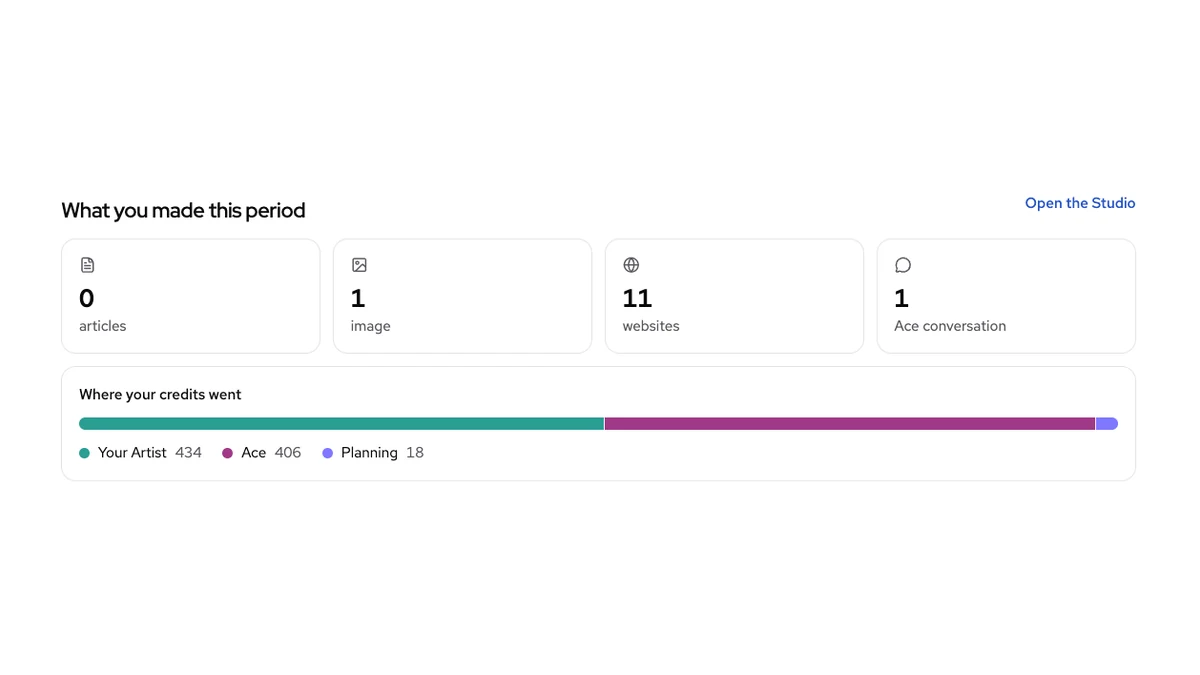
The cost per credit shows what the plan fee is really buying. Builder works out to $0.00145 a credit ($29 for 20,000), Premium to about $0.00123 ($49 for 40,000) and Premium Plus+ to $0.00099 ($99 for 100,000). Top-ups cost $0.001 per credit, which is less than Builder’s or Premium’s monthly credits.
Top-ups don’t come with a website, though. Since every plan gets every tool, the monthly fee mostly buys you a website, a monthly allowance and a higher daily cap on Ace, not extra features.
Credits now pay for AI work, not your membership. You get them from your plan, from top-ups, or as a monthly allowance for promoting Wealthy Affiliate.
So are credits a hidden meter that runs out mid-month? At two posts a week on Builder, with a cover on each, the arithmetic says no. If you do push past your allowance, you get the 90% warning first, and nothing you’ve already made disappears.
What the AI Still Leaves to You
The AI drafts, but it doesn’t do the whole job. For a part-timer, the gaps matter more than the feature list, because they’re where your own hours go.
Wealthy Affiliate’s own terms say AI output can be wrong, repetitive or out of date; that you should review everything before you publish; and that you’re responsible for what goes out under your name, affiliate disclosure included.
Google’s guidance on people-first content asks whether a page shows first-hand expertise, and it describes using AI to produce large amounts of text without manual oversight or curation as little to no effort.
So every Writer draft still needs you to edit it so it sounds like you and add what you’ve actually seen. No plan includes that part.
Keyword numbers are the next gap. When I asked Ace, it gave no search volume or competition figures and pointed me to Google Keyword Planner or Ubersuggest instead.
Jaaxy, the keyword tool older reviews describe, has been retired, so you’ll need a keyword research routine built on outside tools. A Researcher agent has been announced, but it isn’t live.
Learning has changed too. The old step-by-step core training has been removed. Learn now holds answers written by Ace, Focus topics that use credits, 48 short Concepts across 8 areas, 21 platform guides and recordings of Live sessions.
All of that is useful as reference, but there’s no longer a course that takes a beginner through the work in order. In the Live Chat, members said they’re worried about the lack of structured training for beginners. If you were counting on a course to carry you through your first months, that worry is worth taking seriously.
Ace’s first Gameplan also plans only from what lives inside your Wealthy Affiliate account. When I opened the Hub for ClickToProsper, the plan counted the 2 posts I’d published from Wealthy Affiliate and didn’t see the 35 others already on the site.
If you’re bringing an existing site in, check the Gameplan against what you’ve already published before you follow it.
The platform has been shipping fixes since launch, so expect some rough edges and check the pricing page before paying. None of these gaps rule the platform out, but they decide who it suits, and that’s the next question.
Which Plan Fits, and Who Should Skip Wealthy Affiliate
Before the verdict, here’s what I’d weigh, roughly in the order it changes the answer:
- How many posts you’ll realistically finish each month. Credits are spent per article and per image, so this number, and how many images each post carries, decides the plan more than anything else.
- How many sites you need. Websites are the one thing the plans add besides credits: 1, 3 or 5.
- Whether you need a structured course. The step-by-step training is gone, and Learn doesn’t replace it.
- Whether you need keyword numbers inside the tool. Ace doesn’t give them, so you’ll be using outside tools either way.
- Whether you’ll edit what the AI drafts. The terms put responsibility for every published word on you.
- How much a month of unused credits would bother you. Monthly credits don’t roll over, so an irregular schedule means paying for credits you lose.
Starter is the honest test. It costs nothing and asks for no card, and about five articles’ worth of credits is enough to find out whether the Writer’s drafts are worth your editing time. Its limits are real, though: you get a practice site rather than a website, and the credits don’t refill.
Builder fits one site published at about two posts a week. That’s the pace the arithmetic above was built on, and it leaves room for a cover image on each post.
Premium earns its extra $20 a month when you need more sites and would use the extra credits too. Three sites is where it clearly wins: $49, against $47 for Builder plus two extra websites at $9 each, with twice the credits.
For a second site alone, Builder plus one extra website comes to $38. And if you run one site and only run short of credits now and then, a $20 top-up buys the same 20,000 credits Premium adds, and top-up credits don’t expire.
Premium Plus+ is for someone who’s already publishing at volume and keeps running out, not for someone hoping a bigger allowance will make them write more.
I learned that last point the expensive way. Before I came back to online business in 2014, I spent real money on pay-per-click ads with no landing page and no strategy, and I had nothing to show for it. Buying more capacity before you have a publishing habit is the same mistake in a different form.
The higher plans sell more credits and more sites, but they don’t supply the plan, so buy for the posts you finish now and upgrade when you actually run out.
You should skip Wealthy Affiliate if any of these sound like you:
- You want a structured course. The step-by-step training was removed, and what’s in Learn now is reference material.
- You need keyword numbers inside the tool. Ace gives no search volume or competition numbers, and the Researcher agent isn’t live.
- You won’t edit AI drafts. The terms make you responsible for what you publish, and an unedited draft is the kind of work Google’s guidance describes as little to no effort.
- You expect Ace to run the business. Wealthy Affiliate’s own homepage promises no “done for you” riches, and the reasons done-for-you systems fail still apply when the system is an AI.
- A lost month of credits would bother you more than the convenience is worth. If you write in bursts, every quiet month is money spent on credits that disappear.
If you do start, set your expectations by Wealthy Affiliate’s own homepage, which says most businesses take months of real, steered work before they bring in real money. My own first commission was $2.12. I mention it because that’s what an honest early result looks like, and a review promising you more than that early on deserves a second look.
For a realistic picture of what comes after, here’s what the first 24 months look like at a part-time pace.
Refunds, Cancelling and Leaving: The Terms to Read Before You Pay
If a subscription has burned you before, these are the lines to read first. All of them come from Wealthy Affiliate’s pricing page and its terms of service, so you can check each one yourself.
- Refunds are incident-based only. Wealthy Affiliate refunds when something has gone wrong with your account or billing. A business that didn’t work out isn’t grounds for one.
- You can cancel anytime. Your membership stays active until the end of the period you’ve already paid for.
- Upgrades are immediate; downgrades wait. Upgrades take effect right away, and you pay the difference for the rest of the period. Downgrades take effect when the paid period ends.
- Prices can change. Existing members keep their current price while their membership stays active, but Wealthy Affiliate may change prices with reasonable notice before your next billing period.
- You own what you make. That includes what Ace and the Agents produce, to the extent the law allows.
- You have to be 18 or older. Membership is limited to adults.
Leaving is where the all-in-one setup cuts the other way. When an account closes, access to its Hubs, content and hosted websites ends, so export your content before you go and keep your own copy of anything you can’t afford to lose.
A free account, by contrast, stays open as long as you keep it. Neither the pricing page nor the terms say what happens to a paid website if you stop paying and keep the free account, so ask support before you pay, and keep your own backup of the site.
Here’s the step I’d take before paying for anything. Open the free Starter account, draft one post with the Writer, make its cover image, and note what both cost in credits. Then multiply that by the posts you realistically finish in a month, and let that number pick your plan rather than the feature list.
Tell me in the comments which plan you’re weighing and how many posts a month you realistically finish. If you were a member before the relaunch, tell me what changed most in your account. I read and reply to every comment.

Sonia Zannoni
Hi, I’m Sonia Zannoni, creator of Click to Prosper. I share practical tools, workflows, and honest guidance to help you build an online business with more clarity and less chaos.
About Sonia
Feeling stuck between too many tools and too much advice? Start with the beginner path.
View the Blueprint