

The Pages Your Affiliate Site Needs Before It Earns Traffic

Affiliate Disclosure: This post contains affiliate links. If you purchase through one of my links, I may earn a commission at no additional cost to you. Read the full Affiliate Disclosure for details.
Which pages could get you in trouble if you leave them off your affiliate site, and which ones are only there to make it look established? You usually start asking once a few real posts are live and you notice the row of footer links every established site carries.
Search for the pages every affiliate website needs and you get a list of nineteen pages, another of thirty, a policy generator asking for a subscription, and a forum thread insisting terms of service is mandatory. None of that answers your question.
The confusion comes from those lists, not from you. They mix legal pages, trust pages and pages meant for merchants without ever saying which is which. So if you pasted in a generator’s policy and hoped for the best, or put the whole job off for later, both are reasonable responses to muddled information.
What you need is a short, sorted answer for a one-person content site, not a business website checklist. There are four pages, sorted here by what triggers each one. Two have rules behind them once your site does certain things, two are expected because readers and affiliate managers look for them, and you can set up all four in one sitting so each one describes what your site really does.
TL;DR: The Pages Every Affiliate Website Needs
Required or Expected: Sorting the Four Pages by What Triggers Each One
An affiliate content site needs four pages before it earns traffic: About, Contact, Privacy Policy and Disclosure. Disclosure and Privacy have rules behind them, triggered by carrying affiliate links and by collecting visitor data. About and Contact aren’t legally required for a US content site, but readers and affiliate managers expect to find them.
The long lists get to nineteen or thirty items because they lump three kinds of page together. There are legal pages, there are trust pages, and there are merchant-side pages, meaning signup and landing pages for people running an affiliate program rather than publishing for one. Nobody labels which is which, so a beginner reads every item as a requirement.
The question I’d ask of each page is a plain one: what does my site do that triggers this page? Ask it of every page on those lists and the four that matter separate out quickly. It’s also the test every section below applies, so it’s worth holding onto.
Asked that way, Disclosure and Privacy each have a trigger with a named rule behind it. About and Contact don’t have a general legal rule behind them for a US content site in any source I checked. They earn their place through trust, because they’re how a stranger works out who’s behind the site.
Terms of service isn’t on the list. No source checked for this post makes one required for a content site with no accounts or checkout, so it stays off, whatever that forum thread says. Rules vary by country, and this post describes the rules it names.
Here’s how the four pages sort, with what triggers each one and where the rule comes from:
Page
Required or expected
What triggers it
Where the rule comes from
Disclosure
Required (the disclosure in each post; the page backs it up)
The site carries an affiliate link
The FTC’s endorsement guidance
Privacy Policy
Required once a rule applies
Analytics, affiliate cookies or a contact form collect data
Google Analytics’ terms, California’s privacy law
About
Expected
Readers and affiliate managers look for who runs the site
Google’s helpful content guidance (a trust signal, not a legal rule)
Contact
Expected
Readers and partners need a way to reach you
No general legal rule found for a US content site
Disclosure
Required or expected: Required (the disclosure in each post; the page backs it up)
What triggers it: The site carries an affiliate link
Where the rule comes from: The FTC’s endorsement guidance
Privacy Policy
Required or expected: Required once a rule applies
What triggers it: Analytics, affiliate cookies or a contact form collect data
Where the rule comes from: Google Analytics’ terms, California’s privacy law
About
Required or expected: Expected
What triggers it: Readers and affiliate managers look for who runs the site
Where the rule comes from: Google’s helpful content guidance (a trust signal, not a legal rule)
Contact
Required or expected: Expected
What triggers it: Readers and partners need a way to reach you
Where the rule comes from: No general legal rule found for a US content site
The Disclosure page carries the most misunderstanding of the four, so that’s where to start.
Your Disclosure Page: Backing Up the Disclosure Each Post Has to Carry
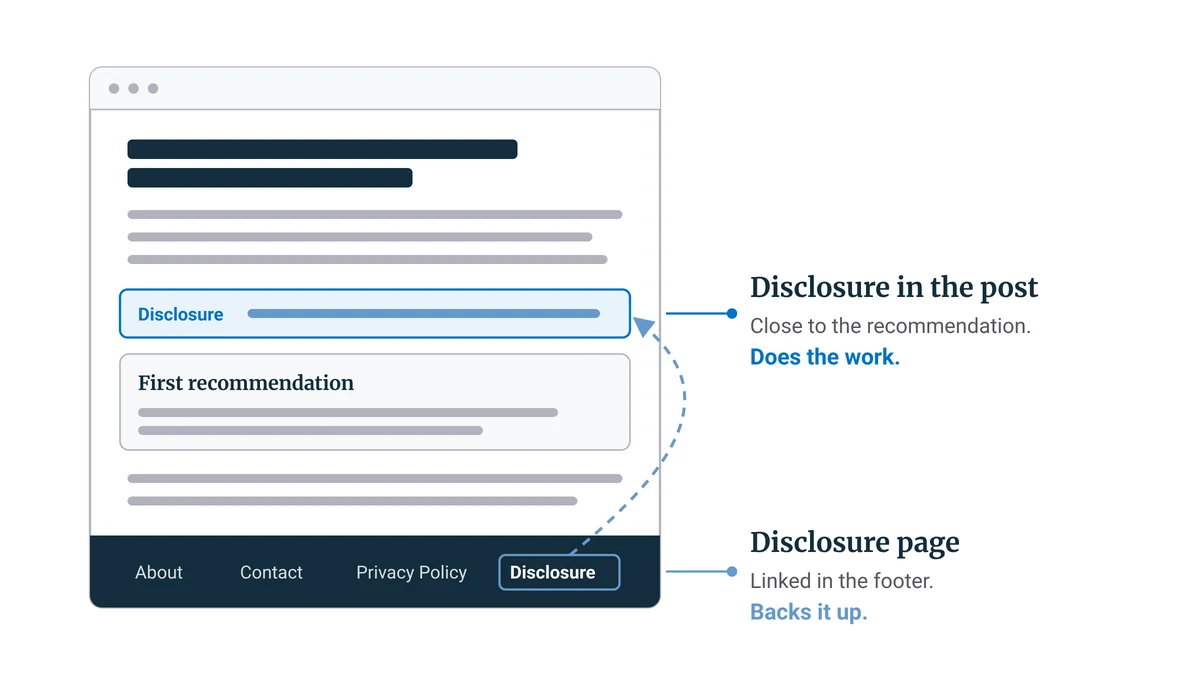
A Disclosure page explains how your site earns from affiliate links, but the FTC says a linked disclosure on its own is easily missed and isn’t clear and conspicuous. The disclosure that does the work sits inside each post, close to the recommendation. The page backs it up and gives the full explanation.
What the FTC asks for is the disclosure itself, and the page is the site-level explanation behind it. In its Endorsement Guides FAQ, the FTC makes several points that show why the page can’t carry the job alone:
- A single disclosure on your home page isn’t enough, because people arrive on and read individual posts, not your home page.
- A disclosure reached only through a link is easily avoided, so the FTC doesn’t treat it as clear and conspicuous.
- The closer a disclosure sits to the recommendation, the better, and one at the bottom of a page may be missed.
- Readers may not understand that “affiliate link” means the publisher gets paid.
Put those points together and you can see why the page alone fails. A reader can skip a page they never click, so the explanation behind your footer link never reaches the person reading a review and deciding whether to buy.
I’ve already covered where the disclosure goes in a review and how to word it, so this section stays with the page itself.
The page should say, in plain language, which kinds of links on your site earn a commission and how you decide what to recommend. That second part matters more than it looks, because a reader who’s just learned you get paid will want to know whether the payment picks the products. Link the page in your footer so it’s reachable from every page.
Some programs also require their own wording on your site. Amazon Associates is the usual example: its operating agreement asks for the statement “As an Amazon Associate I earn from qualifying purchases.” If you’re in a program like that, your Disclosure page is a natural home for its required line, word for word.
You might be thinking your theme’s footer already links a disclosure page, so you’re covered. By the FTC’s reasoning you aren’t, because a disclosure reached only through a link is exactly what it calls easily avoided. The footer link is still worth having. It just can’t stand in for the disclosure in each post.
The privacy policy has the opposite problem: most beginners think it doesn’t apply to them yet.
Your Privacy Policy: Why “I Don’t Collect Emails” Doesn’t Get You Out of It
Most affiliate sites need a privacy policy even with no email list. Google Analytics’ terms require one that notes its cookies, a contact form collects names and email addresses, and California’s privacy law requires a commercial site collecting personal information from its residents to post a policy and follow it.
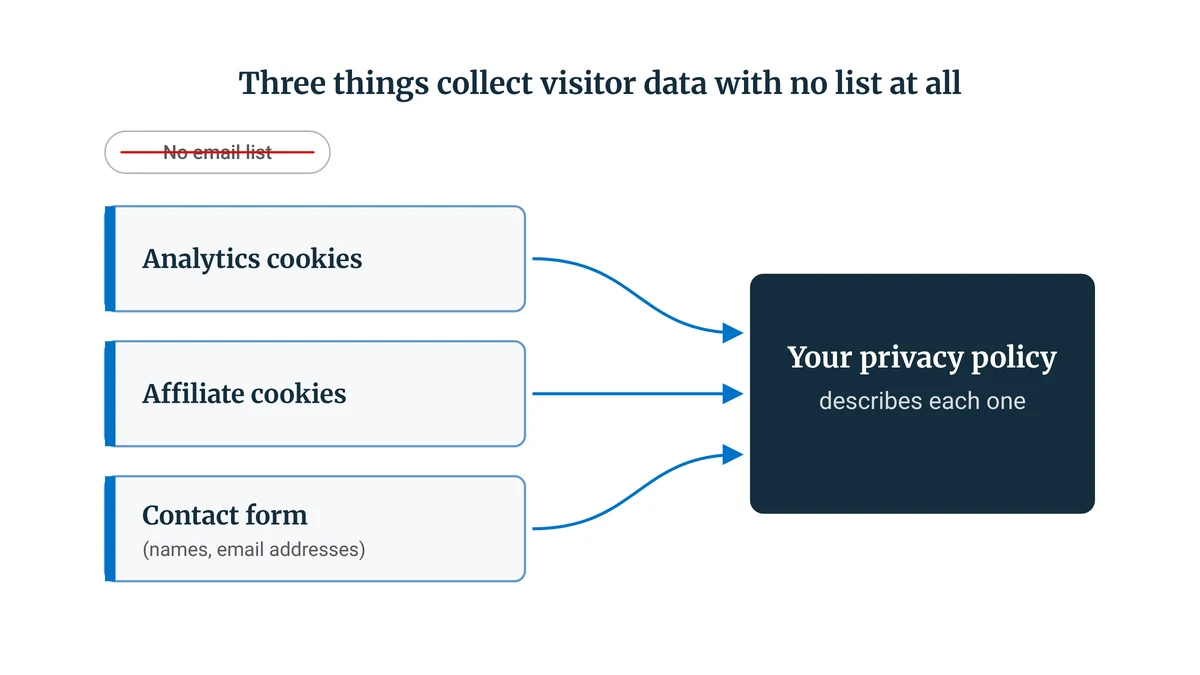
The belief that stops beginners writing one is that collecting data means running an email list. On a new affiliate site, three things collect visitor data with no list at all:
- Analytics. The tracking tag sets cookies so it can count visits and follow how people move through the site.
- Affiliate cookies. Affiliate links rely on cookies so the program can credit you when a reader you sent goes on to buy.
- A contact form. Every message arrives with the sender’s name and email address attached.
Google Analytics’ terms require a site using it to post a privacy policy that gives notice of its use of cookies. So the day you add the analytics tag, the policy already has a job to do.
Amazon’s oneTag policy works along the same lines. It requires Associates who’ve added oneTag, an optional Amazon script, to their site to publish a privacy policy explaining how visitors opt out.
Then there’s California’s privacy law. It requires the operator of a commercial website that collects personally identifiable information from California residents to post a privacy policy conspicuously and to comply with it. Under that law, the policy has to:
- identify the categories of personal information the site collects, and the third parties it shares that information with
- state the policy’s effective date
- describe how visitors are told when the policy changes
- say how the site responds to browser Do Not Track signals
- say whether other companies, such as your analytics provider or an affiliate program, may collect information about a visitor’s activity across different websites when they use yours
Do Not Track is a browser setting that asks websites not to follow a visitor’s activity, and the law only asks your policy to say how your site responds to it. The same law counts a homepage text link as posting the policy conspicuously, as long as the link includes the word “privacy,” which comes up again when you set up your footer.
Before you write a word of the policy, list what your site actually runs: your analytics, each affiliate program you’ve joined, every form, and anything else that sets cookies. You’ll find most of it on the WordPress Plugins screen, in any videos or forms you’ve embedded, and in any tracking code added to your theme’s header.
That list is the policy’s raw material. A privacy policy is a description of your site, so it can only be as accurate as the list you write it from.
Policy generators are fast, and they make a fine first draft if you edit it down to what your site runs. The trouble starts with a pasted template listing tools you don’t use. California’s law requires the operator to follow its own posted policy, so a policy describing a newsletter you don’t have or ad networks you never joined is a problem of its own.
Those two pages are the ones with rules behind them. The next two decide whether a stranger trusts the site.
Your About Page: Not a Legal Requirement, but the Page Strangers Check First
No general US rule requires an About page on a content site, but it’s how readers, affiliate managers and Google’s own guidance judge who stands behind the recommendations. It should say plainly who runs the site, what it covers, who it’s for and how you decide what to recommend.
Google puts this in writing. Its guidance on helpful, reliable content names trust as the most important aspect. It asks whether it’s self-evident to visitors who authored the content, and it lists background about the author or the site, such as an author page or a site’s About page, among the things that make content trustworthy.
Affiliate managers reviewing a new site often look for an About page too, and approval guides commonly list it next to Contact and Privacy. If you’re getting ready to apply, what networks check on a new site goes through the rest of what they look at.
For a content site, the page needs three things:
- Who runs the site. Your name and a sentence or two on why you’re the person writing about this topic.
- What it covers and who it’s for. A reader should be able to tell in a few seconds whether they’re in the right place.
- How you choose what to recommend. It’s the question a reader brings over from your Disclosure page, so answer it here too.
Some site builders now offer to draft an About page for you. Wealthy Affiliate, which I go through in my Wealthy Affiliate review, is one: its AI advisor, Ace, starts a new site on a plan that focuses on getting the homepage and About page live.
A generated draft is a starting point to rewrite in your own words, because a page meant to show who runs the site can’t do that in a tool’s voice.
A common pushback is that nobody reads About pages. Plenty of casual readers never open one. The people deciding whether to trust your recommendations or approve your application do, and theirs is the decision that changes what happens next for the site.
Once a stranger knows who’s behind the site, the next thing they’ll want is a way to reach you.
Your Contact Page: A Form Instead of Your Inbox Address
A Contact page isn’t legally required for a US content site, but readers, affiliate managers and potential partners expect one. A simple form keeps your email address off the page, and because the form collects names and email addresses, it belongs on the list your privacy policy describes.
You don’t need anything elaborate here: one page and a contact form plugin are enough.
Above the form, say which kinds of messages fit the site and roughly when you reply. That sets expectations before someone writes, and it saves you answering messages the site was never meant to handle.
With all four pages sorted, the last step is getting them written without dragging the job out over weeks.
Setting Up All Four in One Sitting, and Keeping Them True
Set up all four pages in one sitting: list what your site runs, write the Disclosure and Privacy pages from that list, then the About and Contact pages, and link all four in the footer. Reread the policy and the Disclosure page whenever you add a tool, an affiliate program or a form.
The list comes first because it drives the two pages with rules behind them. Once you know what your site runs, the Disclosure and Privacy pages are mostly a matter of describing it honestly. About and Contact come after, and they’re the quicker two.
Here’s the sitting as a checklist, with the trigger question for each page:
- Disclosure. Does any page on my site carry an affiliate link?
- Privacy Policy. Does anything on my list (analytics, an affiliate program, a form) collect visitor data? If so, date the policy before you publish it.
- About. Could a stranger tell who runs this site and how I choose what to recommend?
- Contact. Can a reader or an affiliate manager reach me without my email address on show?
Then link all four in the footer, so every page on the site reaches them. A footer link shows on your homepage too, and California’s law counts a homepage text link that includes the word “privacy” as conspicuous posting.
If your site feels too small for this to matter yet, look again at what triggers each page. Every trigger in this post is something the site does (an affiliate link, an analytics tag, a form), and none of them is a traffic level. One sitting now is a lot easier than rewriting four pages after the site has grown around them.
Keeping them true is the part people forget. Whenever you add a tool, join a program or put in a new form, reread the privacy policy and the Disclosure page against your list, and update the policy’s effective date when you change it.
You now know which of those footer links have a rule behind them, which ones are there for trust, and what each one has to say about your site.
This week, set up the four pages, starting with the list of what your site runs, and if the site itself isn’t built yet, you can start it on Wealthy Affiliate’s free Starter account, which gives you one practice site and a starting allowance of AI credits.
Which of the four pages is still missing from your footer? Or is there a line in your privacy policy you’re not sure describes your site? Tell me in the comments. I read and reply to every one.

Sonia Zannoni
Hi, I’m Sonia Zannoni, creator of Click to Prosper. I share practical tools, workflows, and honest guidance to help you build an online business with more clarity and less chaos.
About Sonia

Feeling stuck between too many tools and too much advice? Start with the beginner path.
View the Blueprint