
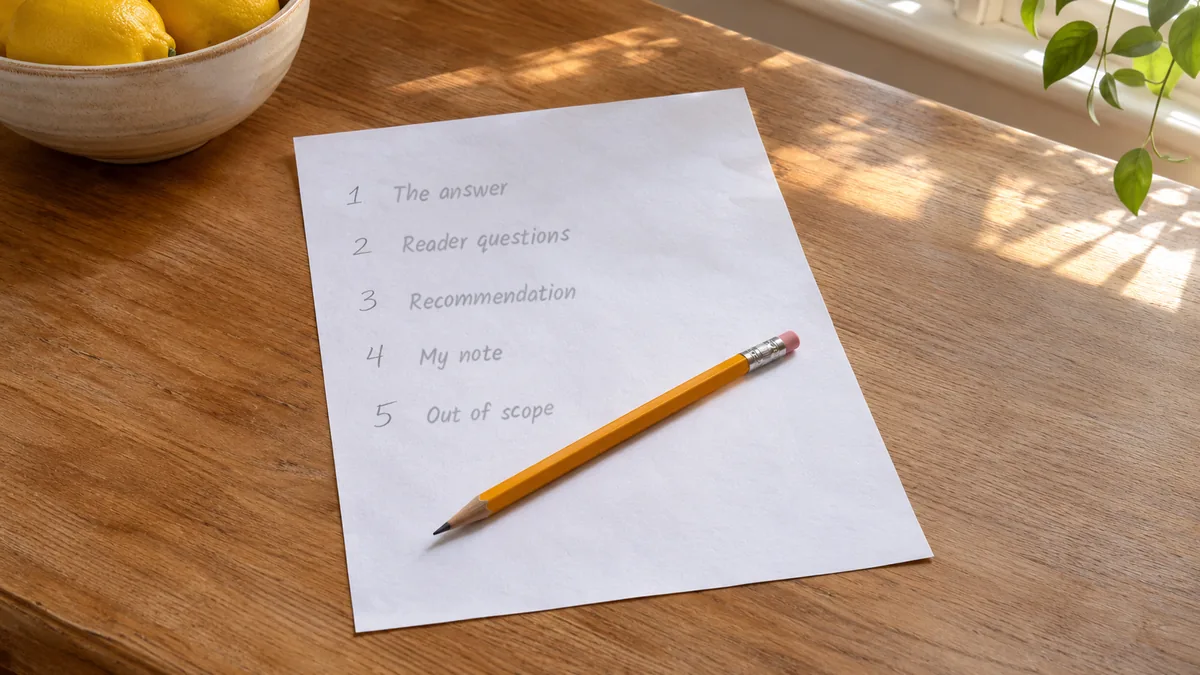
How to Outline a Blog Post with AI Before You Generate a Draft

Affiliate Disclosure: This post contains affiliate links. If you purchase through one of my links, I may earn a commission at no additional cost to you. Read the full Affiliate Disclosure for details.
You’d heard “outline first” often enough that you tried it. Instead of working out how to outline an affiliate blog post yourself, you asked the AI for an outline before the draft, and it handed back the headings every page-one result already uses: a definition, why it matters, five tips, a wrap-up. The draft built on it came out just as generic as the one you’d have got without it.
If you’ve decided outlining is an extra step that doesn’t help, that’s a fair reading of what happened. The step wasn’t the problem. The AI made every structural decision from a keyword, and nobody else made any.
What you actually want is an outline that makes the AI draft come back as your post, not an average of everyone else’s. That comes down to one page of five decisions, built from notes you already have, which AI then checks rather than writes. By the time you prompt the first section, your choices are already shaping it.
TL;DR: Outlining a Blog Post Before AI Drafts It
Why an Outline Built From the Keyword Alone Gives You Everyone Else’s Post
Start with what the AI is actually doing when you hand it a keyword. A language model writes by predicting the most likely next words, so a prompt that holds only a keyword gets back the most likely structure for that keyword. Nothing in the prompt points it toward your reader, your site or what you know, so it has no reason to go anywhere else.
That’s why writers who try it keep reporting the same result: an outline asked for from a bare keyword comes back as the obvious, consensus structure. The headings are tidy and reasonable. They’re also the headings you’d expect on anyone’s post about that keyword.
Google’s guidance on generative AI content describes these tools in the same terms, and it’s relaxed about using them to help organize a post. What it treats as spam is using AI to turn out pages in bulk that add nothing. So the risk isn’t that AI touched your outline. It’s an outline where AI made every call.
On an affiliate site, that matters twice over. A post with the same structure as page one gives a reader no reason to pick yours. It also leaves you nowhere to put what you actually know about the product or the problem, because every section is already filled with the general version.
The obvious objection is that AI outlines faster than you ever will, and that’s true. What you trade for the speed is a structure nobody chose. That’s why the rest of this post gives AI a different job: checking your outline once you’ve made the decisions in it.
Start From the Notes You Already Have
Your outline already has two inputs before you write a line of it. The first is the three sentences from keyword research: the direct answer, the reason it’s true, and the action the reader should take.
The second is the three notes from your intent check: the dominant format on page one, the main SERP feature (the extra box Google adds to the results page, such as a short answer at the top or a list of related questions), and what those two mean for your post’s structure.
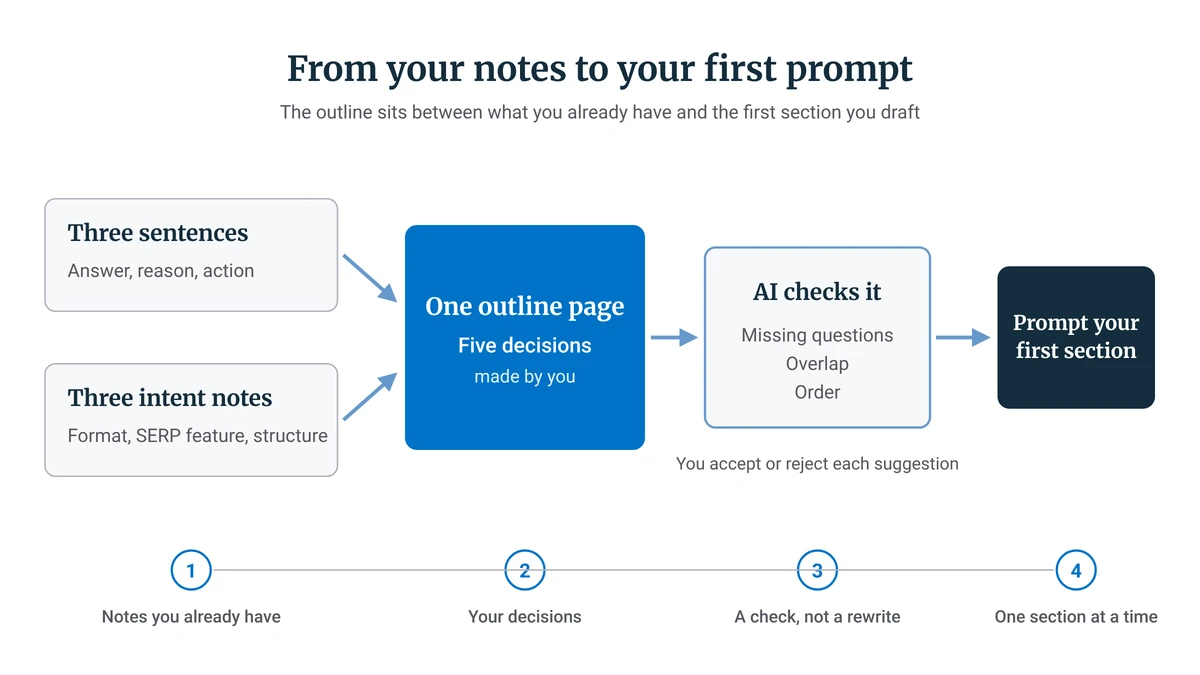
The three sentences set the answer the post commits to. If you don’t have them yet, the 3-Sentence Rule is the quick test that produces them from the keyword you’ve picked, and it’s worth running before you outline anything.
The three intent notes set the post’s shape: a list, a step sequence or a comparison. Your outline takes those notes as its starting input, so if you skipped checking search intent first, go back and do that now. An outline built on a guessed format can be well organized and still be the wrong kind of post.
With the answer and the shape in hand, what’s left is a short set of decisions, and they all fit on one page.
The Five Decisions an Outline Settles Before Any AI Writes
Most people picture an outline as a list of headings. The headings come later. What an outline really holds is five decisions, made by you, that every heading then has to follow.
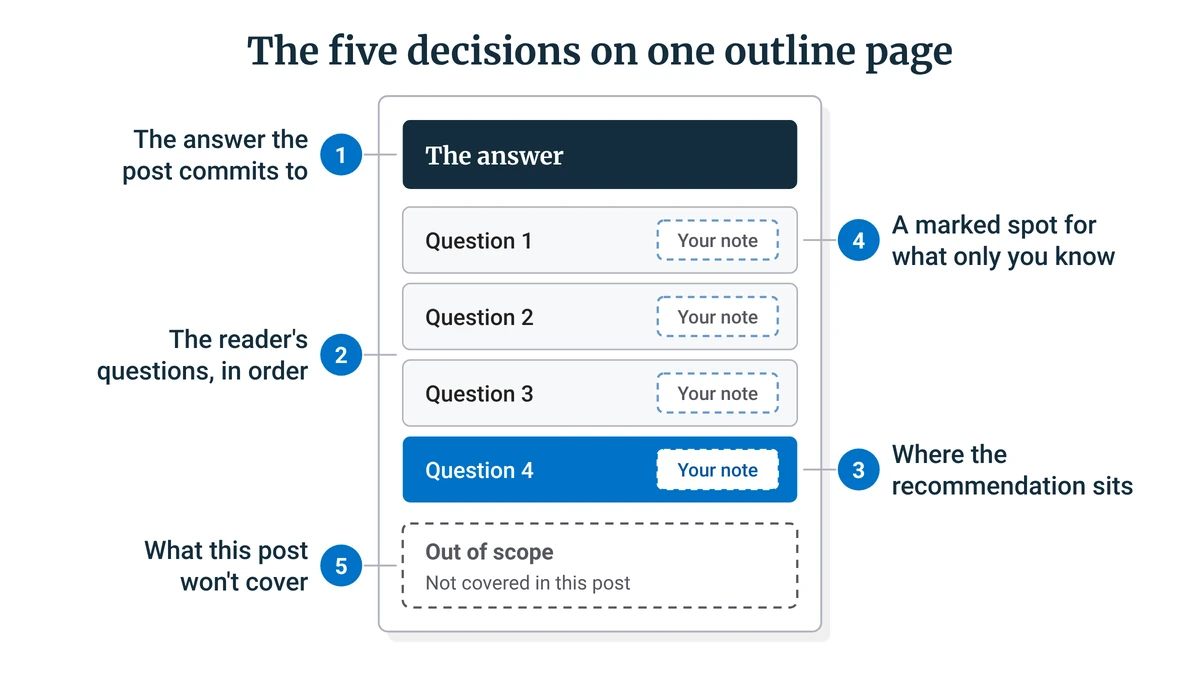
To keep this concrete, picture an affiliate post on how to choose a standing desk for a small apartment. Each decision below uses that post as its example.
Decision One: The Answer the Post Commits To
Take your direct-answer sentence and turn it into the one sentence the post stands behind. For the standing desk post, that might be: measure your space and your standing height before you compare a single desk. Every section either supports that sentence or gets cut.
This matters because an AI will happily support three different answers in one post if nothing stops it. One committed sentence gives every section something to answer to, and it gives you a quick test for anything the draft adds later.
Decision Two: The Reader’s Questions, in the Order They Come
Each section answers one question a reader would ask next, in the order they’d ask it. Someone choosing a standing desk for a small apartment asks roughly this: will one fit, what height range do I need, crank or electric, how much should I spend, and which one would you pick? That’s five sections, already in order.
This is what replaces the what, why and how padding a keyword-only outline produces. It also stops five thin bullets from being stretched across 1,500 words, because a section built on a real question is finished once the question is answered.
Decision Three: Where the Recommendation Sits
In an affiliate post, decide before drafting which section carries the recommendation or the affiliate link. It should land after the reader has what they need to judge it. In the standing desk post, that’s the last section, after fit, height, type and budget, rather than a top pick in the opening lines.
The review and comparison section further down shows how this shifts when the whole post is a recommendation.
Decision Four: A Marked Spot for What Only You Know
Mark a slot in each section for your own material, so the AI draft leaves room for it instead of filling the gap with the general version. A plain marker line is enough, as long as it sits where your material belongs.
In the standing desk post, the height-range section gets its marked line right after the section’s answer, before anything general. It can be as simple as “My note: what I measured in my own corner.”
Google’s people-first content guidance asks whether a page offers original information and shows first-hand experience. The outline can’t supply that for you. Its job is to make sure the space for it exists and sits in the right place before any AI starts writing.
Decision Five: What This Post Won’t Cover
Write a short list of what the post won’t cover. For the standing desk post, that might be the health claims around standing at work and the choice of chair, which each deserve a post of their own.
The list stops the AI wandering into the neighbouring topic, which it will do whenever a related subject is the likely next thing to say. It also keeps two of your own posts from covering the same ground.
How the Outline Changes for a Review or Comparison
The five decisions hold for any post, but how much weight each one carries depends on the decision your reader is making. In a review or comparison, the criteria come before the full recommendation, and the outline decides in advance which section carries it.
So a review outline lists what the verdict rests on first. A one-line verdict can sit near the top for skimmers, but the full recommendation and the affiliate link come only after each of those criteria has been covered. If a review is what you’re outlining, the full method for structuring one as a decision tool is in my guide to writing an honest affiliate review.
There’s an exception, and it depends on context. A short post answering one narrow question may need nothing more than the three sentences, because there’s only one thing to say. A comparison needs the most structure of all, because the reader is weighing options against each other rather than following steps.
Here’s how the outline shifts across the four post types you’re most likely to write:
Post type
What the outline settles first
Where the recommendation sits
How much outline it needs
How-to or workflow guide
The steps, in the order the reader does them
At the step where a tool is needed, if there is one
A full outline
Single review
The criteria the verdict rests on
Full recommendation after the criteria; a short verdict can sit up top
A full outline
Comparison
The criteria both options are judged on
After both options are judged on the same criteria
The most structure of the four
Short narrow answer
The one direct answer
Usually none
The three sentences may be enough
How-to or workflow guide
What the outline settles first: The steps, in the order the reader does them
Where the recommendation sits: At the step where a tool is needed, if there is one
How much outline it needs: A full outline
Single review
What the outline settles first: The criteria the verdict rests on
Where the recommendation sits: Full recommendation after the criteria; a short verdict can sit up top
How much outline it needs: A full outline
Comparison
What the outline settles first: The criteria both options are judged on
Where the recommendation sits: After both options are judged on the same criteria
How much outline it needs: The most structure of the four
Short narrow answer
What the outline settles first: The one direct answer
Where the recommendation sits: Usually none
How much outline it needs: The three sentences may be enough
The structure grows with the decision the reader is making. Once you know how much outline your post needs and you’ve written it, it’s ready to be checked.
Let AI Check the Outline Instead of Writing It
Before you ask AI anything, know what a finished outline looks like, so you can judge what it tells you. Your outline is ready when:
- Each section answers one reader question, so nothing is there just to fill space.
- The sections follow the order the reader would ask those questions, so nobody has to scroll back to find a missing piece.
- Each section has a marked spot for your own material, so the draft leaves room for it.
- The out-of-scope list exists, so the AI has a boundary to stay inside.
Then paste the outline into your AI tool and ask it to check three things: which reader questions are missing, which sections overlap, and whether the order matches how a reader would actually ask. One plain request covers it: “Here’s my outline. Tell me which reader questions are missing, which sections overlap, and whether any section is out of order. Don’t rewrite it.”
You stay the one who decides. AI suggests, and you accept or reject each suggestion against your five decisions.
When I run this check, I read every suggestion against the committed answer and the out-of-scope list first. A suggestion that pulls against either one is the AI drifting back toward the consensus version, the same pull it has with a bare keyword.
If outlining still sounds like time you don’t have, look at where the fixes happen. Fixing the order or an overlap in an outline takes a few lines. Fixing the same problem once the draft exists means rewriting whole sections.
Hand the Outline to Your Drafting Tool One Section at a Time
Once the outline passes the check, paste the whole thing into the chat, then ask for one section at a time. Each section gets written from decisions already made, with the committed answer, the question order and the out-of-scope list sitting in the same conversation.
Free tiers have usage limits, and it’s easy to hit one partway through a post. When that happens, the outline is what goes into the next tool, so the new chat starts from the same decisions instead of from your keyword. If your next question is which free tool to draft in, my breakdown of what the free AI tiers cover shows where each one’s limits bite.
Any drafting tool works from the outline the same way. Wealthy Affiliate’s Writer is one example: its article plan carries your target keyword, and articles are charged in credits by length. If you’re weighing whether a platform like that belongs in your setup, my full Wealthy Affiliate review is the place to look.
Then prompt your first section. When it comes back, the outline has done its job: the structure is yours, and every section after it will be written from the same decisions. What happens to that section next is editing the AI draft so it sounds like you, and that’s a job of its own.
If you’d like to look around Wealthy Affiliate before deciding anything about it, the free Starter membership is an easy way to start.
Which of the five decisions is hardest to settle for the post you’re working on right now: the committed answer, or the out-of-scope list? Tell me in the comments. I read and reply to every comment.

Sonia Zannoni
Hi, I’m Sonia Zannoni, creator of Click to Prosper. I share practical tools, workflows, and honest guidance to help you build an online business with more clarity and less chaos.
About Sonia
Feeling stuck between too many tools and too much advice? Start with the beginner path.
View the Blueprint