

Is Amazon Associates Worth Building Your Affiliate Site Around?

Affiliate Disclosure: This post contains affiliate links. If you purchase through one of my links, I may earn a commission at no additional cost to you. Read the full Affiliate Disclosure for details.
Every beginner checklist puts Amazon Associates first. Sign up, drop a few product links into your posts, move on. Then you open the dashboard a few weeks later and see some clicks, an order or two, and a balance you read twice because it’s counted in cents.
So now you’re asking the question the checklist skipped: is Amazon Associates worth it, or did you start in the wrong place?
You’re not doing it wrong by being confused. Here’s the contradiction nobody points out: the program every list puts first is, by its own terms, one of the harder places for a brand-new site to start. The rates in most everyday categories are low, the buying window is short, and your account has to pass a review before your site has much traffic at all.
The advice you followed was a starting checklist, not a reading of the contract. And a lot of what ranks for this question was written before Amazon’s current terms.
So I read the contract for you. Below is how your commission is actually calculated, what the 24-hour window really covers, how the three-sale review works, and which rules close accounts.
By the end, you’ll know which of three calls fits your site: keep Amazon as a fallback tag (your tag is the tracking ID Amazon adds to your links so the sale is credited to you), build around it, or wait to apply.
TL;DR: Is Amazon Associates Worth It?
Why Your Amazon Balance Is Measured in Cents
Looking at how the rate card is built, a small balance isn’t a glitch. It’s what the math produces on most everyday products.
Amazon pays you a percentage of what it calls Qualifying Revenue, at a rate set by the product’s category. Qualifying Revenue leaves out shipping, gift wrapping, handling, taxes, service charges, credits, rebates, card processing fees and bad debt. So the number your commission is calculated on is already smaller than the price your reader saw.
The current US rate card runs from 10% down to zero. Luxury Beauty, Luxury Stores Beauty and Amazon Explore sit at the top at 10%. Digital and Physical Music, Handmade and Digital Videos pay 5%, and Physical Books, Kitchen and Automotive pay 4.5%. Amazon devices, Apparel, Shoes, Jewelry, Watches, Luggage and the catch-all “All Other Categories” pay 4%.
Below that, the rates thin out fast. Home, Toys, Pets Products, Outdoors, Sports, Tools, Beauty and Baby Products, among others, pay 3%. PC and PC Components pay 2.5%, Televisions and Digital Video Games pay 2%, and Grocery, Health and Personal Care, Physical Video Games and Consoles and Amazon Fresh pay 1%.
A few categories pay nothing at all, including Gift Cards, Kindle subscriptions and Alcoholic Beverages. Alongside the percentages, Amazon also pays some fixed bounties, for example $20.00 for an Audible Standard Free Trial and $3.00 for a Prime Free Trial.
Here’s what that looks like on real prices. A $40 Kitchen item at 4.50% earns you $1.80 ($40 × 0.045). A $15 Health and Personal Care item at 1.00% earns you $0.15 ($15 × 0.01). Same click, same post, and one sale is worth twelve times the other.
That gap is the diagnosis you came for. A balance in cents can mean two different things. If you link $40 kitchen gear and just don’t have many visitors yet, that’s a starting problem, and it grows as your traffic grows. If you link $15 items in a 1% to 3% category, that’s a structural problem, because more traffic only multiplies a small number.
If you want to see how that compares with programs that keep paying every month, I’ve laid out why recurring software commissions compound while retail sales reset in its own guide. I won’t rebuild that comparison here.
One warning before you trust any rate you’ve read. Rate tables circulating online have drifted. Some still list “Amazon Games 20%” or “Amazon Haul 7%”, and neither appears on the current US statement. Amazon Haul now shows up only as a fixed $4 first-purchase bounty.
So don’t take a rate from someone’s blog, this one included. Look up your own category on Amazon’s Standard Commission Income Statement, which is the source every figure above comes from.
Then there’s timing. Commission is paid roughly 60 days after the end of the month you earned it. The minimum payout is $10, whether you’re paid by direct deposit, gift card or check, and checks to US addresses carry a $15 processing fee. If an account shows no substantial activity for 3 years, Amazon can withhold a small accrued balance (up to the $10 payment minimum) after 7 days’ written notice.
If you’re outside the US, most Amazon stores run their own program with their own rate card. A US account can also earn on Amazon Canada and the main European stores (UK, Germany, France, Italy and Spain) through Amazon’s OneLink tool, but stores such as Australia need a separate account.
So the rate decides what a sale is worth. Whether a sale gets credited to you at all comes down to the window.
What Amazon’s 24-Hour Window Really Covers
If cookie tracking is new to you, start with how cookie tracking works and come back. Amazon’s version has its own rules, and the popular summary, “24 hours and then nothing”, is wrong in both directions.
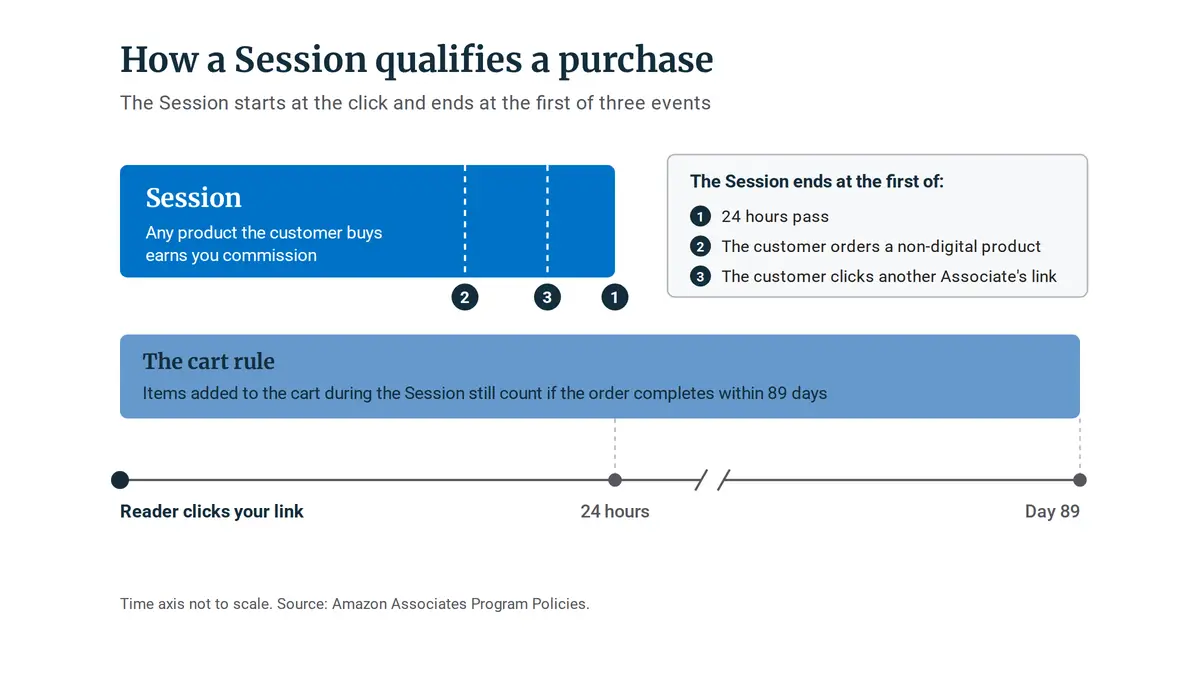
A click on your link opens what Amazon calls a Session. Any product the customer buys during it earns you commission, not only the one you linked. Items added to the cart in that Session still count if the order completes within 89 days. The Session ends early if the customer orders a physical product or clicks another Associate’s link.
Here’s the full rule, as the Amazon Associates Program Policies set it out. The Session starts at the click and ends at the first of three events:
- 24 hours pass. This is the window everyone quotes, and it’s the longest a Session can run.
- The customer orders a non-digital product. One physical order closes the Session, even if it happens ten minutes after the click.
- The customer clicks another Associate’s link. Your Session ends right there, however much time was left on it.
Now the generous part. A purchase inside the Session qualifies whether or not it’s the product you linked. That’s why people see commission on items they never mentioned: a reader clicks through for a stand mixer, doesn’t buy it, and picks up a phone charger instead.
Then there’s the cart rule. If the customer adds an item to their cart during the Session, that item still qualifies as long as the order completes no later than 89 days after the original click. Someone who adds a tent to the cart on your click and checks out six weeks later can still earn you commission on it.
One newer rule sits on top of all this. Under the policy update effective April 14, 2026, a purchase only qualifies if, within 180 days of the purchase, the product has been shipped, streamed or downloaded, and paid for. Keep that 180 days separate in your head from the 180 days in the next section. They’re two different rules that happen to share a number.
“But Amazon converts so well.” You’ll read that everywhere, usually with a conversion percentage attached and no source behind it. I won’t quote one. What I can point to is the mechanism: shoppers already trust the checkout, so you never have to sell them on the store, the Session pays on the whole cart rather than one item, and the 89-day cart rule catches people who add now and order later.
So the window is short, and one click on someone else’s link ends it. But while it’s open, it pays on everything. Whether that works for you depends on one thing: do your posts reach people when they’re ready to buy?
The Three-Sale Review, and Why When You Apply Matters
This is the part of the contract I’d weigh most heavily before signing up, and it’s the one the beginner checklists leave out.
Amazon reviews a new Associates account only after it drives three qualifying sales within its first 180 days. Your own orders don’t count toward it, as Amazon’s Application Review Process page notes. The Program Policies also bar you from asking friends, relatives or employees to buy through your links.
Amazon also gives a rule of thumb for the site itself: at least 10 posts of original content, content generally published within the last 60 days, and a site you own. The April 14, 2026 update defines original content as content with commentary, analysis or transformation. In plain terms, a page that only repeats the product listing isn’t what they’re asking for.
Social pages can qualify too. The accepted networks are Facebook (not personal pages), Instagram, Twitter, YouTube, TikTok and Twitch, generally with at least 500 organic followers. And one detail worth knowing before you click apply: Amazon states it can’t reassess an application once it has been rejected.
Now set that rule next to how a new site actually grows. A new domain worked at a part-time pace usually sees its first consistent commissions somewhere in months 6 to 12, and here’s what a realistic first-year traffic curve looks like if you want the full picture. Open your account on day one, and the 180-day clock starts before the traffic that could beat it exists.
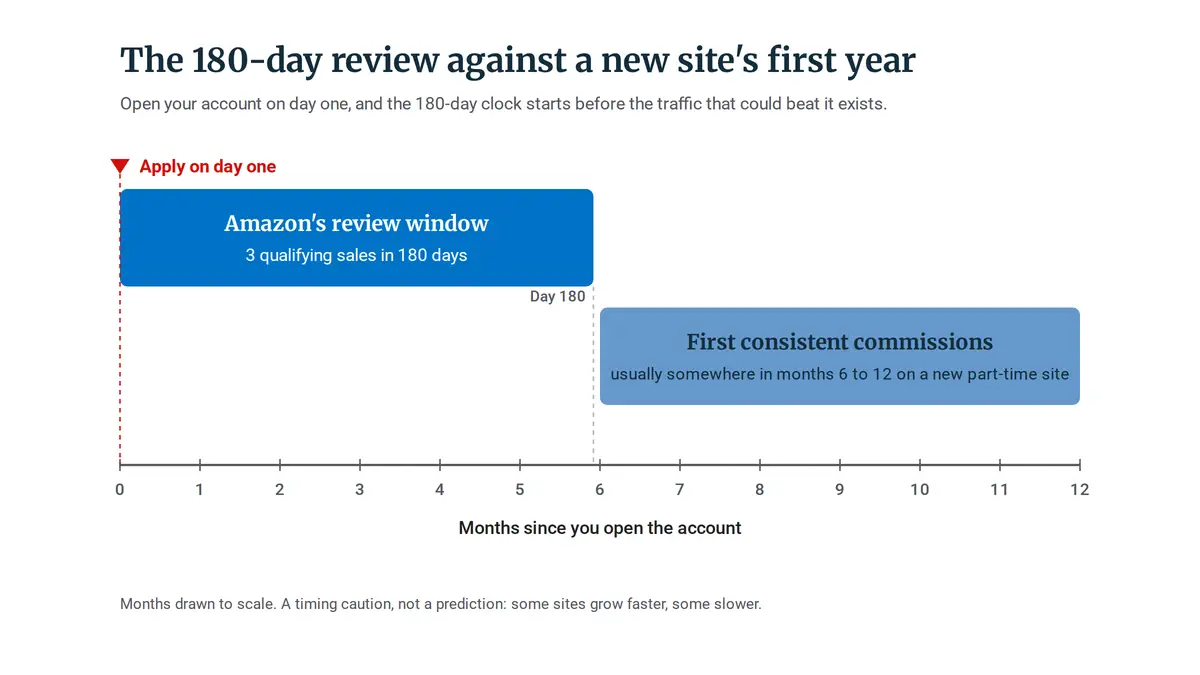
That isn’t a prediction about your site. Some sites grow faster, some slower. It’s a timing caution, and it’s the reason when you apply is a real decision rather than a box to tick on day one.
What happens if the 180 days run out with fewer than three sales? Amazon says the application can be withdrawn, and it can’t reinstate that account or its Associates ID. You can reapply once your site is established, but you start over with a new application.
“But everyone says start with Amazon.” They do, and they’re answering a different question. That advice is about which program to join. It says nothing about when, and on a new site, when is the part that decides whether your first application survives.
Getting through the review keeps the account open. The next set of rules decides whether it stays that way.
The Rules That Can Close Your Account and Cancel What You’ve Earned
What follows is the contract’s own terms, summarized in plain language, not legal advice.
Amazon treats any breach of its Participation Requirements as a material breach, which allows immediate termination and can cancel commission you’ve already earned.
The rules beginners are most likely to break cover showing prices or star ratings outside Amazon’s tools, hiding links, putting links in ebooks or print, sending unsolicited emails, running paid ads, and buying through their own links.
Where Your Links Can and Can’t Go
These are the placement rules, with what each one means for a small site. Amazon’s term for your tagged links is Special Links.
- Prices and availability. Don’t show them unless they’re served by Amazon’s link or pulled through the Creators API or PA API (Amazon’s tools for product data). A price typed into a post goes stale, and it’s also against the terms.
- Customer reviews and star ratings. Don’t display Amazon’s customer reviews or star ratings unless you obtained them through the API. Copying the stars from a product page counts.
- Cloaking and shorteners. No cloaking or link shorteners that hide the fact that the link goes to Amazon. If you use a link plugin, check which link plugins handle Amazon’s cloaking rule before you switch on any redirect.
- Print, ebooks and offline. No Special Links in printed material, ebooks or offline promotion. A free ebook you offer as a signup incentive counts as an ebook.
- Email, SMS and social DMs. Allowed, but only when solicited, meaning the recipient opted in. If you’ve read that email links are banned outright, that information is out of date.
- Paid ads. Purchases referred through paid ads are disqualified. Since April 14, 2026, that covers any paid or boosted advertisement linking to Amazon, so boosting a post with an Amazon link in it falls under the rule.
- Incentives and price tracking. No rewards or incentives for using your links, and no price tracking features.
- Your own orders. Your purchases don’t qualify, and neither do purchases by friends, relatives, employees or business relations.
On top of these, the program requires this disclosure on your site: “As an Amazon Associate, I earn from qualifying purchases.”
What the Contract Lets Amazon Do
If a closed account worries you more than the low rates, that worry isn’t paranoia. It comes straight from the contract.
- Ending the agreement. Either side can end it with 7 days’ notice, with or without cause.
- Immediate termination. Amazon can end it immediately for a material breach, and any Participation Requirements violation counts as one. Other immediate triggers include failing to cure a problem within 7 days, potential liability, brand or reputation concerns, deceptive activity and tax collection concerns.
- Earned commission. On a violation, Amazon may permanently stop paying all commission income owed, whether or not it relates to the violation. A mistake on one post can cost you what the other posts earned.
- Changing the terms. Amazon can change the terms on two business days’ notice, and staying in the program counts as accepting them.
And it has used that power on rates before. Effective April 21, 2020, with about a week’s notice, furniture and home improvement fell from 8% to 3% and grocery from 5% to 1%. CNBC reported the cuts, and Amazon told CNBC that changing rates is standard industry practice.
So here’s the real trade. You get a checkout your reader already trusts, one you never have to sell. In exchange, you accept terms that can change, or end the account, with little recourse.
You now have every piece. Time to put them together for your own site.
Five Questions That Decide Whether Amazon Fits Your Site
Whether Amazon Associates is worth it depends on five things: the commission rate for what you sell, whether your posts reach buyers ready to purchase, whether your traffic can produce three sales in 180 days, whether better-paying direct programs exist in your niche, and how much risk you accept from terms that can change on short notice.
These are the filters I’d run on any site before deciding how much of it to build on Amazon.
- What commission rate applies to what your site sells? Open the statement, find the category for the product you link most, and multiply your typical price by that rate. If the answer is well under a dollar, you know which kind of cents problem you have.
- Do your posts reach people ready to buy, inside the Session? Reviews and comparisons catch readers close to a purchase, which is exactly when a 24-hour window pays. Informational posts mostly reach people who are still learning, and those visits mostly don’t convert inside a day.
- Can your traffic produce three qualifying sales in 180 days? Answer from where your traffic is today, not where you hope it will be in six months. If search traffic is still a trickle, the review clock is running against you.
- Do direct brand programs or affiliate networks exist in your niche that pay more or track longer? If the brands you write about run their own programs, Amazon becomes the comparison point rather than the default. Check before you fill every post with Amazon links.
- How much risk can you accept from terms Amazon can change on two business days’ notice? If one program carries most of your income, a single rate change or closure hits all of it at once. The more of your site depends on Amazon, the more that notice period matters.
Fallback Tag, Foundation, or Not Yet: The Verdict by Site Type
Here’s how those five questions play out for the three kinds of site most readers are building.
Site type
Rate reality
Session fit
Three-sale review
Verdict
Education or software site
4 to 4.5% on books and devices, secondary income
Mostly informational content
Realistic once traffic builds
Fallback tag
Physical-product site
1 to 4.5% by category (most gear 3 to 4.5%, electronics and health lower)
Buyer-intent reviews and comparisons
Realistic with steady search traffic
Build around it
Brand-new site
Rate matters less than traffic for now
Not enough traffic to test
Not yet
Wait to apply
Education or software site
Rate reality: 4 to 4.5% on books and devices, secondary income
Session fit: Mostly informational content
Three-sale review: Realistic once traffic builds
Verdict: Fallback tag
Physical-product site
Rate reality: 1 to 4.5% by category (most gear 3 to 4.5%, electronics and health lower)
Session fit: Buyer-intent reviews and comparisons
Three-sale review: Realistic with steady search traffic
Verdict: Build around it
Brand-new site
Rate reality: Rate matters less than traffic for now
Session fit: Not enough traffic to test
Three-sale review: Not yet
Verdict: Wait to apply
Keep It as a Fallback Tag: Education, Software and Service Sites
If your site teaches a skill, reviews software or sells a service, this is most likely you. Amazon covers the books, gear and physical items you mention in passing, while your main income comes from programs that pay more on what you actually recommend.
Keeping Amazon as a fallback doesn’t mean treating those links carelessly. If they sit inside product reviews, the job is to write product reviews readers actually trust, with the Amazon link as the convenience, not the pitch.
This isn’t for you if your site never mentions a physical product. In that case, the account adds rules to follow and very little to earn.
Build Around It: Physical-Product Sites With Buyer Traffic
Amazon can be the base when your site covers physical products, publishes buyer-intent content, and has the traffic to clear the review. This is where whole-cart commission and near-universal product coverage matter most, because nearly everything your reader might buy is on one checkout.
The deciding skill here isn’t picking products. It’s knowing how to check whether a keyword has buyer intent before you write, because purchase-intent content is what decides whether a Session ever converts.
Even here, go in with eyes open. Everything in the section on account rules applies to you more than anyone, because more of your income sits on terms that can change in two business days.
Where a brand you cover runs its own program that pays more or tracks longer, it’s worth comparing before you default to Amazon. This path doesn’t fit a product site built mostly on informational posts, since those readers rarely buy inside the Session.
Wait to Apply: Brand-New Sites Still Building Traffic
If your site is new and search traffic hasn’t started yet, consider holding the application until three sales in 180 days is realistic. One practical signal, a rule of thumb rather than anything Amazon sets: your review and comparison posts are getting search clicks every week in Search Console.
Build the content first. Those same posts are what Amazon’s rule of thumb asks for anyway: original content, published recently, on a site you own.
Waiting doesn’t cost you much, because commission at low traffic is small either way. What it saves you is a withdrawn application and a restart, since an account opened too early starts a clock your traffic can’t beat yet. This isn’t the right call if you already have steady buyer-intent traffic, because then there’s no reason to hold back.
And if reading this has shifted your question from “which program?” to “how do I build the traffic?”, that’s the right shift. The program was never the bottleneck. If you want the training and the workflow I use to build that traffic, read my full Wealthy Affiliate review.
Before you add another Amazon link to your site, do one thing. Open the statement linked in the first section, find the category for the product you link most, and run the arithmetic on its typical price.
That one number tells you whether you’re looking at a traffic problem or a ceiling, and which of the three calls fits your site.
What kind of site are you building, and which part of the terms caught you out: the 24-hour window, the three-sale review, or a rule you weren’t sure you were breaking? Tell me in the comments. I read every one, and I reply.

Sonia Zannoni
Hi, I’m Sonia Zannoni, creator of Click to Prosper. I share practical tools, workflows, and honest guidance to help you build an online business with more clarity and less chaos.
About Sonia

Feeling stuck between too many tools and too much advice? Start with the beginner path.
View the Blueprint