

How to Write a Post That an AI Answer Cannot Replace

Affiliate Disclosure: This post contains affiliate links. If you purchase through one of my links, I may earn a commission at no additional cost to you. Read the full Affiliate Disclosure for details.
You type one of your own target questions into Google, and an AI answer settles it in four lines. It makes the same points your post makes, in roughly the same order. Then Google Search Console, the free tool that reports how your site does in search, shows you what that looks like from your side: impressions (the times your post appeared in results) holding steady while clicks drift down.
If you’ve gone looking for advice on writing blog posts AI can’t replace, you’ve probably noticed it contradicts itself. Stop writing explainers. Write longer ones. Reformat everything into answer blocks. Most of it also assumes a content team with a budget for surveys and expert interviews, so feeling stuck here is completely reasonable.
What you actually want to know is smaller and more practical: what goes in the next section you write, so it isn’t the part an AI answer lifts.
You’ll get a check to run on each section before drafting it, where the material comes from on a new site with a few evenings a week, and an honest word on the sections that’ll get summarized anyway, so you know where your time goes.
TL;DR: Writing Blog Posts AI Can’t Replace
Why an AI Answer Can Use Your Post Without Sending You the Click
If part of you is wondering whether it’s still worth writing posts at all, that’s a fair doubt, and why blogging still works answers it properly. This post picks up from there, with what goes inside the sections you write.
Start with how the answer gets built. Google says its generative features ground their answers in pages its core ranking systems retrieve, often through something it calls query fan-out: the AI runs several related searches on its own to gather more pages.
Google doesn’t say how the answer decides what to state. What you can see for yourself is that a point every one of those pages makes is one the answer can state in full, so nobody needs to click through to any of them, yours included.
A Pew Research Center study tracked 68,879 Google searches by 900 U.S. adults in March 2025 and published the results in July 2025. When an AI summary appeared, people clicked a traditional result on 8% of visits, against 15% without one, and clicked a link inside the summary on 1%.
Summaries showed up on 60% of searches that began with a question word such as who, what, when or why, and on 53% of searches of 10 or more words, against 8% of one- or two-word searches.
Those numbers come from one month, and they’ll shift as Google changes things. What matters for your drafting is the pattern. Definitional and question-style sections are going to be summarized, and nothing in this post will stop that. So the useful question is which of your sections are worth your evenings.
Most of the advice out there answers that by changing how you format. Google’s own documentation answers it differently.
Most AI Search Advice Says Format for Extraction. Google’s Own Guide Says Otherwise
What most guides say is that you should write for the machine. Break your content into self-contained answer blocks of 40 to 60 words, chop everything into small chunks, and keep the tone neutral so any piece can be lifted cleanly into an AI answer.
Google’s guide to its generative AI features, last updated 10 July 2026, doesn’t ask for any of that. It says there’s no requirement to break content into small pieces, no ideal page length, and no special way of writing for AI. Google Search ignores AI-specific text files, and no structured data is needed for generative AI search.
What the guide does name is content people find unique, compelling and useful. Google says that kind of content will likely influence your presence in generative AI search more than any other suggestion in the guide.
Google draws the line between commodity and non-commodity content. Commodity content is what anyone could assemble from what’s already published. Non-commodity content goes past common knowledge, usually because it comes from someone’s own experience. Google’s example sets generic tips for first-time homebuyers against a first-hand account of waiving an inspection and looking inside the sewer line.
On an affiliate site, the commodity version is the standard “what is keyword difficulty” section: a definition, a scale, a tip to aim low. Every result on page one has it. The non-commodity version is the keyword you dropped after checking its results page, and why. Maybe page one was already settled by an AI answer and three big sites, and you decided your post had nothing new to add.
So what decides whether a section is worth a visit isn’t its format, it’s whether anyone else could have written it.
That doesn’t mean you should rip out your headings or bury your direct answers. Clear structure still helps the person reading on the page, and they’re the one you wrote it for.
The predictable pushback is that answer blocks are what get cited. Some of them probably are. Being easy to quote still isn’t the same as earning the click, though. A block written to be lifted whole hands the AI everything it needs and leaves the reader nothing to come over for.
None of this is a case against AI tools, either. You’ll use them in this very workflow. The problem is the commodity section, whoever or whatever writes it.
The Check to Run on Every Section Before You Draft It
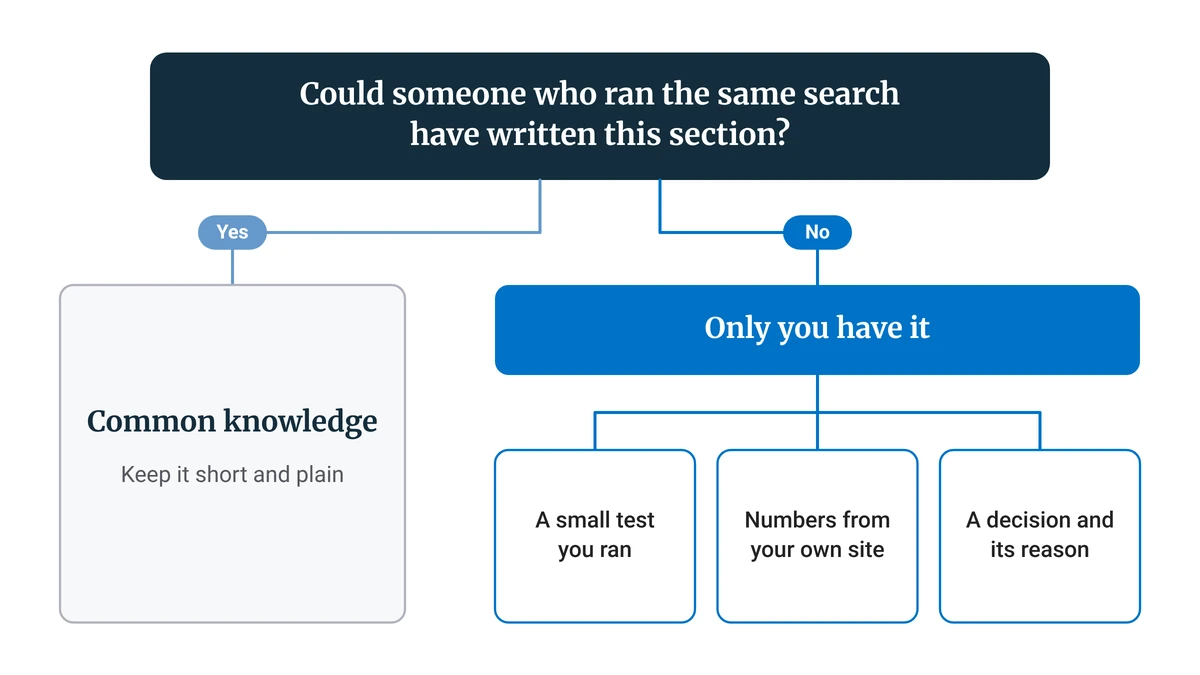
Here’s the question I’d ask of every heading before writing a word under it: could someone who ran the same search have written this section? If the answer is yes, it’s common knowledge, so keep it short and plain. If the answer is no, it carries something only you have, and that’s where your drafting time goes.
The decision starts earlier than the draft. When you’re outlining with AI before the draft, you’re already choosing headings, and that’s the moment to mark which ones will need first-hand material.
To answer the question honestly, you need to see what’s already out there. Look at the results page for your keyword, including whether an AI answer already resolves the question, and note what the top five results all say. It’s the same habit as checking search intent, with one extra question at the end. Anything on that list of shared points is common knowledge by definition.
Google’s own people-first content questions point the same way. Among them, it asks whether the content provides original information, reporting, research or analysis, whether it offers substantial value compared with other pages in the search results, and whether it clearly demonstrates first-hand expertise. The section check is a way of asking those questions one heading at a time.
Picture the heading list for an ordinary beginner post on choosing a first keyword, with each heading marked:
- What a target keyword is: anyone. Every result defines it, so it gets a short paragraph.
- Why low competition matters on a new site: anyone. Useful context, kept brief.
- How to judge competition from the results page: mostly anyone, unless you show the results page you actually judged.
- The keywords you shortlisted and the one you dropped: only me. Material: the results page that made you drop it, and your reason.
- Which free tool you used to check, and where it ran out: only me. Material: the point where the free version stopped being enough for your niche.
Under each “only me” heading, you write one line naming the material it will carry before you draft anything. In this example that’s two out of five, and the split will change from post to post. The three “anyone” sections stay short, and your writing time goes to the other two.
What Counts as First-Hand Material When Your Site Is Brand New
“I’m a beginner. I have no data and no experience.” That’s a fair objection, and it comes straight from the advice itself. Most guides on first-hand content assume surveys, expert interviews and proprietary data, and a new site with a few evenings a week has none of those. It does have three kinds of material no other page can copy.
A Small Test You Ran
A test doesn’t need a lab. Comparing two versions of something, checking exactly where a free tier stops, or timing how long a workflow step really took you all count. So does a product you’d only partly recommend, because the part you wouldn’t recommend is the detail no sales page will give the reader.
Say you’re writing about free tools for making blog images. Every result lists the same handful. You make one image in each, note which free versions add a watermark or cap your downloads, and write down the one you’d actually keep using. That paragraph exists nowhere else.
What didn’t work counts too. If a free tool turned out to be useless for your niche, that’s a finding, and it’s often the most useful line in the section. Reviews are where this kind of material carries the most weight, and the method for writing an honest product review shows how to build a whole post around it.
Numbers From Your Own Site, at Any Size
Your Search Console holds numbers no other site has: the queries people actually typed to find a post, how many impressions it’s getting, and whether clicks are falling while impressions hold. If you’re not sure where to look, the Search Console reports worth checking as a beginner are a good place to start.
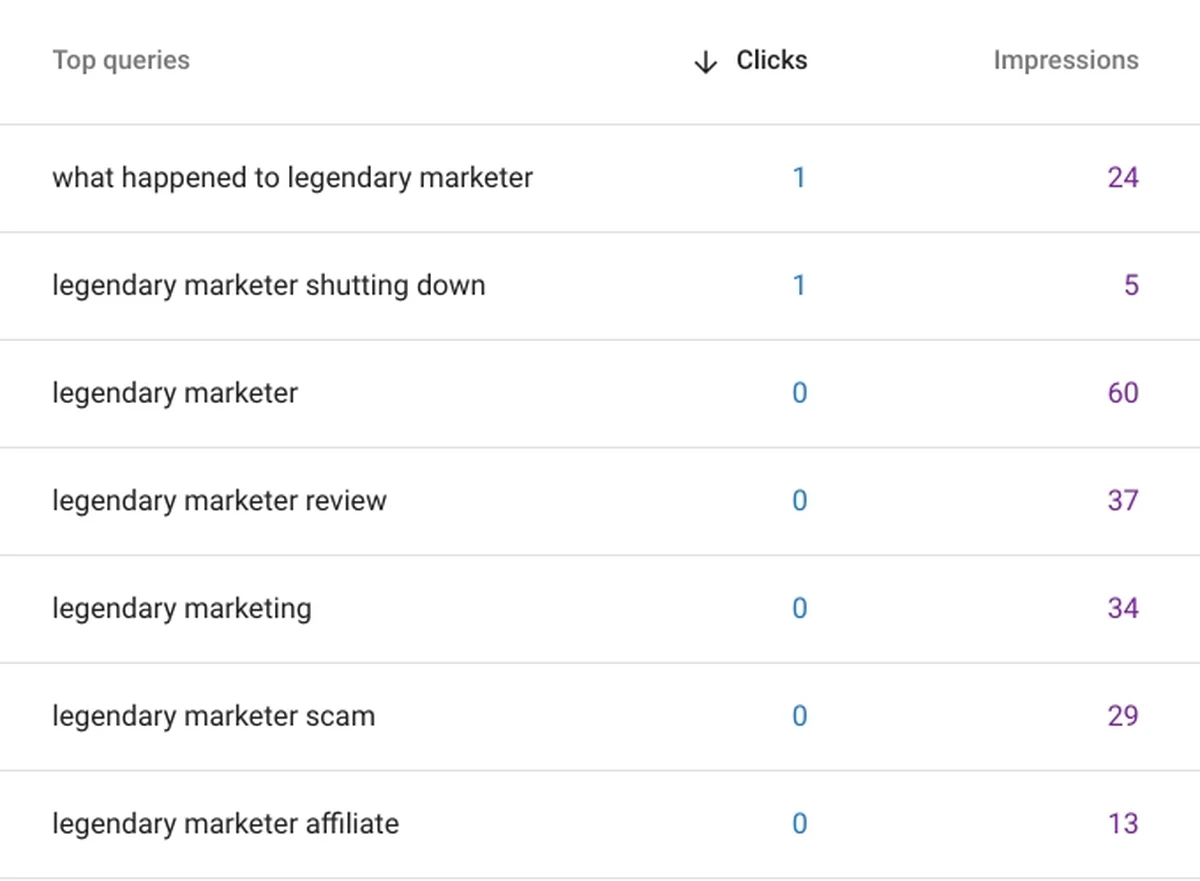
Small numbers still count, because no other site has them. A line like “the query bringing this post most of its impressions isn’t the keyword I targeted” is first-hand material at any traffic level, and it tells the reader something the AI answer can’t.
Google says traffic from its AI features is counted in the Search Console Performance report under the Web search type, and its AI features guide also names a Generative AI performance report. So the numbers you’d want to watch for this are already in the tool you have.
A Decision and the Reason Behind It
This is the one people overlook. What you chose, what you skipped and why are all first-hand material, for example:
- A keyword you dropped after seeing its results page, and what on that page made you drop it.
- A free tool you picked over a paid one, and what tipped the choice for a site your size.
- A section you cut from your outline because every result already covered it well.
A decision with its reason is first-hand even at zero traffic, because nobody else made that call for your site. It’s also the easiest of the three to start with tonight.
How Much of a Post Needs First-Hand Material
It depends on the post type. A review needs first-hand material in most sections, a tutorial needs it in the steps where readers’ choices differ from the default, and an explainer may only need it in one or two sections.
This table shows where that material usually sits for the common post types, and what can stay short:
Post type
Where first-hand material usually sits
What can stay short
Product review
Most sections: the testing, who it suits, the tradeoffs
What the product is and its specs
Tutorial or workflow
The steps where your setup or choices differ from the default
What the tool is and why the step exists
Explainer
One or two sections carrying your example or decision
The definition and background
Comparison
The criteria, and which option you’d pick for whom
The feature lists
Product review
Where first-hand material usually sits: Most sections: the testing, who it suits, the tradeoffs
What can stay short: What the product is and its specs
Tutorial or workflow
Where first-hand material usually sits: The steps where your setup or choices differ from the default
What can stay short: What the tool is and why the step exists
Explainer
Where first-hand material usually sits: One or two sections carrying your example or decision
What can stay short: The definition and background
Comparison
Where first-hand material usually sits: The criteria, and which option you’d pick for whom
What can stay short: The feature lists
If you’ve started to believe informational posts are finished and only reviews are still worth writing, look at it section by section instead. An explainer with even one section only its writer could fill still gives the reader a reason to visit, whatever the topic.
Definitional content still has a job, by the way. It helps the reader on the page even when it won’t earn the click, so keep it, and keep it short.
With limited evenings, this split is also a time decision. Let an AI drafting tool handle the short common-knowledge parts, and spend your own time on the sections only you can fill. If you’d rather keep those drafting tools in one place, that’s one of the things I look at in my full Wealthy Affiliate review.
Drafting the Sections Only You Can Write
Once you know which sections are yours, the order of work matters. In each “only me” section, write the first-hand part first, in plain words, before any AI fills in the rest of the post.
Put the specific thing near the start of its section: the result, the number, or the decision and its reason. It’s the part no other page in the results can supply, so the reader should meet it early rather than three paragraphs down.
Then let AI draft the short common-knowledge sections from your outline, and keep them brief. Their job is to give the reader enough context to follow the parts you wrote.
When the whole draft exists, stop drafting. The voice pass and cleanup are a separate step, and editing AI content picks up exactly there.
So take the next post on your list and run the check on its headings before you write a word. Mark each one “anyone” or “only me”, and write one line under every “only me” heading naming what it’ll carry. Some of those sections will still get summarized, and that’s fine, because you’ll have put your time into the ones that give a reader a reason to come over.
If you’d like to try this workflow inside Wealthy Affiliate, you can start with a free account and run the check on your first post there.
Which section of your current draft failed the “could anyone have written this” check? Or, if your site still gets very little traffic, what first-hand material did you find anyway? Tell me in the comments. I read and reply to every one.

Sonia Zannoni
Hi, I’m Sonia Zannoni, creator of Click to Prosper. I share practical tools, workflows, and honest guidance to help you build an online business with more clarity and less chaos.
About Sonia

Feeling stuck between too many tools and too much advice? Start with the beginner path.
View the Blueprint