
How to Edit AI Content So It Sounds Like You

There’s a mistake that derails most side-hustlers the moment they start editing AI content for the first time. They paste the raw draft into an automated “humanizer” tool and expect it to come out sounding like them, or they spend the rest of their evening rewriting every sentence by hand. The first approach produces content that sounds like a machine cleaned it. The second turns a time-saving tool into a new chore.
If you’ve opened a 2,000-word AI draft and felt that immediate drop in energy because it reads like a clinical textbook, you’re not imagining it. The writing isn’t broken. It’s just not yours. Generative models write by picking the most likely next word, not by thinking through your reader’s specific situation, and the result is a polished, even-toned draft with no friction and no personality.
The fix isn’t a full rewrite, and it isn’t an AI detector score. It’s a 3-step triage process: strip the robotic markers, inject your actual perspective, and run a quick voice check. This tutorial walks through each step so you finish with a draft that sounds like you wrote it, without losing your evening.
TL;DR: Editing AI Content
Why Raw AI Drafts Stiffen Up (And Why It Costs You, Readers)
Every AI draft shares the same structural problem, and it’s built into how these models work.
Generative tools write by predicting the most statistically likely next word given what came before it. That process sounds efficient until you see the output at scale: uniform sentence lengths, the same transition patterns cycling every few paragraphs, and a smooth, even tone that reads like it was written for a textbook rather than for someone with a real problem to solve. The writing is technically correct. It just has no pulse.
The reader doesn’t consciously recognize these patterns. They feel them. Something in the prose reads as impersonal, like a company memo rather than advice from someone who has actually done the work. That feeling is what triggers the bounce.
This pattern isn’t just a subjective feeling. Industry analyses of AI writing at scale, including Jasper’s editorial guide on editing AI content, point out that repetitive sentence structures and uniform transition sequences signal to readers that the content wasn’t written for them specifically. The authority drops. The trust erodes. What’s left is a draft that passes a quick skim but doesn’t hold attention, and that’s the problem editing AI content actually solves.
The 3-Step Content Triage: A Feasible Evening Editing Workflow
The standard advice for editing AI content is to rewrite the parts that feel robotic. That advice collapses at scale. Rewriting everything is just writing, and it takes the same amount of time you were trying to save.
The better frame is triage. Medical triage doesn’t treat everything equally. It identifies what’s critical, what can wait, and what’s already fine. Content triage works the same way.
Most of a raw AI draft is structurally sound. The problem sections are predictable: the intro, the transitions, and the moments where the draft drops into corporate-speak when it should be talking directly to a person. Triage lets you target those sections without touching everything else.
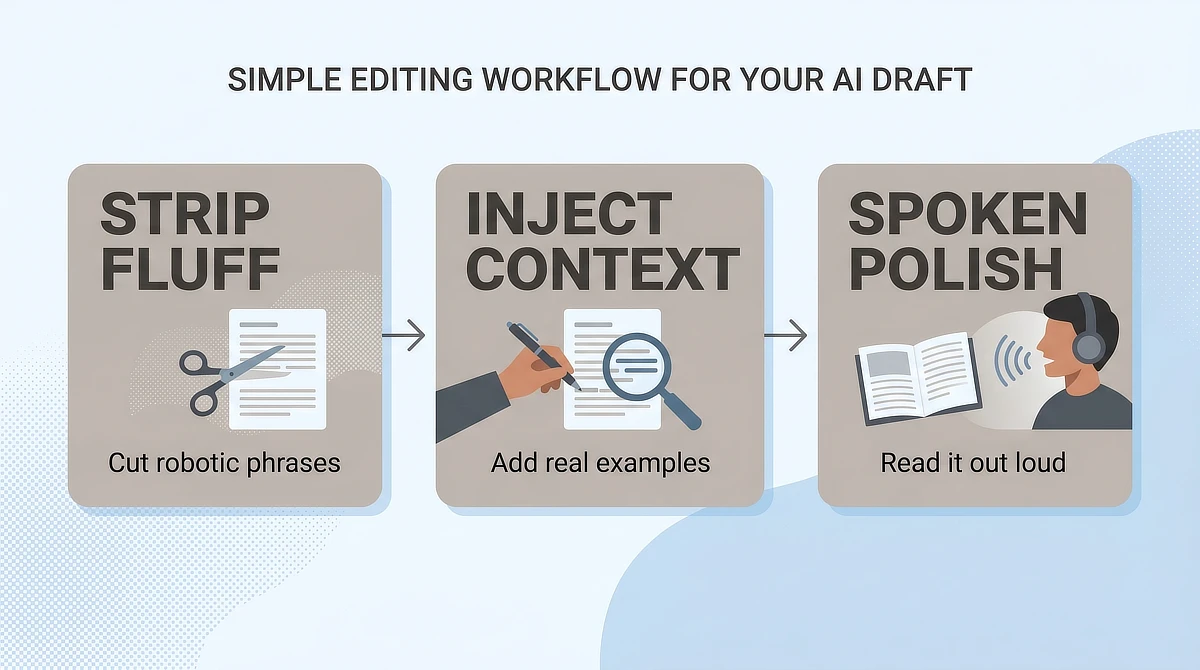
Here’s how the process breaks into three steps you can run in a single editing session:
- Step 1: Strip. Remove the generic phrases, hollow transitions, and structural clichés that mark the draft as automated. This is a deletion pass, not a rewriting pass. You’re cutting, not replacing.
- Step 2: Inject. Add your actual perspective: specific examples, concrete numbers, short workflow observations from your own experience with the topic. This is where your expertise goes in.
- Step 3: Polish. Read it out loud, or run it through a text-to-speech reader. Anything that sounds unnatural gets a quick fix. Sentence rhythm is the target, not perfection.
Tools like AI Author (Wealthy Affiliate’s integrated drafting assistant), Claude, or ChatGPT work well as raw-draft engines when you treat them exactly that way: engines, not authors. The draft is the starting point. You are still the one who decides what stays, what goes, and what sounds like a person worth trusting.
Step 1: Strip the AI Veneer (Removing Generic Phrasing and Clichés)
The deletion pass is the fastest part of this workflow, and it has the most visible impact on the final draft.
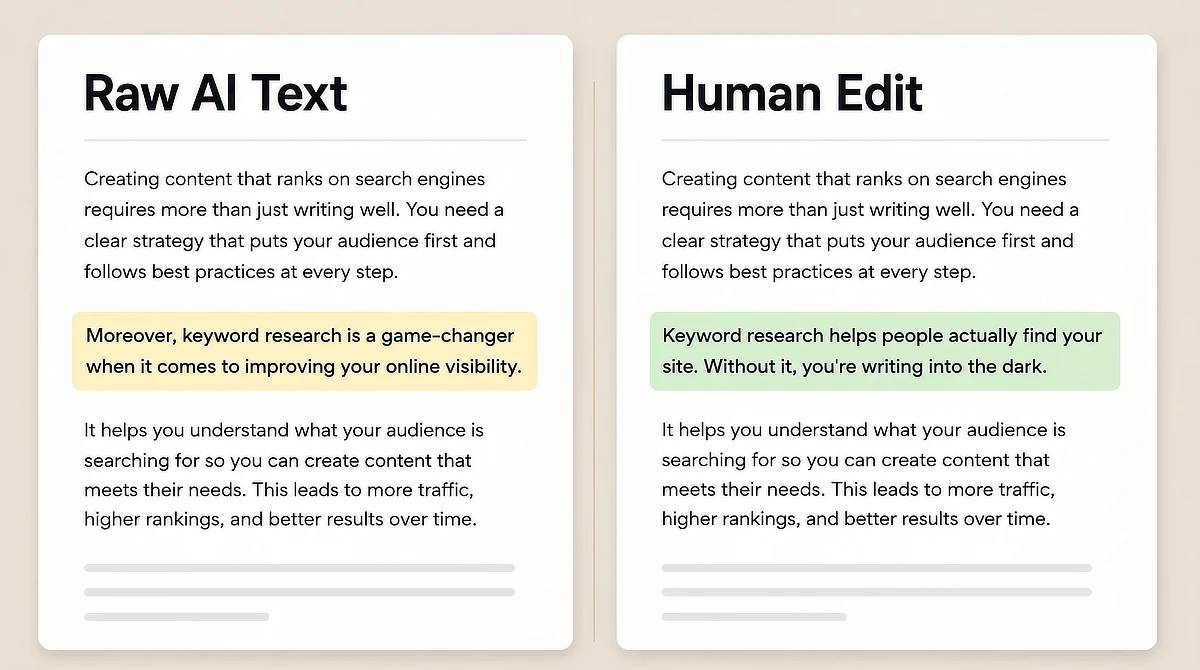
Start by reading the draft line by line with one question: would a real person actually say this out loud? The phrases that fail that test are usually the same across every AI draft. Transitions like “moreover” and “furthermore.” Intros like “in today’s digital landscape” and “it is important to note that.” Marketing phrases like “game-changer” and “unlock the secrets.” Delete all of them.
They add length without adding meaning, and they’re the clearest signal to a reader that this content wasn’t written specifically for them. Every one of those phrases is a place where the model defaulted to the predictable path, and your editing pass is what catches it.
Review drafts get the worst of it, because the model has read a million sales pages and assumes that is what a review should sound like. Stripping that tone out of a product review means replacing each adjective with the specific thing it was standing in for, not just deleting it.
If you find yourself sliding back into robotic phrasing, keep a digital sticky note on your desktop with your own “Blacklisted Words.” Add phrases like furthermore, tapestry, or in today’s digital landscape as you catch them so you have a quick reference sheet during your Tuesday-night edits.
After clearing the transition clutter, look at sentence structure. AI drafts default to long, multi-clause sentences packed with more subordinate information than any reader wants to process at once. Break them at the point where the meaning stops, and the scaffolding begins.
The table below shows the pattern directly, with examples of typical AI sentence structures alongside cleaner, peer-to-peer alternatives.
Raw AI Sentence Pattern
What It Signals to the Reader
Human Spoken Alternative
“Moreover, it is important to note that keyword research is a game-changer when it comes to search optimization.”
Automated filler, low trust
“Keyword research is what determines whether anyone finds your site. Without it, you’re writing for no one.”
“In today’s digital landscape, content creators must leverage cutting-edge tools to ensure maximum visibility.”
Generic, could appear on any site
“The tools have improved. The strategy hasn’t changed: write for a specific person with a specific problem.”
“Furthermore, one should consider the multifaceted implications of niche selection prior to committing to a topic area.”
Corporate jargon, reader disconnects
“Pick a niche before you write a single word. Changing it later costs you months.”
“It is worth mentioning that building a sustainable online business requires a comprehensive approach to content strategy.”
Padding with no practical value
“A content strategy isn’t a document. It’s a decision about what you’ll write and who it’s for.”
“Moreover, it is important to note that keyword research is a game-changer when it comes to search optimization.”
What It Signals to the Reader: Automated filler, low trust
Human Spoken Alternative: “Keyword research is what determines whether anyone finds your site. Without it, you’re writing for no one.”
“In today’s digital landscape, content creators must leverage cutting-edge tools to ensure maximum visibility.”
What It Signals to the Reader: Generic, could appear on any site
Human Spoken Alternative: “The tools have improved. The strategy hasn’t changed: write for a specific person with a specific problem.”
“Furthermore, one should consider the multifaceted implications of niche selection prior to committing to a topic area.”
What It Signals to the Reader: Corporate jargon, reader disconnects
Human Spoken Alternative: “Pick a niche before you write a single word. Changing it later costs you months.”
“It is worth mentioning that building a sustainable online business requires a comprehensive approach to content strategy.”
What It Signals to the Reader: Padding with no practical value
Human Spoken Alternative: “A content strategy isn’t a document. It’s a decision about what you’ll write and who it’s for.”
The goal of this pass isn’t to rewrite. It’s to expose the skeleton underneath. Once the hollow phrases are gone, you can see exactly what the draft is actually saying, which sentences carry real weight, and which ones are just taking up space.
Step 2: Inject Your Expertise (Adding Specific Examples and Context)
After the deletion pass, the draft is leaner but probably still generic. The statements are broadly true, but they could have been written about any topic in any niche. That’s the gap this step fills.
Look at each remaining claim and ask one question: what specifically is true about this for the reader this post is written for? Not “keyword research is important” in the abstract, but “a 5-keyword shortlist built around one core search problem is more useful in your first three months than a full content calendar.” The second version has actual information in it. The first version is just a statement.
This is where topic familiarity pays off directly. When you’re picking a topic you can write about naturally and editing AI content on a subject you actually know, the examples are already in your head. You know which specific scenario the reader is probably stuck in. You know what the common mistake looks like in practice.
If the injecting step feels slow, that’s usually a signal about the topic, not the editing process. When you know the subject well, adding one concrete workflow observation per section takes under two minutes. This is exactly why picking a topic you can write about naturally matters: your raw material is already close to the surface.
Modern search engines are oriented around what the SEO community calls information gain: original content that adds something the reader can’t find in the existing top ten results. Every concrete example you inject is a piece of that. Generative tools can’t produce information gain because they’re synthesizing what already exists.
That’s your competitive edge. Not writing faster. Knowing things a model doesn’t.
Step 3: Polish for the Human Ear (The Spoken-Voice Read-Aloud Check)
The deletion pass strips the surface noise. The injection step adds substance. This step fixes the rhythm.
Rhythm is the hardest thing to edit by eye because you instinctively read your own writing the way you intended it to sound, not the way it reads on the page. A text-to-speech reader solves this. Paste your draft into your phone’s accessibility reader or use any free browser extension, and listen while it reads back.
Most operating systems have this built-in. On a Mac, you can enable “Speak selection” under System Settings > Accessibility > Read & Speak (or Spoken Content), select your text, and press the Option + Esc keys to hear it read. On Windows, you can open your draft in Microsoft Edge and use the built-in “Read Aloud” reader.
You’ll catch the problems within the first paragraph. Sentences that are technically correct but too long to say comfortably out loud. Sections where every sentence lands with the same beat, the same length, the same structure. Those are the robotic markers that survive the deletion pass because they don’t look like clichés on the page; they just sound like them when spoken.
The fix is rhythm variation. A short sentence carries more weight when it follows a longer one. “Most people quit by month three. Not because they’re bad at this. Because they expected results by month two, and the math doesn’t work that way.” That’s one idea delivered with intentional pace. You can apply the same structure anywhere the draft starts to read flat.
Apply the spoken check most aggressively on the introduction, section transitions, and the final sentence of each subheading (H2). Those are the places where AI drafts are most likely to stiffen into connective filler. “In the next section, we will explore…” doesn’t need to be there. Just start the next section.
Preserving Human Judgment (Why You Should Skip AI Detector Obsession)
At some point in the editing process, most side-hustlers stop and ask: should I run this through an AI detector to make sure it passes?
The short answer is no. Not because AI detectors don’t work, but because what they’re testing isn’t what matters. AI detectors look for statistical patterns that correlate with automated text. When you’ve done the triage pass correctly, those patterns are already gone, and even when they’re not, you’re optimizing for the wrong reader.
The detector isn’t buying anything from you. It isn’t sharing your post. It isn’t coming back next week.
There’s also a practical problem with detector obsession: these tools sometimes penalize certain kinds of human writing. Short, clear, confident sentences can register as “likely AI-generated” because the sentence structure is clean. Longer, more complex human writing sometimes passes because it matches the statistical profile of older training data. The score tells you something about the text’s statistical makeup, not its quality or its usefulness to an actual reader.
The final check on any piece of content is one question: does this actually answer what the reader came here to find? Not the detector score. Not the keyword density. Does it solve a specific problem for a specific person? If yes, publish it. If no, no score is going to fix that.
Building Long-Term Search Trust in an Automated World
The side-hustler’s edge in content has never been raw output volume. It’s always been perspective.
Search engines are getting better at filtering content that genuinely helps from content that technically answers a query but adds nothing new. That distinction matters more as AI content volume grows. The sites that survive algorithm updates are the ones where real editorial decisions are being made about what to say and who the content is actually for. A triage workflow doesn’t replace that judgment. It keeps it in the process.
Manual editing is your moat. It’s slow enough to be a barrier for pure content farms, but fast enough with a working system to fit a real side-hustle schedule. Every post you publish that sounds like a person wrote it is an asset that compounds over time. That compounding is why blogging still works for small publishers: consistent human perspective is hard to automate away.
One practical step for tone consistency as you scale is building a custom writing profile that captures your voice conventions, your recurring audience scenarios, and your flagged phrases. Wealthy Affiliate’s integrated content workspace includes a framework for this kind of systematic tone management. If you want to see how the platform handles custom writing profiles in detail, my full Wealthy Affiliate review walks through the workflow setup.
The triage system covered in this tutorial takes about 30 to 45 minutes per post with practice. That fits inside a real evening session without consuming the whole thing. The first few passes take longer because you’re building the habit of treating AI drafts as raw material rather than finished work. After a few posts, the pattern becomes automatic, and the draft that would have taken three hours to rewrite now takes 45 minutes to make yours.
What’s the biggest hurdle you face when trying to make AI drafts sound like you? Do you struggle with removing robotic transitions, or is it finding the right examples to inject? Let me know in the comments below. I read and answer every one.

Sonia Zannoni
Hi, I’m Sonia Zannoni, creator of Click to Prosper. I share practical tools, workflows, and honest guidance to help you build an online business with more clarity and less chaos.
About Sonia

Feeling stuck between too many tools and too much advice? Start with the beginner path.
View the Blueprint