How to Check Search Intent Before You Write a Single Word

You spend hours writing a detailed guide on a keyword your SEO tool promised was informational, and hit publish. Six months later, your traffic is a flat line of zero clicks. It is incredibly frustrating, and it is exactly why most side-hustlers quit. If you have hit this wall, you are not failing because of your writing quality. You are failing because your tool didn’t show you how to check search intent manually.
Two blog posts get published in the same week on nearly identical keywords. Both writers did keyword research and found similar search volumes. Six months later, one post is on page one. The other got zero traffic.
The difference has nothing to do with writing quality. One writer verified the actual live search engine results pages (SERPs) before drafting. The other trusted an outdated database label and wrote directly into a format Google had no interest in rewarding. This guide gives you the 10-minute verification routine that protects your writing time before you invest a single word in the wrong direction.
TL;DR: How to Check Search Intent
Why Automated SEO Tools Lie to You About Search Intent
Keyword software assigns intent labels using pattern-matching rules applied to historical query data. A tool might classify a keyword as “Informational” because, six months ago, that query returned a mix of articles and product pages. But Google’s live results shift constantly as user behavior changes, new pages earn authority, and algorithm updates refine how the search engine interprets a query’s purpose. The database your tool reads from is always behind.
This creates what I call the Software Misalignment trap. Your tool says “Informational,” so you draft a 2,000-word tutorial. Then you search the keyword yourself and find page one filled with product comparison widgets, sponsored shopping results, and retail grids. The tool was technically correct at some point. It just wasn’t correct today, when it matters.
For a side hustler working a limited number of hours per week, this mismatch is expensive. A wasted draft doesn’t just cost you the writing time. It costs you the research time, the editing time, and the week you spent expecting a post to gain traction. Manual intent verification is not optional; polish your layer on top of your keyword research. It is the insurance policy that protects every hour that comes after.
The 10-Minute Manual Reality Check (Your Live SERP Answer Key)
The single tool you need for this check costs nothing: a private or incognito browser window. Opening a private tab strips away your browsing history, your login cookies, and any geographic personalization Google has built up around your account. What you see in a private window is as close to a neutral, unbiased result as you can get from your location. That neutral view is the one that matters, because it reflects what a first-time searcher is actually seeing.
Type your target keyword into the search bar and press enter. Do not go straight to a keyword tool sidebar or browser extension.
Just look at the page. Google has already done the work of determining what content satisfies this query, and it shows you the answer in the live layout. The top ten organic results are your open-book exam.
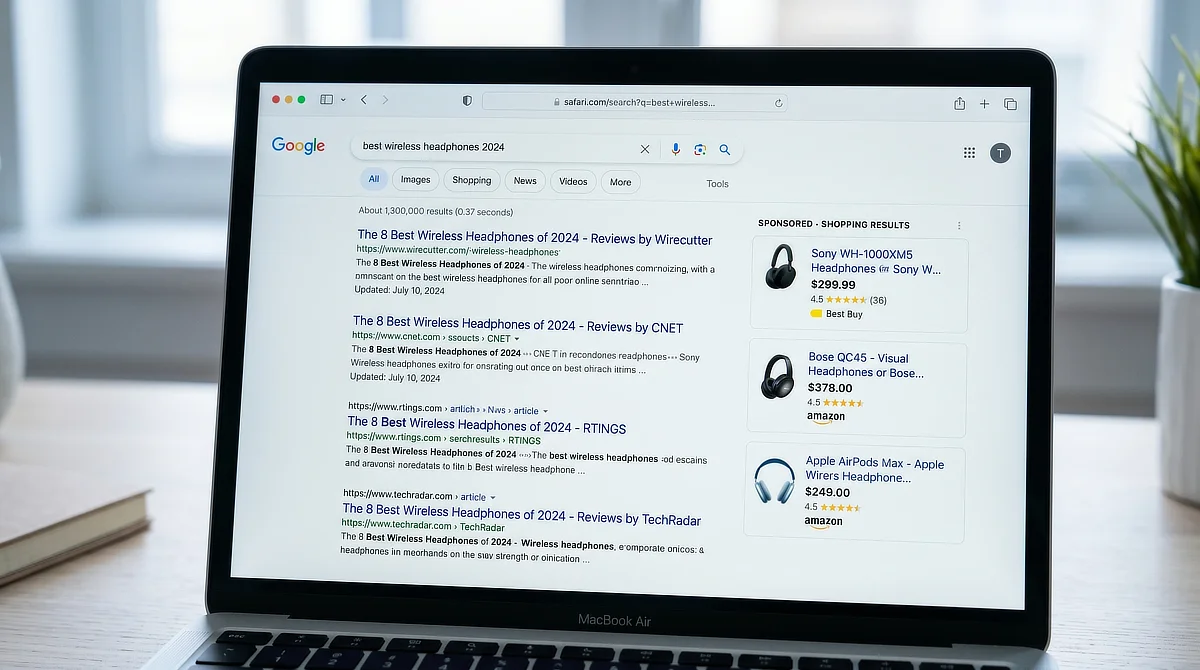
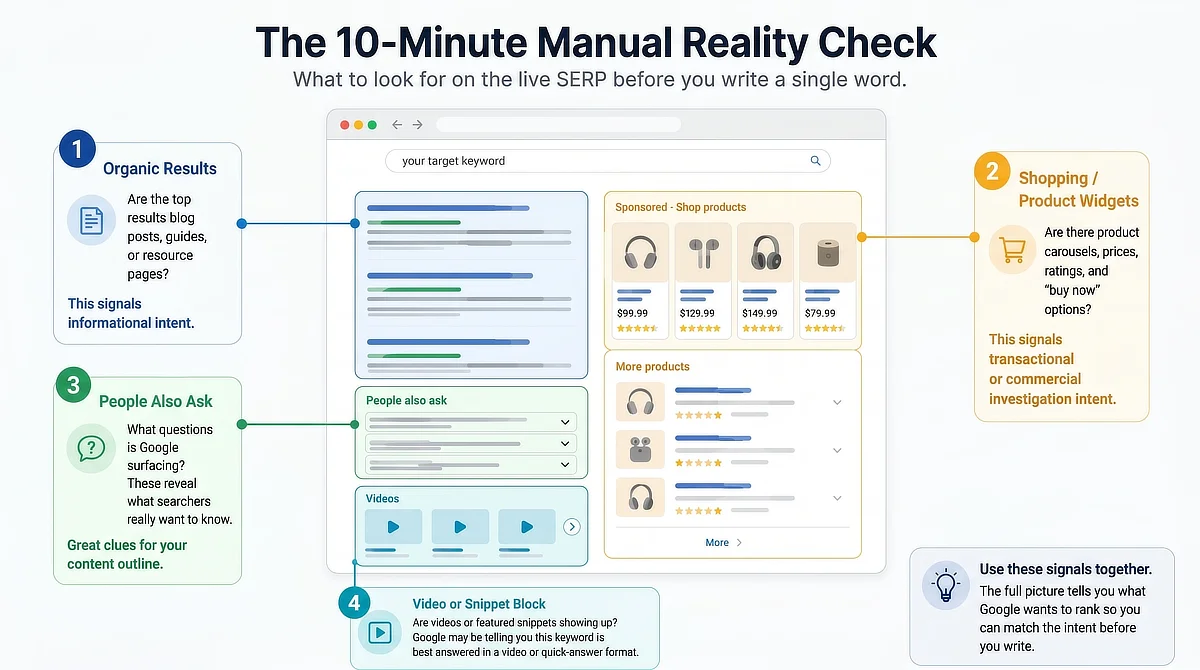
You don’t need to memorize academic definitions of the four intent types (Navigational, Informational, Transactional, Commercial Investigation) to do this effectively. What you need to spot are visual cues any reader can identify in under a minute.
Are the results mostly long-form articles with numbered list titles? Are they product pages with “Buy Now” buttons? Are there video thumbnails above the organic results? Each of those signals tells you what Google believes the searcher is trying to accomplish, and what format you need to match.
If your keyword selection process still feels uncertain, a fast, tool-agnostic keyword selection routine can help you lock down verified, rankable targets before you reach the intent check stage.
For context on why manual verification consistently outperforms automated assumptions, Google’s search quality evaluator guidelines are worth reading once. They establish that understanding the purpose behind a search is a core criterion for what earns visibility, which explains precisely why a database-assigned label and a live search result can tell you completely different things.
How to Spot the “Ecommerce Wall” Before You Write a Word
The Ecommerce Wall is what you encounter when a search engine results page is dominated entirely by transactional content: product detail pages from major retailers, category listing grids, or sponsored shopping carousels that push organic results far down the page. These pages exist to convert browsers into buyers, not to inform or educate. Google has determined, based on aggregate user behavior, that the person searching this query wants to purchase something, not read about it.
For example, if you search “best espresso machines,” you will see a wall of Amazon links, retail grids, and buying guides. That is a transactional and commercial SERP. But if you search “how to clean an espresso machine,” Google serves informational articles and step-by-step videos. If your target keyword looks like the first example, your informational draft does not stand a chance.
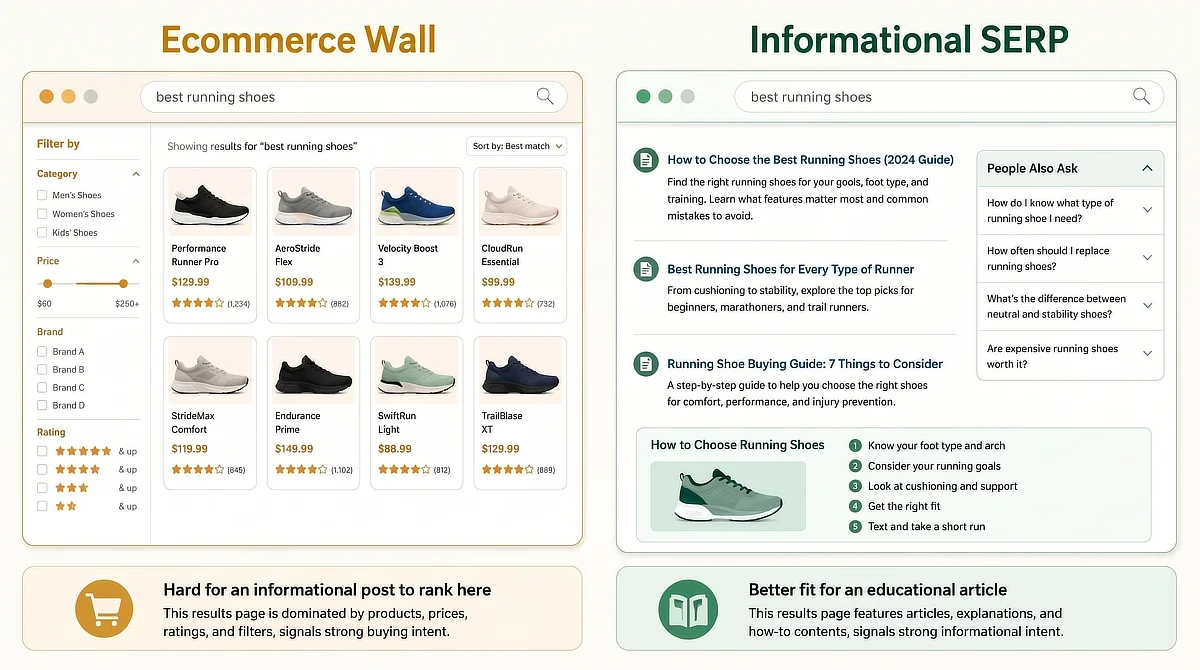
A well-researched, well-written informational blog post cannot rank on a page that Google has assigned to transactional intent. This is not a matter of improving the post or building more backlinks over time. The structural mismatch between an editorial piece and a transactional SERP is something no amount of optimization can bridge.
The right move is to walk away from the keyword. This is not a failure. Recognizing an unrankable keyword before you write is one of the smartest decisions you can make as a content creator with a limited schedule.
Your goal is to protect your production hours for keywords where your content format matches what Google is serving. If the top ten results are checkout screens, close the tab and find a better target.
Mapping the SERP Layout to Your Content Blueprint
Once you have confirmed the keyword is not an E-commerce Wall and the intent is genuinely informational, the SERP layout becomes your structural guide. Scan the top results for specific layout features before you open your drafting document. Each element you see is a signal about what format Google considers most appropriate for this query.
The table below maps the most common SERP features to their intent signal and the content format you should match:
SERP Feature Observed
Implicit Searcher Intent
Required Content Format
Featured Snippet (numbered list)
Step-by-step procedural guidance
How-to post with clear numbered sections
Featured Snippet (paragraph)
Direct definitional answer
Lead with a concise, quotable definition early in the post
People Also Ask box
Exploratory research, multiple sub-questions
FAQ structure or dedicated H2 sections per sub-question
E-commerce product grid
Purchase intent
Walk away from this keyword
Video block above organic results
Visual or demonstration preference
Plan for embedded video or reconsider the content angle
Long-form articles (1,500-plus words)
In-depth informational research
Thorough section development with substantive coverage
Featured Snippet (numbered list)
Implicit Searcher Intent: Step-by-step procedural guidance
Required Content Format: How-to post with clear numbered sections
Featured Snippet (paragraph)
Implicit Searcher Intent: Direct definitional answer
Required Content Format: Lead with a concise, quotable definition early in the post
People Also Ask box
Implicit Searcher Intent: Exploratory research, multiple sub-questions
Required Content Format: FAQ structure or dedicated H2 sections per sub-question
E-commerce product grid
Implicit Searcher Intent: Purchase intent
Required Content Format: Walk away from this keyword
Video block above organic results
Implicit Searcher Intent: Visual or demonstration preference
Required Content Format: Plan for embedded video or reconsider the content angle
Long-form articles (1,500-plus words)
Implicit Searcher Intent: In-depth informational research
Required Content Format: Thorough section development with substantive coverage
Structure your post to match the dominant layout pattern you see. If numbered list titles dominate the top results, your post should be organized as a numbered list.
If paragraph-style featured snippets are present, your introduction should contain a clean, direct definition that Google can pull. You are not copying the content on those pages. You are matching the format Google has determined the searcher finds most useful.
What if the page is a mixed bag, showing half product grids and half informational articles? If you see this kind of mixed intent, the safest move for a time-strapped side-hustler is to pivot to a more specific, long-tail variation of the keyword where informational blogs clearly dominate the top five positions, securing a much safer return on your writing hours.
This is also where a platform that integrates research, training, and content management in one place reduces friction. While you still need to open an incognito window for your manual search, seeing how the integrated tools inside Wealthy Affiliate simplify your overall workflow means you are not managing five different marketing subscriptions just to move from keyword validation to drafting.
Your Step-by-Step Intent Verification Routine
Here is the four-step routine to run before drafting any post. Keep this close to your workspace.
- Open a private or incognito browser window. Do this before typing anything. A regular browser window carries your history, your cookies, and your personalization. Private mode gives you a neutral view.
- Enter your full target keyword and read the top ten organic results. Ignore sponsored ads and shopping carousels, focusing strictly on organic positions. What format do those results take? What type of site dominates the top five?
- Identify any E-commerce Wall signals. If product pages, category grids, or retail giants occupy the top positions, note it and walk away from this keyword before investing any more writing time.
- Map the dominant SERP layout features. Before opening your drafting document, write three quick notes: the dominant content format you observed, the primary SERP feature present (Featured Snippet, PAA, video block), and the structural implication for your post.
This routine takes ten minutes the first time and closer to five once it becomes a habit. Run it on every keyword before you write a single sentence of your draft. The writers who skip this step are the ones who check their analytics three months later and wonder why a post they worked hard on never moved.
Once your intent is verified and your format is mapped, the next challenge is formatting your drafted content to match reader expectations so it reads naturally. Getting the structure right on the SERP is step one. Making the draft read well for actual humans is step two.
If you have questions about analyzing live search results, identifying E-commerce Wall roadblocks, or mapping your content layout before drafting, drop them in the comments below. I read every message and am here to help you protect your writing time.

Sonia Zannoni
Hi, I’m Sonia Zannoni, creator of Click to Prosper. I share practical tools, workflows, and honest guidance to help you build an online business with more clarity and less chaos.
About Sonia

Feeling stuck between too many tools and too much advice? Start with the beginner path.
View the Blueprint