
What You Actually Need to Start Affiliate Marketing (Lean Budget Blueprint)

You’ve probably spent at least one late evening staring at a screen full of open tabs. A premium keyword tracker on one. A visual page builder pricing page on another. An email automation platform on the third. Somewhere between the free trials and comparison articles, two hours disappeared, and you still haven’t written a single word.
That frustration isn’t about you. The conversation around what you need to start affiliate marketing is largely driven by people who earn recurring commissions on the tools they recommend. The more expensive the software, the bigger the payout. So the list of “necessary” startup tools keeps expanding, and your budget keeps draining before your site even exists.
This post is a practical reset. You need three core assets: a custom domain, cost-effective hosting, and a focused block of weekly time.
TL;DR: What You Need to Start Affiliate Marketing
The Guru Stack Myth (Why Your Startup Capital Is Draining Before Your Site Is Built)
Walk into any affiliate marketing forum or YouTube channel, and you will find the same startup list: a premium keyword research suite, a drag-and-drop page builder, a heatmap analytics tool, an email automation platform, and possibly a social media scheduler to push content out. The combined monthly tab can easily hit $200 to $300 before you have published a single post.
What most beginners don’t realize is that the people recommending these tools are paid to recommend them. Affiliate commissions on software products are often 20 to 40 percent recurring, which means a $99 monthly tool earns the blogger nearly $40 every month you stay subscribed. This isn’t an accusation of bad faith. It’s the structure of the business. But it’s worth understanding before you open your wallet.
The quieter problem is what configuring software does to your weekly hours. Setting up a tool feels like progress. It has the feedback loop of productive work: menus to navigate, settings to adjust, tutorials to watch.
But an evening spent troubleshooting a plugin integration conflict is an evening that produced zero sentences your future reader can find in search. Beginners who quit in the first three months rarely run out of ideas. They run out of evenings without ever building a writing habit, because setup consumed the time that should have gone to drafts.
If you want to understand how the “mandatory software stack” recommendation pattern fits into broader online business scam patterns, that post covers the warning signs worth knowing before you spend another dollar on a subscription.
The True Baseline (The Only Three Things You Actually Need to Spend Money On)
Strip away everything the industry says you need and you are left with three non-negotiable assets: a custom domain name, website hosting, and weekly time you protect.
A custom domain is your site’s address, something like yoursitename.com. It costs roughly $10 to $15 a year. Without one, you don’t have a professional presence.
Free subdomains from blogging platforms tell search engines and readers that you haven’t committed to the project. For roughly the cost of one streaming subscription per year, you own your corner of the internet.
Web hosting is the server infrastructure that keeps your site running and reachable. Reliable shared hosting runs $10 to $25 a month. Slow-loading sites lose readers before the first paragraph loads, so performance matters here, but you don’t need the premium tier with managed staging environments and CDN add-ons. Standard shared hosting handles a new site’s traffic without issues.
The third asset, your dedicated weekly time, costs nothing except calendar discipline. It is also, realistically, the scarcest resource you have.
To make this completely transparent, here is how the essential startup costs break down compared to the free tools you can use instead:
Asset
Necessary Expense
Free Alternative?
Purpose
Domain Name
$10 to $15 per year
No (custom URL is needed for brand trust and SEO credibility)
Your site’s permanent online address
Website Hosting
$10 to $25 per month
Free options exist, but carry severe performance and branding limits
Keeps your site running securely and quickly
Writing Workspace
$0 (Google Docs)
Yes, fully free
Content creation and article organization
Keyword & SEO Suite
$0 (Google tools)
Yes (Google Autocomplete and People Also Ask)
Search intent research and topic planning
Domain Name
Necessary Expense: $10 to $15 per year
Free Alternative?: No (custom URL is needed for brand trust and SEO credibility)
Purpose: Your site’s permanent online address
Website Hosting
Necessary Expense: $10 to $25 per month
Free Alternative?: Free options exist, but carry severe performance and branding limits
Purpose: Keeps your site running securely and quickly
Writing Workspace
Necessary Expense: $0 (Google Docs)
Free Alternative?: Yes, fully free
Purpose: Content creation and article organization
Keyword & SEO Suite
Necessary Expense: $0 (Google tools)
Free Alternative?: Yes (Google Autocomplete and People Also Ask)
Purpose: Search intent research and topic planning
Before you add anything beyond this list, take five minutes to review every tool subscription you are currently paying for. If you haven’t opened something in the last two weeks, cancel it before you buy anything else. The goal in your first six months is to protect every dollar until your site has the traffic to justify spending it.
The Part-Time Reality (How to Structure Your Weekly Hours for Raw Production)
Here is the thing about a constrained weekly schedule: it is actually enough. Not enough to sprint, but enough to build something real, if you put those hours toward the right work.
Most beginners don’t have a time problem. They have an allocation problem. The hours exist, but they easily get absorbed by tool setup, social media rabbit holes, and re-reading articles about affiliate marketing instead of writing them. The reader who can’t find their site in month six isn’t struggling because their keyword tool lacked features. They’re struggling because month one went to plugin configuration and month two went to reading about SEO instead of publishing it.
The fix isn’t finding more time. It’s deciding, before you sit down, what the session is actually for.
A simple split that works: roughly two hours for keyword planning and topic selection, six hours for drafting and editing, and two hours for formatting and publishing. That’s across the full week, not in a single sitting.
If you cannot find contiguous multi-hour blocks, break that six-hour writing target into 45-minute micro-drafting sessions on weeknights, focusing on writing exactly one section of an article per session. If your schedule is tighter, scale down but keep the same ratio.
Writing and editing must take the biggest slice, every week, without exception. Publishing articles is the only activity that directly builds your search engine presence in the first six months of a new site.
If you want a stripped-back, realistic roadmap for how to sequence the early weeks of building an affiliate site, that guide walks through the order that actually matters.
High-Value Alternatives (Free Tools That Do the Heavy Lifting for Beginners)
The first thing most beginners buy is a keyword research tool. On the surface it makes sense. You want to find topics people are searching for, and a premium tool promises to make that efficient.
But Google itself tells you exactly what people are searching for, in real time, at no cost. You just need to know where to look.
Google Autocomplete (Your Free Keyword Tool)
Start typing a search query into Google and watch the suggestions appear below the search bar. Those are Google’s real-time patterns for that phrase, drawn from actual user behavior. Type “affiliate marketing for” and you will see: “beginners,” “beginners step by step,” “beginners with no money,” “dummies.” That is a content calendar, built from live data.
The “People Also Ask” boxes that appear inside search results are even more useful. They surface the follow-up questions real searchers are asking after they land on an initial result. Each one of those questions is a potential article. The data is more current than any paid tool’s database because it reflects live search activity, and accessing it costs nothing.
Google Docs (Your Distraction-Free Draft Space)
Writing directly inside WordPress surrounds you with buttons, plugin notifications, widget menus, and settings you didn’t mean to open. Google Docs is a clean, blank page.
It autosaves, works on any device, and keeps your attention on the sentence in front of you instead of the sidebar next to it. You can even use a simple, free table at the top of your draft document as your editorial calendar. This keeps you from losing days setting up complex, premium project management software like Notion, Trello, or ClickUp before you have even published three articles.
One thing that costs zero dollars and gets skipped far more often than it should is a proper affiliate disclosure. The Federal Trade Commission’s guidance on endorsements and disclosures {target=”_blank”} is plain language, freely available, and takes about 10 minutes to read.
A compliant disclosure is a short sentence at the top of your post. Skipping it isn’t just a trust problem. It can create a legal one.
Consolidated Setup vs Tool Fragmentation (How to Choose a Simple Starting Path)
Here is a scenario that plays out constantly with new affiliate sites. Someone registers a domain with one provider, buys hosting from a second, installs WordPress manually, then discovers their SSL certificate isn’t configured and their DNS records are pointing in the wrong direction. Three evenings later, the site is still broken, and no articles have been written.
This isn’t a failure of intelligence. It’s the predictable result of stitching together tools that were never designed to communicate with each other. Tool fragmentation is the primary technical reason beginners abandon their sites before they gain any traction.
Managing separate accounts, billing cycles, and configurations is real overhead. None of it builds the site; it just maintains the conditions that might allow you to build it someday.
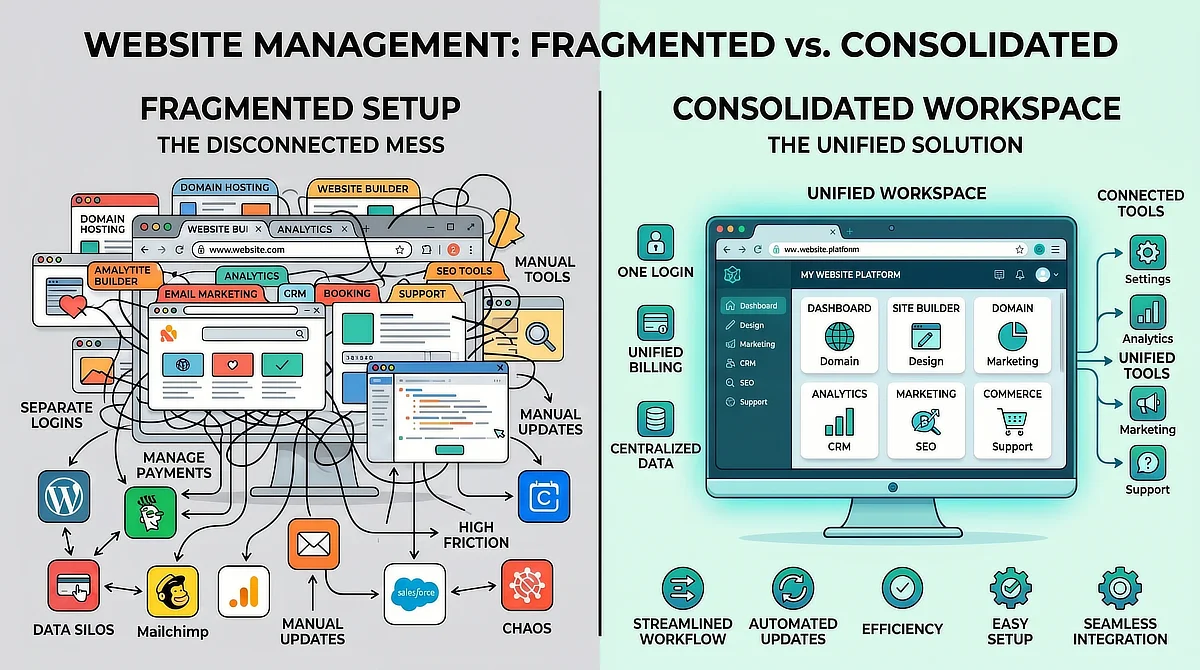
An integrated platform resolves this by putting hosting, security, and your content environment in one place. You log in once, your site is running, and your evening hours go to writing instead of troubleshooting.
Wealthy Affiliate’s Starter tier is structured exactly this way, with hosting, site management, and foundational training consolidated under a single dashboard built for people working around a full-time schedule. See how WA consolidates these tools before committing to a fragmented setup. While advanced marketers eventually graduate to specialized, high-performance hosting once their sites gain heavy traffic, this unified environment removes the exact setup friction that kills most beginner sites in month one.
If you want a deeper comparison of how integrated platform architecture stacks up against building your own separate stack, that guide covers the practical tradeoffs in detail.
The goal at the start isn’t the most technically impressive setup. It’s the most sustainable one. A configuration that lets you open your laptop on a Wednesday evening and get straight to writing is worth more than a sophisticated stack that costs you troubleshooting hours every week.
Starting affiliate marketing with a lean setup isn’t settling for less. It’s the only version of this that actually works around a real schedule. A domain, basic hosting, Google Docs, and a consistent block of weekly hours have built sustainable affiliate sites. A $300 monthly tool stack and zero published articles have not.
The moment your site starts earning, you will know exactly which tools are worth adding because you will have real data to justify the expense. Until then, protect your hours and protect your budget. Both are limited, and both are doing real work every week you put them toward content.
If you have questions about selecting a domain name, setting up hosting, or planning your writing hours on a tight schedule, leave them in the comments below. I read and answer every question.

Sonia Zannoni
Hi, I’m Sonia Zannoni, creator of Click to Prosper. I share practical tools, workflows, and honest guidance to help you build an online business with more clarity and less chaos.
About Sonia
Feeling stuck between too many tools and too much advice? Start with the beginner path.
View the Blueprint