Standalone WordPress Hosting vs. All-in-One Platforms for Beginners: A Three-Year Cost Breakdown

Affiliate Disclosure: This post contains affiliate links. If you purchase through one of my links, I may earn a commission at no additional cost to you. Read the full Affiliate Disclosure for details.
The $2.99-a-month hosting plan looks like the logical move. It is labeled as a limited-time deal and packaged to look self-sufficient.
The checkout process makes you feel like you are making a sound financial decision before you even type your first blog post. Most beginners commit, enter their credit card details, and lock into a 48-month contract.
Then the dashboard opens.
The question of WordPress hosting vs all in one platform is rarely framed as a comparison between what you are paying for and what you are actually buying. Three dollars a month in hosting costs is not the same as three dollars a month in business infrastructure.
The first number is a promotional price. The second is the actual operating cost of a part-time affiliate business, and those two figures can be very far apart.
This post maps that gap directly. You will get a three-year cost projection that includes what hosting companies leave out of their promotional copy.
We will break down the exact administrative tasks each setup requires, and look at how Automattic’s 2026 WordPress.com update shifts the decision. No promotional framing. Just the structural math.
TL;DR: WordPress Hosting vs. All-in-One Platform
The False Economy of the Cheap Hosting Hook
Hosting companies are not in the business of selling three-dollar plans. They are in the business of acquiring customers at three dollars and renewing them at ten, eighteen, or more.
The promotional rate exists to win the checkout decision. The renewal rate is where the revenue lives, and it activates the moment the initial contract period expires.
To access the lowest promotional prices, most shared hosts require a 36-month or 48-month upfront payment. Hostinger’s promotional rate of $2.69 per month, for example, is not available on a monthly cycle.
You pay the full amount in advance before your site even exists. This is a real financial commitment made before you publish a single post, or before you even know if this business model works for you.
The financial commitment is only part of the setup. The operational burden is the other part. Once inside a shared hosting environment, a solo beginner becomes an unpaid systems administrator.
Tasks like installing WordPress correctly, managing file permissions, and configuring backups fall directly on you. You also have to renew SSL certificates (the standard security technology that displays the padlock icon in your browser’s address bar). These are not one-time tasks. They recur throughout the life of your site.
Here is what a realistic evening session on a self-hosted setup looks like. You log into your control panel and see a warning about an expired security plugin.
You spend the next hour comparing replacement options, purchasing a subscription, and configuring a new firewall from scratch. By the time that sequence is complete, the writing window is gone, and the post you planned to draft has not been started.
That is not an unusual session for a solo builder managing a modular WordPress stack without prior server experience. It is a predictable one.
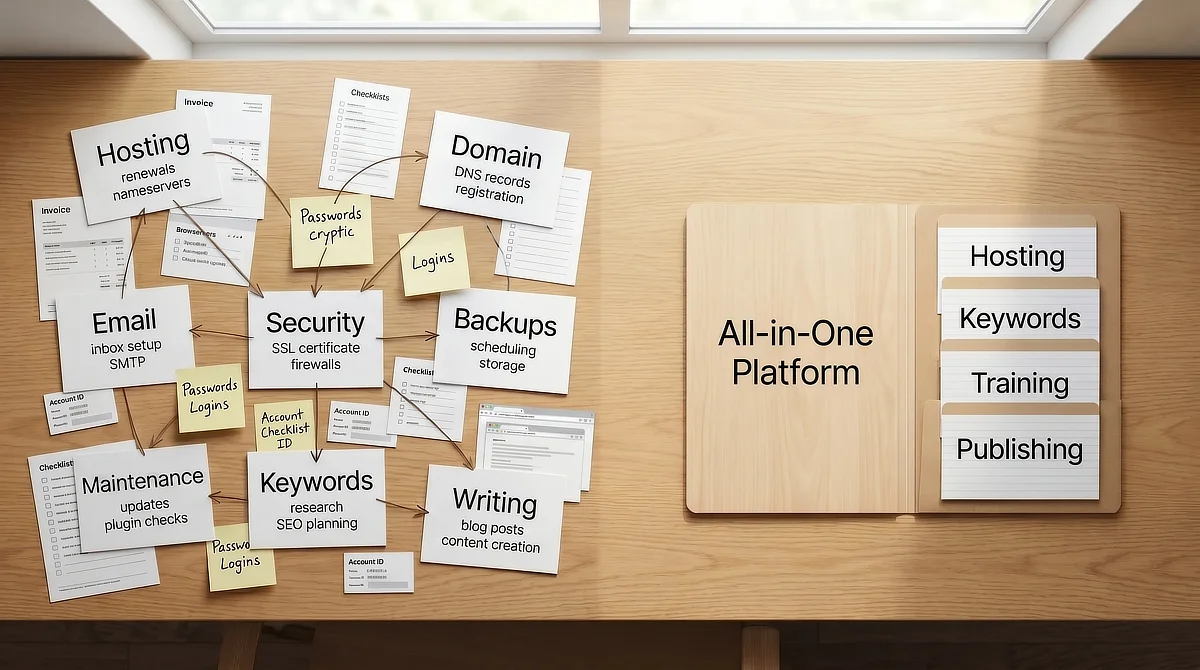
There is also the cognitive overhead of account fragmentation. A standard modular stack requires separate logins for almost every tool you use.
You will find yourself hopping between your registrar, hosting panel, email provider, keyword tool, security dashboard, and analytics account. Each additional platform is a small friction point, but fragmented infrastructure compounds quickly, and attention is the scarcest resource a part-time builder has.
Without a tested starting point, plugin selection alone becomes its own research project. A highly curated list of essential plugins for affiliate sites removes at least one of those decisions from the queue.
Where WordPress.com and WordPress.org Fit Into This Decision
The naming overlap between WordPress.org and WordPress.com creates massive confusion for beginners. A brief clarification is useful here.
WordPress.org is an open-source software project. The software itself is free, but running it requires a separately purchased server, a registered domain, and a self-managed technical environment.
WordPress.com is a fully managed hosting service run by Automattic that uses WordPress software as its foundation. On WordPress.com, the server infrastructure is handled by Automattic. You manage a site, not a server.
In April 2026, Automattic announced a structural change to WordPress.com tiers that shifted the entry-level decision. Universal access to over 50,000 plugins and themes was extended to all paid plans, including the $4-per-month Personal tier.
Previously, plugin installation was restricted to higher-cost plans. That restriction is gone, meaning beginners no longer have to use self-hosted WordPress.org setups just to access essential tools.
The Personal tier operates within defined technical boundaries. You do not get direct database access via MySQL (the structured database system that stores your site’s content and settings).
You also lack SFTP capability (the technical method used to upload custom files to your server) and staging access. For an affiliate marketer focused on publishing, these are not major limitations.
The 2026 WordPress.com update matters most for a specific type of beginner. It fits someone who wants managed hosting, needs access to plugins, and wants to avoid server administration.
What this tier does not provide is integrated keyword research, affiliate training, or a structured business framework. Those remain separate, paid additions.
The core structural decision remains unchanged regardless of where WordPress.com now sits on the cost spectrum. Do you build a modular stack where you assemble and maintain each component separately, or do you invest in an integrated workspace where the infrastructure is managed and the business tools are built in?
The Three-Year Cumulative Cost-Stacking Projection
The promotional price is the number hosting companies want you to evaluate. The three-year total cost of ownership is the number that determines whether your infrastructure choice was financially sound. These two figures are rarely close.
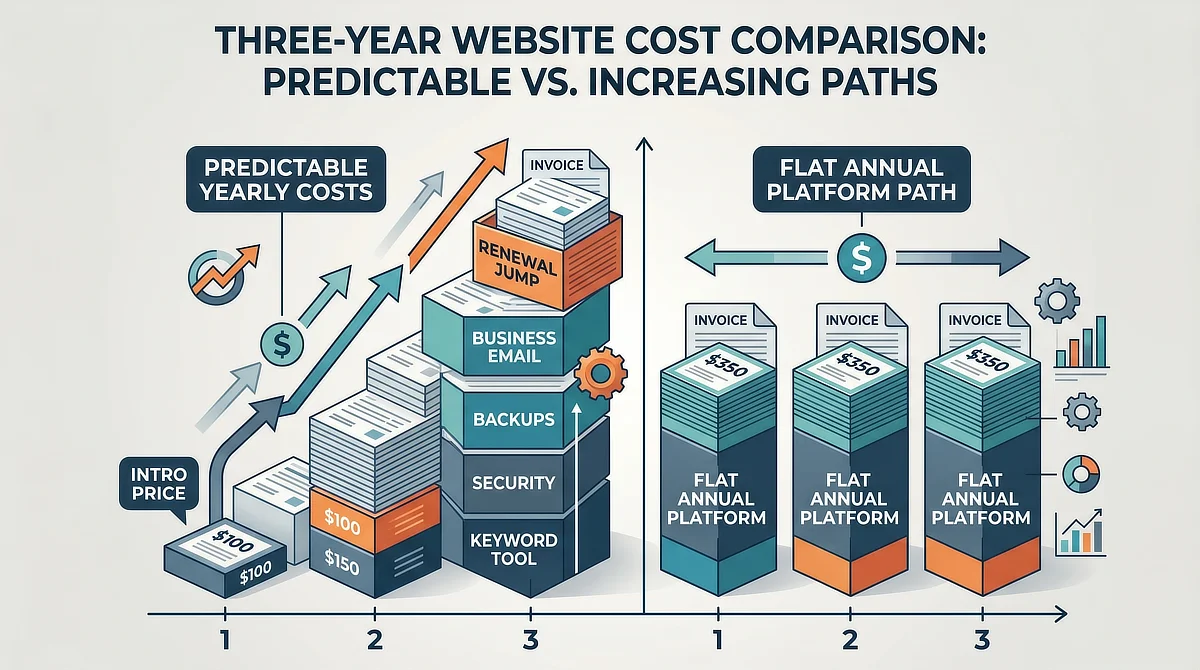
The renewal rate jumps on shared hosting are significant and automatic. Hostinger‘s promotional rate of $2.69 per month climbs to approximately $10.99 at renewal, a 308% increase.
SiteGround‘s $2.99 promotional rate renews at approximately $17.99, a 501% increase. Bluehost‘s $3.99 starter rate moves to approximately $9.99 at renewal, a 150% increase.
These renewal spikes are not optional upgrades. They represent the standard pricing that activates automatically the moment your initial contract period ends.
Renewal rates are only the beginning of the cost stack. A functional affiliate marketing site on a self-hosted WordPress environment requires additional tools that your host does not include.
Domain registration and privacy protection run about $25 to $30 combined per year. Professional business email through Google Workspace costs approximately $6 per month.
A reliable automated backup solution adds $30 to $80 annually. A security plugin with malware scanning and active firewall protection adds $80 to $150 per year for a premium license. None of these are optional additions for a site operating in a competitive niche.
The largest variable in the modular stack cost is the keyword research tool. Publishing affiliate content without keyword research is publishing into a void.
A professional-grade keyword subscription runs between $49 and $99 per month at the entry level. At the lower end, that keyword research tool adds an extra $1,764 over 36 months on top of your other costs.
To understand why this spending is tied to revenue-generating work, the core economics of online business models covers that relationship in practical detail.
The table below maps the core cost structure across the major options available to beginners. All pricing figures should be verified against currently live pricing pages before publication, as promotional pricing and renewal structures are subject to change.
Hosting Option and Tier
Pricing Snapshot
Essential Add-ons Needed
3-Year Cumulative Cost (Est.)
Key Limitations
Hostinger Premium Shared
Promo: $2.69/mo with 48-month contract. Renewal: ~$10.99/mo multi-year or $12.99/mo for 12 months.
Domain privacy, professional email, security plugin, backup solution, keyword research tool
~$2,300 to $4,200+
Multi-year financial commitment required before validating the model; keyword research not included; manual server administration
SiteGround StartUp
Promo: $2.99/mo with 12-month contract. Renewal: ~$17.99/mo, about a 501% increase.
Domain privacy, professional email, staging access not included at this tier, keyword research tool
~$2,600 to $4,800+
Steepest renewal rate spike in this comparison; resource caps on entry-level tier; email and backup sold separately
Bluehost Starter
Promo: $3.99/mo with 36-month contract. Renewal: ~$9.99/mo, about a 150% increase.
Domain privacy sold separately at checkout, security plugin, keyword research tool
~$2,200 to $4,000+
Domain privacy upsold at checkout; no integrated marketing tools; storage limits on starter tier
WordPress.com Personal
Promo: $4.00/mo flat rate. Renewal: $4.00/mo stable.
Domain registration around $15/yr, professional email, keyword research tool
~$2,000 to $3,800+
No database, SFTP, or staging access; keyword research required separately; no integrated business tooling
Wealthy Affiliate Premium
$49/mo or ~$41.41/mo with annual billing at $497/yr. Renewal: $497/yr flat rate.
Domain registration around $15/yr
~$1,536 to $1,809
Higher monthly entry point; platform-specific training sequence; limited server-level root access
Hostinger Premium Shared
Pricing Snapshot: Promo: $2.69/mo with 48-month contract. Renewal: ~$10.99/mo multi-year or $12.99/mo for 12 months.
Essential Add-ons Needed: Domain privacy, professional email, security plugin, backup solution, keyword research tool
3-Year Cumulative Cost (Est.): ~$2,300 to $4,200+
Key Limitations: Multi-year financial commitment required before validating the model; keyword research not included; manual server administration
SiteGround StartUp
Pricing Snapshot: Promo: $2.99/mo with 12-month contract. Renewal: ~$17.99/mo, about a 501% increase.
Essential Add-ons Needed: Domain privacy, professional email, staging access not included at this tier, keyword research tool
3-Year Cumulative Cost (Est.): ~$2,600 to $4,800+
Key Limitations: Steepest renewal rate spike in this comparison; resource caps on entry-level tier; email and backup sold separately
Bluehost Starter
Pricing Snapshot: Promo: $3.99/mo with 36-month contract. Renewal: ~$9.99/mo, about a 150% increase.
Essential Add-ons Needed: Domain privacy sold separately at checkout, security plugin, keyword research tool
3-Year Cumulative Cost (Est.): ~$2,200 to $4,000+
Key Limitations: Domain privacy upsold at checkout; no integrated marketing tools; storage limits on starter tier
WordPress.com Personal
Pricing Snapshot: Promo: $4.00/mo flat rate. Renewal: $4.00/mo stable.
Essential Add-ons Needed: Domain registration around $15/yr, professional email, keyword research tool
3-Year Cumulative Cost (Est.): ~$2,000 to $3,800+
Key Limitations: No database, SFTP, or staging access; keyword research required separately; no integrated business tooling
Wealthy Affiliate Premium
Pricing Snapshot: $49/mo or ~$41.41/mo with annual billing at $497/yr. Renewal: $497/yr flat rate.
Essential Add-ons Needed: Domain registration around $15/yr
3-Year Cumulative Cost (Est.): ~$1,536 to $1,809
Key Limitations: Higher monthly entry point; platform-specific training sequence; limited server-level root access
When you look at that table against the comparison most hosting review sites present (promotional rate versus promotional rate), the framing problem becomes visible.
The honest comparison is not three dollars against forty-nine dollars. It is the total cost of a functional affiliate infrastructure over a realistic building window, measured against what that infrastructure actually delivers in terms of business-ready tools and removed friction.
The Solo-Builder Workflow Friction Index
Infrastructure costs are measurable. The time cost of managing that infrastructure is harder to put in a table, but it carries the same weight for a builder working around a demanding day job.
A standalone WordPress site requires manual maintenance that a managed platform handles automatically. The technical tasks quickly stack up.
You must configure server-level caching to meet Core Web Vitals requirements (Google’s metrics for measuring loading speed and user experience). You are also responsible for file compression, scheduled backups, malware scanning, and conflict-free plugin updates.
These tasks do not cluster conveniently into one monthly maintenance window. A plugin update that triggers a PHP version conflict (a coding mismatch between your web server’s underlying software and the plugin’s code) can break a site immediately after an automatic update runs.
Resolving that conflict, restoring from backup if necessary, and re-testing the site can consume several hours. For a builder writing posts after a full day at work, a three-hour database recovery session does not just delay the week’s content. It replaces it.
If you only have 5 hours a week to build your business, look at where that time actually goes. On a standalone setup, you might spend 2 hours troubleshooting a plugin conflict and 3 hours writing. On a managed platform, you spend 30 minutes on setup and 4.5 hours writing. Over a year, that difference dictates whether you publish 20 articles or 50.
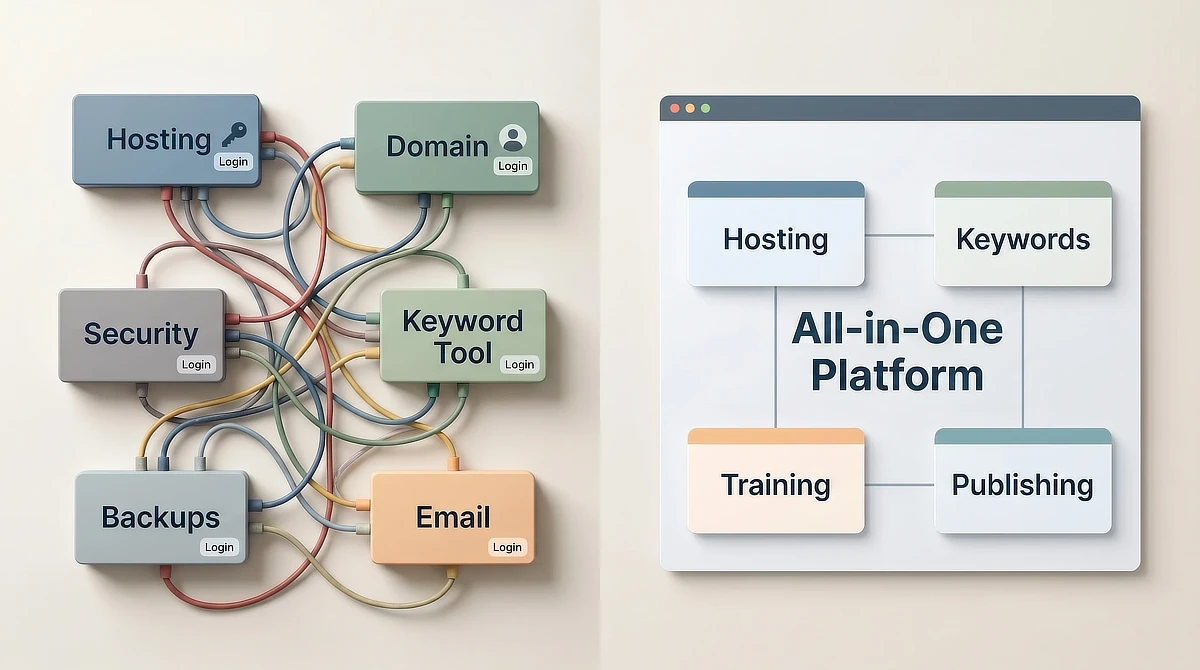
Managed platforms handle the entire technical layer without surfacing it to the content creator. Security scanning, performance optimization, backup execution, SSL management, and server-side caching are infrastructure-level responsibilities that remain invisible to the builder.
The interface you interact with is the content dashboard. The server behavior stays completely hidden.
For a part-time builder, this is the difference between getting an article published and losing your entire week to troubleshooting. The relevant question is not whether standalone hosting provides more control. It does, objectively.
The question is whether that control actually produces affiliate revenue. Configuring caching rules does not write your posts or find your target keywords. Every hour spent on server maintenance is an hour stolen from revenue-generating work.
Balancing Server-Level Control Against Cognitive Load
Standalone WordPress.org hosting is the right choice for a defined set of use cases. It fits experienced developers who need direct database access and custom server configurations.
It fits agencies managing multiple client sites. It also works for builders with systems administration knowledge who enjoy server management.
For a beginner, the assessment of standalone hosting is more nuanced. Root server access and database visibility are genuine capabilities. However, they require significant technical knowledge to use safely.
A misconfigured file permission or an unmonitored plugin vulnerability can quickly expose your site to security risks. Without a server management background, these are not theoretical worries. They are predictable failure points.
If you build on standalone hosting, establish a strict 30-Minute Boundary Rule. If a technical server error or plugin conflict takes more than 30 minutes of troubleshooting, stop.
Walk away from the screen and contact your host’s support team. Do not let a minor technical hitch swallow your entire evening writing window.
There is a practical test worth running here. Does database access, custom PHP configurations, or SFTP help a beginner publish their first ten articles?
For the vast majority of content creators, the answer is no. Those technical features are operationally invisible to someone focused on publishing content.
All-in-one platforms introduce their own constraints. Data portability is a legitimate concern because your content and workflow are tied to the platform.
If pricing changes or a feature is discontinued, migrating your site becomes a manual project. These are genuine tradeoffs that belong in any honest evaluation.
The harder version of that tradeoff is a platform that stops operating altogether. When Legendary Marketer closed, its affiliates lost the funnel pages it had hosted for them, because those pages lived on the vendor’s software rather than on a domain they owned.
The decision comes down to where your available hours produce the most business value. Is that value higher when spent on server configuration or on content?
For some builders, technical setup is engaging work. For most beginners, content is the real bottleneck, and server administration is just a tax on your limited time.
The Decision Framework: Modular Stack vs. Integrated Workspace
The choice between a standalone WordPress setup and an integrated affiliate workspace is not a question of which option is objectively better. It is a question of which option fits your skill level, time availability, and tolerance for technical complexity.
Before selecting your setup, map three variables honestly. First, assess your technical skills: do you know how to configure servers or resolve database errors?
Second, look at your actual hours: how much time can you spend on setup rather than writing? Third, consider technical failures: can you fix an unexpected error, or will a broken site stall you for days?
To make this concrete, run a quick weekly time-audit. Open your calendar and block out exactly when you will work your 5 to 10 hours for the upcoming week. Now, label each block: is it for administrative troubleshooting, or is it for writing?
If you cannot protect at least 2 hours purely for writing because you anticipate wrestling with database connections, theme setups, or plugin updates, your calendar is telling you that you need a managed setup. Content must be the priority, not the administrative overhead.
Platform costs are business infrastructure costs. A subscription fee for a managed workspace is no different than renting a commercial kitchen for a catering business.
The question is whether that cost supports your work or creates friction. The four-stage business development model shows where these infrastructure decisions fit as you scale your business.
The routing framework for your decision is straightforward. If you have experience managing a self-hosted WordPress server and find technical work engaging, standalone WordPress.org is the right choice.
If you want a managed hosting environment with plugin access at a flat rate, WordPress.com’s Personal tier is a viable middle option.
But if your goal is to build an affiliate business within a structured, fully managed, all-in-one business environment that handles hosting, keyword research, and training under a flat annual fee, an integrated platform is the best fit. Compare those three pathways carefully before you commit to assembling a modular stack.
For that third profile, the most efficient next step is to examine how these pieces fit together under real conditions. We have broken down the technical architecture, cost structure, and workflow impact in a detailed review of the platform, so you can determine if it matches your building schedule before committing.
If you have questions about balancing standalone web hosting costs, navigating the current WordPress.com plugin changes, or choosing a platform setup that fits your schedule, leave them in the comments below. I read and answer every question.

Sonia Zannoni
Hi, I’m Sonia Zannoni, creator of Click to Prosper. I share practical tools, workflows, and honest guidance to help you build an online business with more clarity and less chaos.
About Sonia

Feeling stuck between too many tools and too much advice? Start with the beginner path.
View the Blueprint