Kre8or.AI Review: Does This New Creator Platform Fit a Part-Time Schedule?

Affiliate Disclosure: This post contains affiliate links. If you purchase through one of my links, I may earn a commission at no additional cost to you. Read the full Affiliate Disclosure for details.
Most AI image tools make the same promise: describe what you want, hit generate, done. That holds up fine for a one-off illustration. It falls apart the moment you need consistent visual assets across a blog, a Pinterest account, and an affiliate promotion campaign.
The characters drift between sessions. The style shifts. You run the same prompt six different ways and still end up with nothing you can actually brand. If that is the consistency problem you are trying to solve, this Kre8or.AI review is written for you.
The frustration is real, and it is common. The AI image tool market has been flooded with generators that all work roughly the same way: blank prompt box, generate, hope for the best. They handle one-off creative requests fine. They were not built for repeatable, brand-consistent output across a full content calendar. Adding another monthly tool to that stack only makes sense if this one solves the problem differently.
Kre8or.AI positions itself as structurally different from the standard generation sandbox. It organizes creation around guided workshops, remixing, referral sharing, and a character system called Cast that keeps the same figure consistent across separate generations.
Whether those architectural differences actually solve the consistency problem, or just add another tool to manage, is what this review examines.
TL;DR: Kre8or.AI Review
Kre8or.AI is a standalone creator environment combining guided design workshops, remixing, sharing tools, and Cast, a character system that holds a consistent likeness across scenes.
The Transition from Isolated Generators to Connected Creator Environments
Early AI art generators operated as black boxes. You typed a description, the model produced something, and if it was not quite right, you typed a different description and hoped for better.
There was no template system, no way to lock down visual consistency across multiple pieces of content, and no connection between the generation tool and the business goals driving the content. For a single illustration, that was workable. For a content publisher building a recognizable brand identity across dozens of posts and social channels, it was a lottery.
The problem ran deeper than interface design. Early generative models were optimized for novelty, not repeatability. Every output was fresh, which meant every output was also different, even when you wanted them to look the same.
Affiliate marketers maintaining visual identity for a niche site, or social media managers building a recognizable character across a campaign, quickly found that these tools were not designed for their actual use case.
Kre8or.AI addresses this by embedding image generation inside a structured business environment rather than presenting it as a standalone generation window.
The platform organizes creation around guided workshops, a character system that locks a reusable likeness, and a collaborative remix layer, moving the creative process from isolated prompt guessing toward an organized production system.
For anyone building content at volume, that shift changes what the tool can reliably deliver across multiple sessions and channels.
Practical Utility Across Five Core Creator Use Cases
The platform organizes its workflow around five content tasks that most digital marketers regularly encounter: blog visuals, social media content, Pinterest graphics, infographics, and affiliate promotional materials.
That categorization changes the experience from “generate something and see if it works” to “generate for a specific purpose, with presets calibrated to that purpose.” For the first three of those, one master visual and three fixed templates cover the same ground without a subscription
The most direct way to see what that means in practice is to look at what the platform produces from a minimal prompt. A short instruction like “create an image of a sunset in Hawaii” generates a polished, finished visual without any complex prompt construction.
Prompt Used: “Create an image of a sunset in Hawaii”

That output quality from a short, plain-language instruction is worth noting. Most AI image tools at this price point require significant prompt engineering to reach a usable result.
Kre8or.AI handles the technical weight behind the scenes, which lowers the skill barrier for new users who are still working through choosing an affiliate niche while managing everything else on a part-time schedule.
The infographic use case follows the same logic. A plain-language instruction like “Make a detailed infographic explaining how to make an espresso step by step” produces a structured, multi-step educational visual without requiring the user to specify layout parameters manually.
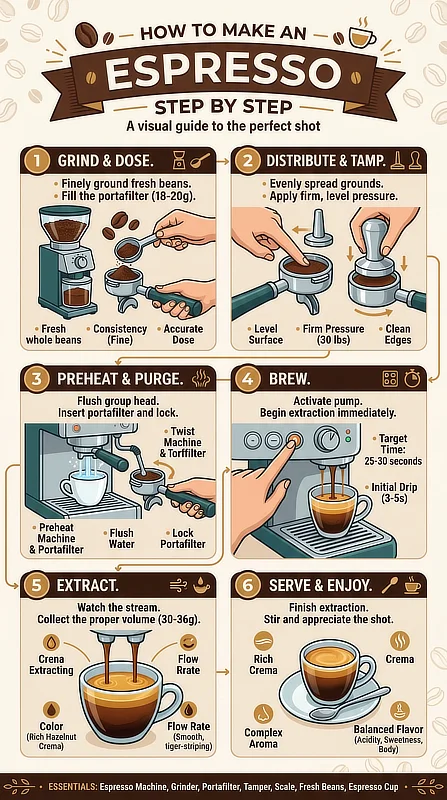
One limitation worth naming directly: while the layout engine handles clean, straightforward infographics well, complex data visualizations with multiple chart types or highly specific text relationships will likely need manual adjustments after generation.
AI generation is not a replacement for design judgment when the data structure is genuinely complicated. What it handles well is the foundational layout work that would otherwise require design software fluency or a freelancer budget.
Here is how the platform addresses each of the five use cases across practical creator scenarios:
Creator Use Case
Platform Solution
Operational Impact
Blog Visuals
Guided workshop templates and contextual graphic presets
Eliminates layout inconsistency and reduces image generation time
Social Content
High-fidelity cinematic rendering and dynamic visual presets
Supports multi-channel branding without requiring separate tools
Pinterest Graphics
High-aspect-ratio canvases and vertical orientation presets
Drives organic discovery and improves pin click-through rates
Infographics
Clean layout engines and multi-step sequential diagrams
Translates subject matter into structured visual guides
Affiliate Promotion
Built-in promotional templates and referral link integration
Connects visual output directly to affiliate revenue
Blog Visuals
Platform Solution: Guided workshop templates and contextual graphic presets
Operational Impact: Eliminates layout inconsistency and reduces image generation time
Social Content
Platform Solution: High-fidelity cinematic rendering and dynamic visual presets
Operational Impact: Supports multi-channel branding without requiring separate tools
Pinterest Graphics
Platform Solution: High-aspect-ratio canvases and vertical orientation presets
Operational Impact: Drives organic discovery and improves pin click-through rates
Infographics
Platform Solution: Clean layout engines and multi-step sequential diagrams
Operational Impact: Translates subject matter into structured visual guides
Affiliate Promotion
Platform Solution: Built-in promotional templates and referral link integration
Operational Impact: Connects visual output directly to affiliate revenue
For blog publishers building out early content frameworks, the guided templates remove one of the more time-consuming decisions in the production workflow: starting from scratch on image layout.
Instead of spending 45 minutes tweaking prompt variables late on a Tuesday night, these guided presets let you drop your asset in, apply the correct layout, and move on to your writing within five minutes. The presets give you a functional starting point already calibrated to the content type.
To test whether the platform fits your specific content needs before committing, Kre8or.AI has a free tier with a starting credit balance. Run your actual content types through it and evaluate the output quality against your real workflow before deciding.
Under the Hood: Workshops, Remixing, and Features Still Rolling Out
To understand what sets Kre8or.AI apart from a standard generation interface, the workshop system is the right place to start. Rather than presenting users with a blank prompt box, the platform organizes creation around guided transformation categories.
Each workshop defines the type of transformation being applied, so you are working within a structured creative direction rather than guessing at which prompt phrasing will produce a useful result.
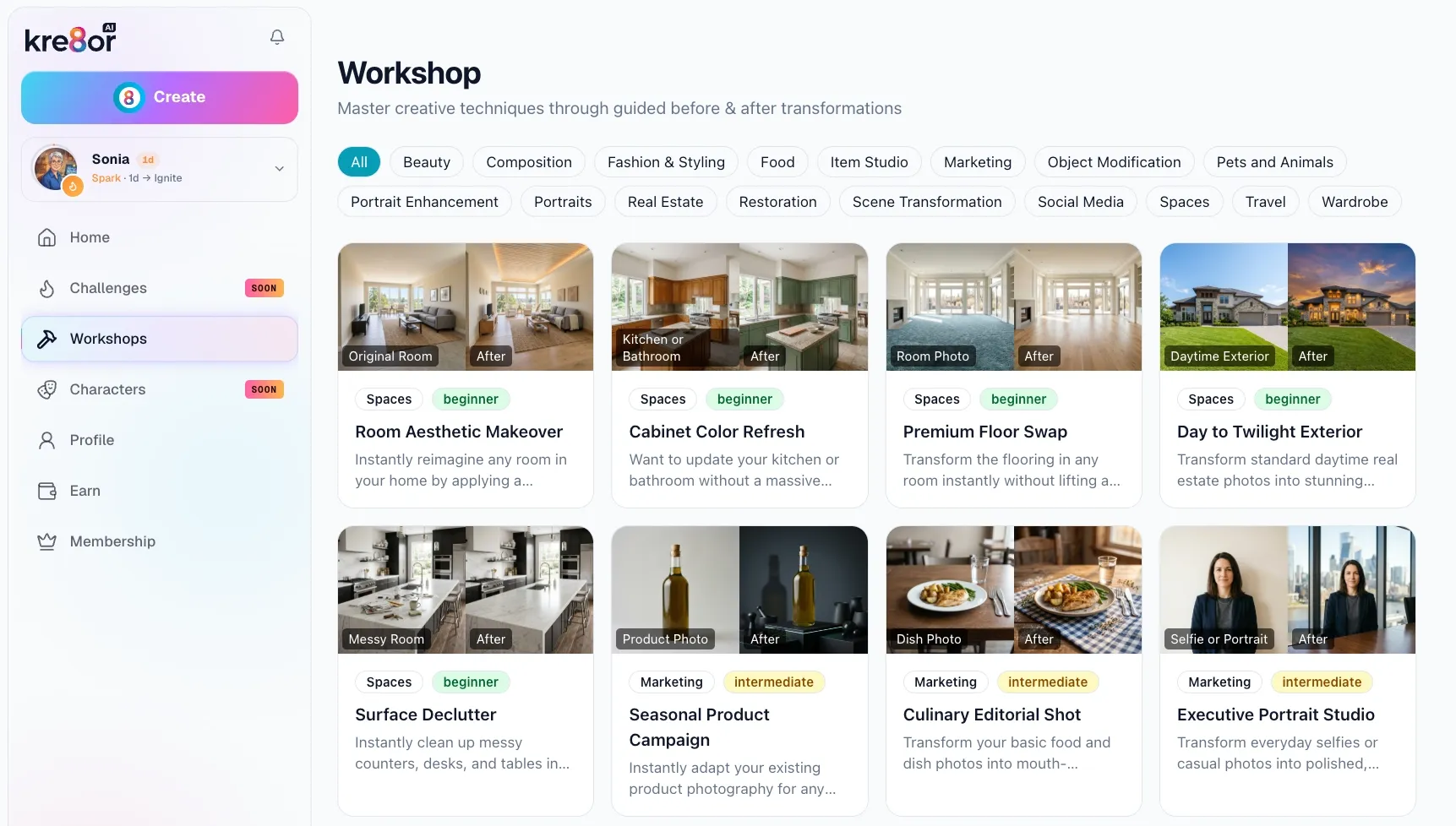
That organizational approach addresses one of the most common friction points in AI image work: the gap between what a user wants and what an open-ended prompt delivers.
When the workshop category is already defined, the generation model can optimize toward a specific output type. The Day to Twilight Exterior workshop is a concrete example: it takes a daytime property photograph and transforms it into a twilight-style image, which is a high-value use case for anyone producing real estate content or dramatic editorial visuals.


Workshop Used: Day to Twilight Exterior
The remixing protocol adds a second layer. The system tracks when a user’s original design is modified by another creator on the platform and triggers automated attribution, meaning the original creator receives a financial kickback when their design is built upon.
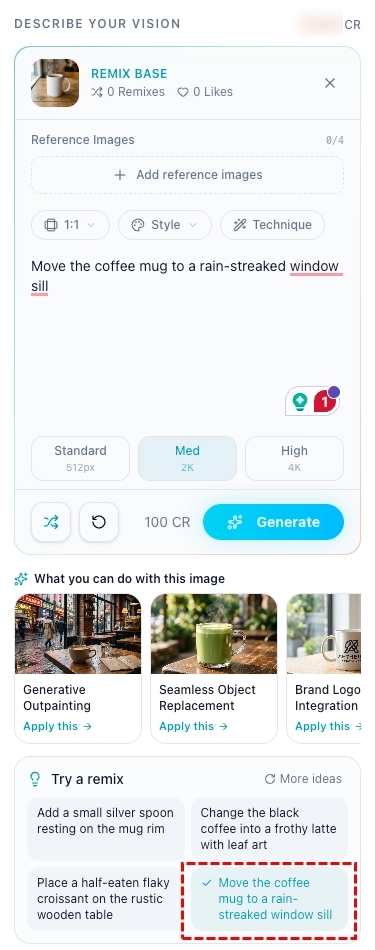
The practical workflow is visible in a concrete example: an original coffee mug image, when presented with a built-in remix suggestion (“Move the coffee mug to a rain-streaked windowsill”), produces a distinct new composition while maintaining attribution back to the original creator.


Cast Answers the Consistency Question (Here Is What It Actually Does)
The character tools I could not review before are live now, under the name Cast. This is the part of the platform I most wanted to test, because it addresses the exact problem that makes AI images hard to use on a real site: generate a character, then generate that same character somewhere else, and by the third image you are looking at a stranger.
The two things worth measuring are the ones I named earlier: does the likeness hold when the pose changes, and does it hold when the framing and lighting change. I built three characters and pushed all of them.

That yeti started as four sentences of description. He has never been in a cabin, and every reference frame the platform built for him was flat autumn daylight in a forest. That is the feature in one image.
Cast works in four steps. You describe a character or upload a photo, pick a look, generate a reference set of seven angles, then name and save. Once saved, the character can be dropped into any scene you describe, and the reference set is what keeps the face the same each time.
Two Ways In, and They Cost Different Amounts
You can build a character from a written description or from your own photos, and the choice is permanent. The interface says it plainly: source is part of who they are, and switching means starting over.
The description route runs four steps. You write a few sentences, the platform returns four candidate looks from one batch, you pick one, and it builds the reference set from your choice. That costs 25 credits for the batch and 175 for the reference set, so 200 to a saved character.
The photo route runs three steps, because your upload replaces the look-generation stage. You get an angle board showing all seven slots; the platform detects which angle your photo covers and drops it into the right slot, then fills the rest. That is 175 credits, and no batch fee.
So casting yourself is cheaper than inventing someone. That surprised me, and it is worth knowing if you are deciding which to try first with a limited balance.
Your Description Sets a Range, Not a Specification
This is the part I would want to know before spending anything, and it took two characters to see clearly.
I asked for a lighthouse keeper with weathered brown skin. Three of the four candidate looks came back pale. The fourth matched exactly. If the platform had returned a single image I would have concluded it ignores what you write. It does not. It samples, and your job is to read all four and pick the one that landed.
Physical attributes behave that way. Rendering style does not.
When I described a yeti mascot and asked for soft, rounded shapes and appealing character design, all four candidates came back photoreal. Not one stylized result in the batch. That is a different failure: the batch did not span my description; it missed the same way four times.
The likely reason is that “appealing character design” is an aesthetic judgment rather than an instruction a model can act on. Naming the medium works better. Say illustrated, flat colour, cel-shaded, or 3D animated, and you are describing something the model can render. Say tasteful or appealing and you are describing an opinion.
That distinction matters more than it sounds, because style is the one thing you cannot fix later. I tested it. Restyle, which changes a character across every angle, accepted a request to render the yeti as a 3D-animated character, charged me for it, and returned an image identical to the one I already had. Restyle changes hair, build, glasses, and clothing. It does not change how the image is drawn.
So if the style comes back wrong, your options are a fresh look on a rewritten description for 25 credits, or a new batch of four for 100. If you have already built the reference set, you are starting the character over. Describe the medium, not the quality, and do it at the first step.
It Builds More Than People
The interface offers two options: Person or Pet/animal. That reads like a hard limit, and I assumed it was one until I tested it.
It is not a species filter. It is a body plan. I described a yeti, selected Person because a yeti stands upright, left the gender field on Other so nothing would push the render toward a human face, and got a genuine yeti. Ape-like features, shaggy off-white fur, upright stance. Not a person in a costume.
So a humanoid mascot works. A four-legged animal mascot works through the other toggle. What I have not tested is something with no clear body plan at all, a logo or an object or an abstract shape, and I would expect that to struggle, because the platform has to infer a profile and a back view from what you give it. If your mascot has a head and limbs, Cast can probably build it.
Did the Likeness Actually Hold?
Yes, on all three characters, and this is the part that matters most.
The described woman came back consistent across all seven reference angles: same face, same skin tone, same single braid over the same shoulder.





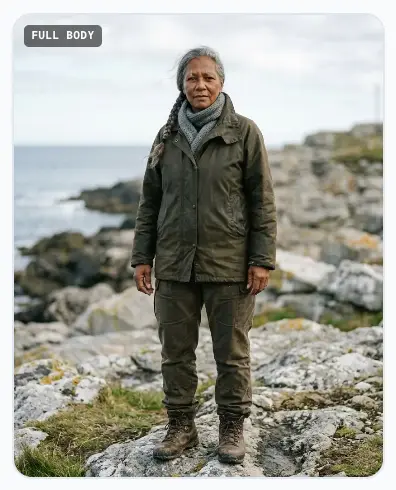

I then put her in a bright modern kitchen holding a mug, a setting that shares nothing with the windswept coast the platform invented for her reference frames. She was still recognizably the same woman, and she held the mug correctly in a pose the reference set never contained.

The photo-built character was the harder test. I uploaded one head-and-shoulders shot, and Cast built six more frames from it, including two full-length ones with legs, boots, and a floor invented from nothing.
Then I changed the wardrobe completely, from a plain shirt to a green velvet robe, across every angle. Then I rendered a candlelit library at night, when every reference frame was flat daylight against a pale wall. It held through all three changes, correctly relit.

The yeti gave the clearest evidence of the three, and for a small reason. His scarf hangs over one shoulder, and it stays on that same shoulder in every frame.
In the rear view it appears on the opposite side of the picture, which is exactly what a real scarf does when you walk around behind someone. The platform is not copying pixels between frames. It is holding an arrangement in three dimensions, which is why the cabin render works at all.
What It Costs to Actually Use
Building a character is the expensive part. Using one is cheap.
Action
Credits
Roughly
Character from a description
200
$0.90
Character from your photos
175
$0.79
Each scene render
25
$0.11
Touch up all seven frames
175
$0.79
Restyle, test on one frame
25
$0.11
Restyle, apply to all angles
150
$0.68
Character from a description
Credits: 200
Roughly: $0.90
Character from your photos
Credits: 175
Roughly: $0.79
Each scene render
Credits: 25
Roughly: $0.11
Touch up all seven frames
Credits: 175
Roughly: $0.79
Restyle, test on one frame
Credits: 25
Roughly: $0.11
Restyle, apply to all angles
Credits: 150
Roughly: $0.68
On the Spark tier at $9 a month, 2,000 credits covers one character and roughly seventy images, or ten characters and nothing else. For a part-time publisher running two posts and a handful of pins a week, that is comfortable. It stops being comfortable if you build characters experimentally, which is exactly what a new user is tempted to do.
The free tier’s 750 starting credits will build three characters, or one character and twenty-two images. Enough to see whether Cast works for you. Not enough to run on.
Two features deserve credit here. The restyle flow lets you test a change on one frame for 25 credits before committing 150 to the rest, with a note in the interface telling you to do exactly that. And you can render a test scene before saving a character at all, so you can see the thing working before you commit to it. Both are unusual, and both save real money.
Two Things the Marketing Will Not Tell You
Clothing carries over. My described character wore her heavy outdoor coat into a bright kitchen, because the scene description said nothing about wardrobe. If you are putting a character somewhere their reference outfit does not belong, say what they are wearing.
And the character marketplace is not live. The platform’s own materials point toward public characters becoming something other creators can cast, with the original owner earning when they do, but no numbers are attached and the option is locked in the app.
For a character built from your own photos, the exclusion is permanent by design: photo-built characters stay personal and cannot be listed publicly at all. Treat the earning angle as a stated direction, not a feature you can plan around.
Who Cast Is For
If you want to appear in your own post and social images without a photo shoot for every piece, the photo route is the strongest use case on the platform. One upload, 175 credits, and every image after that costs about eleven cents.
If you want a recurring character who is not you, a host or a spokesperson or a mascot, the description route does that well. Accept that you are choosing from four interpretations rather than getting exactly what you wrote, and get the rendering style right in your first description.
If you want an abstract logo or an object as your recurring figure, Cast is the wrong tool. It builds things with faces and limbs.
The combination of workshops, Cast, and remix attribution is what separates Kre8or.AI architecturally from a standalone generator. Whether that structure fits your workflow depends on how much design consistency and collaborative monetization matter relative to your current production goals.
The Economics of Kre8or.AI (Subscriptions and the Referral Structure)
The pricing structure removes most of the financial risk from the evaluation process. A free tier with a starting credit balance lets you work through the platform’s core features before any subscription begins, so the first practical question is not whether to pay but whether this tool fits what you need in a real workflow.
Paid plans open at $9 per month and run in four tiers. Everything is priced in credits, which is the number that actually matters once you start using the character system, because building a character costs far more than generating an image.
Here is how the tiers compare on the two things that determine whether a plan fits your output.
Plan
Price
Credits
Storage
Free
$0
750 to start
Not stated
Spark
$9 per month
2,000 monthly
250 images
Creator
$29 per month
7,000 monthly
1,000 images
Visionary
$99 per month
27,500 monthly
5,000 images
Custom
Quoted
Up to 200,000 monthly
Not stated
Free
Price: $0
Credits: 750 to start
Storage: Not stated
Spark
Price: $9 per month
Credits: 2,000 monthly
Storage: 250 images
Creator
Price: $29 per month
Credits: 7,000 monthly
Storage: 1,000 images
Visionary
Price: $99 per month
Credits: 27,500 monthly
Storage: 5,000 images
Custom
Price: Quoted
Credits: Up to 200,000 monthly
Storage: Not stated
Credits can also be bought outright at $0.0045 each; they never expire, and they stack on top of a monthly allowance.
That rate is worth checking against the plans, because Spark works out to exactly the same $0.0045 per credit while Creator drops to about $0.0041 and Visionary to roughly $0.0036. The larger plans are genuinely cheaper per credit, and buying top-ups is always the most expensive way to get them.
The earning side of the platform works separately from the subscription.
Earning Parameter
Detail
Referral commission
10% lifetime recurring
Payout infrastructure
9 integrated payout methods
Derivative revenue
Automated remix kickbacks
Referral commission
Detail: 10% lifetime recurring
Payout infrastructure
Detail: 9 integrated payout methods
Derivative revenue
Detail: Automated remix kickbacks
For affiliate marketers, the referral layer is worth examining separately from the subscription value. A 10% lifetime recurring commission means earnings from a referred subscriber continue for as long as that subscriber stays active, not just at the point of initial sign-up.
That structure rewards early adoption because the value compounds as your referral base grows over time. Nine integrated payout methods broaden global access, which matters for builders operating outside of markets where a single payment rail might not be reliable.
The platform’s referral share panel connects image sharing with campaign tags, custom messages, and direct referral tracking.
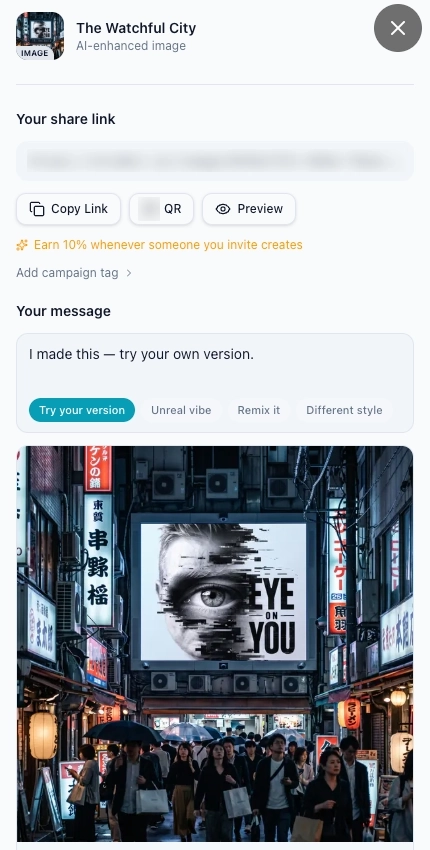
A few practical notes on the economics worth stating directly. The $9 Spark tier gives you 2,000 credits a month. For a part-time creator publishing two posts and five pins a week, that covers your monthly image production comfortably, with room to build one reusable character on top of it.
Heavy users running high-output content calendars will hit those limits, and so will anyone who builds characters experimentally rather than sparingly, since each one costs the equivalent of seven or eight finished images.
That is a standard limitation of credit-based generation systems, not a hidden flaw. Know your monthly image output needs before selecting a tier, and verify current credit allotments on the Kre8or.AI platform page before committing.
One compliance point: if you plan to promote Kre8or.AI through its referral program, standard affiliate disclosure requirements apply. The FTC affiliate disclosure guidelines are the baseline reference for structuring that disclosure correctly.
Kre8or.AI vs the Wealthy Affiliate Artist (Which Tool Fits Your Workflow?)
These two tools aren’t competing for the same job, and that’s the most useful way to compare them. The Artist is Wealthy Affiliate’s image maker (it replaced Image Studio in the October 2026 relaunch), built for someone publishing content to their own site from inside the platform.
Kre8or.AI is a standalone design environment aimed at social media branding, campaign consistency and creating alongside a public creator network.
The difference shows up in where each one sits. On Wealthy Affiliate, the Artist draws on the same monthly credits as the Writer and Ace, and you reach it from Studio, from inside an article (Suggest images, then Make all) or by asking Ace.
It drafts a brief from your request, editing that brief costs nothing, and it shows a credit estimate before you make the image. The estimate and the charge can differ: an article cover I made for my Wealthy Affiliate review was estimated at about 900 credits and charged 434.
Kre8or.AI sits outside that system. You open it separately and carry what you make into whatever publishing workflow you already run.
Here is how the two compare on the points that matter most to a part-time builder (Wealthy Affiliate side checked October 2026):
Feature
Kre8or.AI
Wealthy Affiliate Artist
Where it lives
Standalone public web app
Inside Wealthy Affiliate: Studio, articles and Ace
What it costs
$9.00 monthly subscription
Credits from your WA plan (free Starter has 4,000 once; Builder is $29 a month)
Referral program
10% lifetime recurring commissions
About 40% recurring on memberships, through the WA affiliate program
How you direct it
Guided workshops and your own prompts
A brief the Artist drafts and you edit for free, plus preset styles
Sharing
Remix tracking and peer-to-peer sharing
Your own library in Studio, sorted by Hub
Earning from images
Remix kickbacks and direct affiliate links
None directly; the images serve your own site
Consistency
Workshops, remixing and Cast saved characters reusable across scenes
Up to five reference images it matches for style, palette and identity
Where it lives
Kre8or.AI: Standalone public web app
Wealthy Affiliate Artist: Inside Wealthy Affiliate: Studio, articles and Ace
What it costs
Kre8or.AI: $9.00 monthly subscription
Wealthy Affiliate Artist: Credits from your WA plan (free Starter has 4,000 once; Builder is $29 a month)
Referral program
Kre8or.AI: 10% lifetime recurring commissions
Wealthy Affiliate Artist: About 40% recurring on memberships, through the WA affiliate program
How you direct it
Kre8or.AI: Guided workshops and your own prompts
Wealthy Affiliate Artist: A brief the Artist drafts and you edit for free, plus preset styles
Sharing
Kre8or.AI: Remix tracking and peer-to-peer sharing
Wealthy Affiliate Artist: Your own library in Studio, sorted by Hub
Earning from images
Kre8or.AI: Remix kickbacks and direct affiliate links
Wealthy Affiliate Artist: None directly; the images serve your own site
Consistency
Kre8or.AI: Workshops, remixing and Cast saved characters reusable across scenes
Wealthy Affiliate Artist: Up to five reference images it matches for style, palette and identity
If you need the same character to show up across a social campaign, Kre8or.AI addresses that more directly, and Cast is the reason.
The Artist’s closest tool is References: you attach up to five images, and it matches their style, palette and identity on every image until you remove them. That helps hold a look, but it’s a set of uploads you manage yourself, not a saved character library like Cast.
If you need clean blog images that land in the post you’re writing, the Artist does that without another tool or subscription. Write your own prompt and paste it over the Artist’s brief rather than accepting its first draft, because its rewrites can drift from what you asked for. I walk through the prompt method I use in how to create blog images that match your site.
For anyone still deciding whether Wealthy Affiliate is the right foundation before choosing which image tools to add, read my complete Wealthy Affiliate review for the plans, how credits work and who the platform suits.
Human Capital vs Token Capital (Why Your Judgment Is the Real Multiplier)
There is a pattern developing across the AI tool space worth naming explicitly. As raw generation capability becomes less differentiated between platforms, the actual value in the ecosystem shifts toward what the tool enables humans to do rather than what the tool produces in isolation.
A generation engine accessible to anyone at $9 per month has commoditized the token side of the equation. What has not commoditized is the judgment layer: knowing which creative direction to take, which character to lock, which template fits the actual audience, and which remix adds something the platform’s creator network will build upon.
Kre8or.AI structures its economics around this reality. The remix attribution system and the referral commission are both designed to reward human creative input, not just usage volume.
An automated model running without direction generates output in circular loops because there is no business context to organize what gets produced. A creator who understands their niche, their audience’s visual expectations, and the content gaps they are filling can direct those same generation tools toward assets that hold real commercial value.
That principle applies directly to the affiliate marketing context. The creators who will get the most out of Kre8or.AI are not the ones who generate the highest image volume. They are the ones who generate the right images: consistent with their brand identity, calibrated to their distribution channels, and tied to content goals that have been thought through in advance.
The platform provides a structured environment. The judgment about what to build still belongs to the person directing it.
The Final Verdict (Is Kre8or.AI Worth Your Time and Budget?)
Kre8or.AI solves a specific problem. If that problem is yours, the platform earns its $9 per month. If it is not, adding it to your tool stack creates management overhead without proportional output benefit.
Here is the decision framework that makes that evaluation clear:
Add Kre8or.AI if:
- You want a recurring character, whether that is you or a figure you invent, appearing consistently across your posts and social channels.
- You produce content for Pinterest, social media campaigns, or any distribution channel where visual variety and high-fidelity output matter more than basic blog graphic generation.
- You want a referral income stream tied to a platform you are already using to generate content assets.
- You are running promotional campaigns where template consistency across different formats is a regular production requirement.
Skip It (for Now) if:
- Your current image needs are primarily basic hero images for blog posts inside a unified business platform.
- You are still in the early stages of building your affiliate site and do not yet have a consistent visual production workflow to improve upon.
- Adding a standalone tool requires management bandwidth that your current production volume cannot support.
- The recurring figure you had in mind is an object, a logo, or something without a face and limbs, since Cast builds characters around a human or animal body plan.
The free tier removes the commitment risk from the initial evaluation. Its starting balance is enough to build one character and put it through a handful of scenes, which is the fastest way to find out whether Cast solves your problem.
If the outputs match your production needs, the entry price is low enough to warrant a month of real use before making any longer-term call.
Kre8or.AI works best as a standalone addition to an established business system, not as the business system itself. The foundation of a sustainable affiliate income model is still a well-structured site, keyword-targeted content, and a consistent publishing workflow.
If that foundation is not in place yet, the better next step is to sort out your business system before adding another standalone tool.
If you already have your niche, website, and content workflow in motion, use the free tier to build one character and run it through the content types you actually publish before paying for a plan.
If you have questions about Kre8or.AI’s workshops, the Cast character system, remixing, or how it compares to the Wealthy Affiliate Artist, leave them in the comments below. I read and answer every message.

Sonia Zannoni
Hi, I’m Sonia Zannoni, creator of Click to Prosper. I share practical tools, workflows, and honest guidance to help you build an online business with more clarity and less chaos.
About Sonia
Feeling stuck between too many tools and too much advice? Start with the beginner path.
View the Blueprint