How to Build a 30-Day Content Plan with Jaaxy AI (Step-by-Step)

Most beginners treat keyword research like a collection problem. The longer the list, the better prepared they feel. So they pull terms into a spreadsheet, add columns, color-code rows, and end up with three hundred entries and no clear path forward. A Jaaxy AI Content Plan works differently.
The list is not the plan. It is the raw material. And if you have been sitting down for a free hour, opening Jaaxy, and walking away with more data and less direction, that is not a research problem. That is a system problem.
You do not need a complex corporate software suite or a full-time content team. You need a simple, mechanical process that takes the raw terms you already have and maps them into a 30-day publishing schedule you can actually execute.
This guide walks you through the Part-Time Content Sequence Blueprint: how to find low-competition terms, classify them by intent, and slot them into a four-week calendar that builds authority without burning through the limited hours you have.
TL;DR: 30-Day Content Planning
The Transition from Keyword Lists to Actionable Schedules
Here is what metric stalling looks like in practice. You open your keyword tool, find a promising term, check the search volume, check the competition score, check the trend line, add it to the list, and repeat. Forty-five minutes later, you have twelve more keywords and zero published posts.
That feels like progress. It is not.
This is where most part-time builders lose their momentum. Not because they lack keywords: a motivated beginner can generate hundreds of raw terms in a single session. Raw lists have no sequence, no priority, and no built-in logic for what to write next. Every time you sit down to publish, you go back to the list, feel overwhelmed by the options, and spend your free hour re-evaluating instead of writing.
Without an organized workflow, part-time creators lose critical hours every week managing administrative friction and digital clutter rather than producing actual work. When you only have a few hours a week to spare, that friction can consume your entire content budget before you even open a draft.
A documented content calendar breaks that loop. Before you open your editor, you already know the topic, the target keyword, and how this post connects to the one before it. That shift, from a pile of options to a locked publishing sequence, is what separates creators who build authority from those who produce isolated posts and wonder why nothing gains traction.
Finding Low-Competition Seeds with the Alphabet Soup Method
To beat analysis paralysis when choosing a seed keyword, do not default to generic, broad topics. Start with the single most common question an absolute beginner asks in your niche (such as “how to start list building” rather than just “email list”) to instantly ground your research.
This narrow starting point is your seed keyword. It is the single phrase that describes your topic at its broadest practical level. You do not need dozens of seeds. One or two that are tight enough to anchor a coherent 30-day publishing plan is enough. (If you have not settled on your topic area yet, working through choosing a target affiliate niche before this step will save you several wasted research sessions.)
Once you have a seed, run it through Jaaxy’s Alphabet Soup function. The tool appends letters of the alphabet to your seed phrase and surfaces autocomplete variations that real searchers are actually typing. You are not guessing at topics. You are reading query patterns from a search engine that has tracked billions of searches.
When you evaluate each result, focus on these core indicators within the interface
- Monthly Searches: Target 50 or higher. Below this threshold, a first-page ranking might earn you minimal weekly visitors, making the post a poor return on your limited time.
- SEO: Target positions that register as Good or Excellent (indicated by green scores like 75, 80, or 85). This reflects how achievable a top ranking is for a newer site. A Medium rating means established pages have already claimed the top positions, while green ratings indicate an open gap.
- PPC & Social: Use these indicators to gauge transactional intent and social media visibility scores.
- Intent: Note the tags Jaaxy assigns to each result, such as Learn or Compare. You are not filtering by this column yet; you are reviewing it now so the classification step takes half the time.
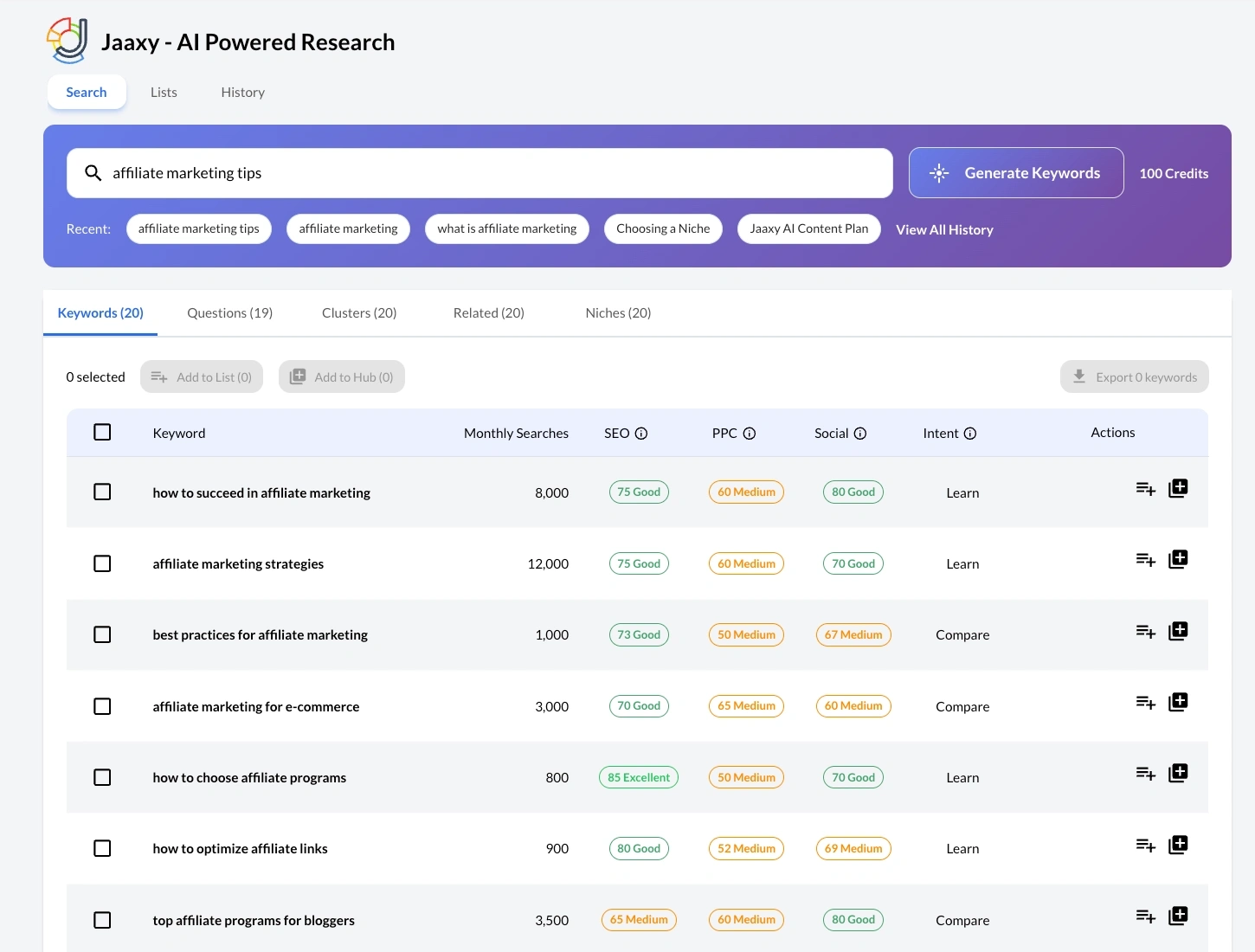
Older versions of the tool included a Domains column for tracking exact-match domain availability. That column is gone from the current interface entirely. It was a legacy metric from an era when a keyword-matched domain name carried real ranking weight.
Search engines have moved on, and the modern interface drops the distraction. Your focus stays where it belongs: keyword quality, intent, and competition level.
When you find a term with a Monthly Searches count above 50 and a solid SEO score, save it. Note the Intent tag alongside it. That keyword belongs in your candidate list for the 30-day plan with its intent classification already attached. Once you have 12 to 15 solid candidates, a simple keyword research routine can help you triage them into a priority order before you move to the scheduling phase.
The Intent-to-Calendar Protocol (Classifying Your Keywords)
Having 12 qualified keywords is not a 30-day content plan. It is a list of 12 qualified keywords. The step that turns that list into a schedule is intent classification.
Search intent is the “why” behind a search query. Google’s four-category framework, documented in Google’s Search Central Developer Guides, classifies queries as Know (the searcher wants information), Do (they want instructions for completing an action), Go (they are navigating to a specific destination), and Buy (they are ready to evaluate or purchase).
For a blog-based affiliate site, most of your content targets Know and Do intent, with Buy-intent posts reserved for product reviews and comparisons. Those are the hardest ones to get right, so it helps to have a repeatable structure for an affiliate review before the first Buy-intent post lands on your calendar.
The modern Jaaxy interface speeds up this step by labeling each keyword with an intent classification directly in the search results. The tool tags relevant search trends into distinct categories like Learn or Compare. Learn maps cleanly to informational and how-to content, while Compare aligns directly with commercial and transactional pages.
This automated tagging is a useful first filter, not a final answer. Before you assign any keyword to a calendar slot, type it into Google and look at what already ranks. How-to guides and explainers confirm informational intent, while product pages and comparison tables signal commercial traffic, regardless of what the initial tag shows. (The step-by-step process for reading a SERP (Search Engine Results Page) result-by-result is covered in the guide on how to verify user search intent.)
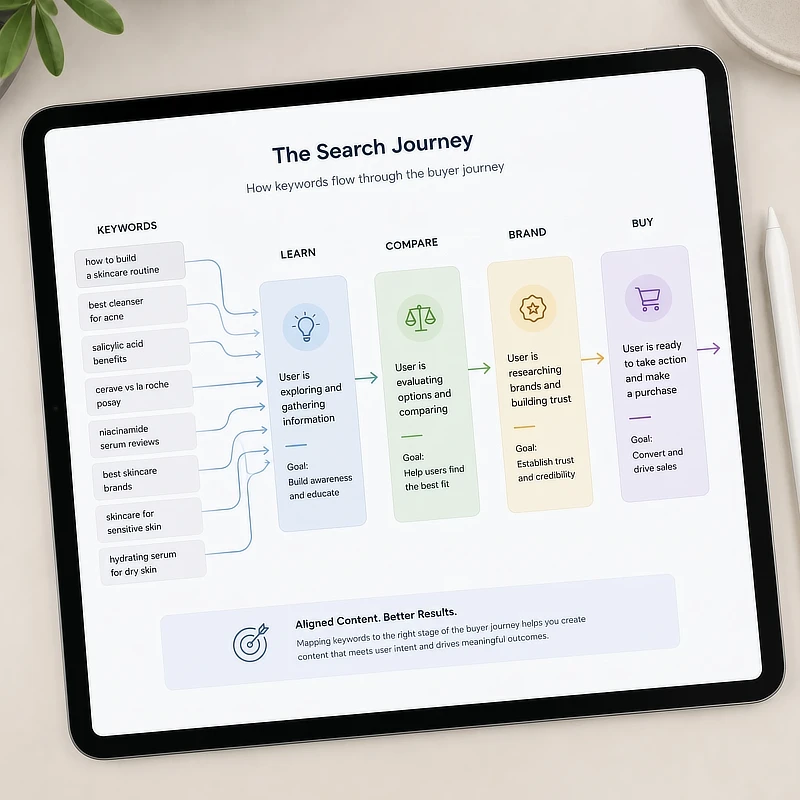
Once you have confirmed the intent behind each keyword, group related long-tail terms (highly specific, multi-word search phrases that are easier to rank for) under a single content cluster. “Best free keyword tools for beginners,” “free keyword tools affiliate marketing,” and “Jaaxy free tier review” are all variations of the same commercial query. They should feed one well-structured comparison post, not three separate articles competing against each other for the same ranking slot.
The Part-Time Publishing Sequence (Your 4-Week Blueprint)
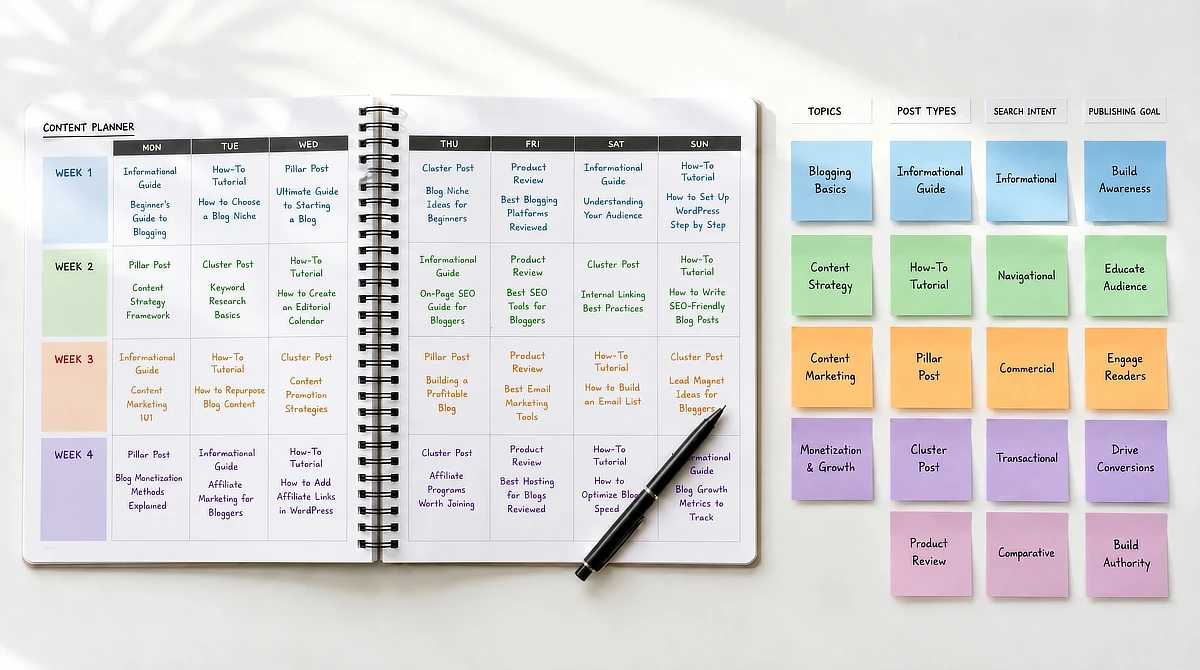
Eight posts in four weeks. That is the blueprint. Not a vague content strategy or a wish list of topics, but a locked sequence with a specific logic behind the order.
The sequence is built around how search engines assess topical authority. You start with foundational informational content, which signals to Google that you cover a topic in depth. You follow with practical tutorials that answer the specific “how do I” queries your readers are already typing.
The third week introduces a pillar post and a tightly focused cluster post, which creates a linking structure search engines can crawl and recognize. The fourth week brings commercial posts: reviews and comparisons that convert readers who have already been educated by the first three weeks.
According to the Content Marketing Institute, documenting an operational content plan increases overall marketing effectiveness by 60 percent. The plan exists on paper so that execution is never a guess.
Here is what the four-week structure looks like in practice:
Week
Post Type
Search Intent
Strategic Goal
Week 1
2x Informational Guides
Know (Informational)
Build foundational topic authority
Week 2
2x Step-by-Step Tutorials
Do (Action/Tutorial)
Answer precise reader search queries
Week 3
1x Pillar Post + 1x Cluster Post
Know / Do
Establish deep-dive topical relevance
Week 4
2x Product Reviews / Comparisons
Buy (Transactional)
Capture transaction-ready traffic
Week 1
Post Type: 2x Informational Guides
Search Intent: Know (Informational)
Strategic Goal: Build foundational topic authority
Week 2
Post Type: 2x Step-by-Step Tutorials
Search Intent: Do (Action/Tutorial)
Strategic Goal: Answer precise reader search queries
Week 3
Post Type: 1x Pillar Post + 1x Cluster Post
Search Intent: Know / Do
Strategic Goal: Establish deep-dive topical relevance
Week 4
Post Type: 2x Product Reviews / Comparisons
Search Intent: Buy (Transactional)
Strategic Goal: Capture transaction-ready traffic
The order is not optional. Publishing a product review in week one, before any topical context exists around it, means that review competes alone with no related content or established relevance signal. Build the foundation first. The commercial posts perform better because of everything that surrounds them when they finally arrive.
A review is also a different writing job from the guides and tutorials that came before it. The keyword decides who lands on the page, and how you structure the review decides whether they believe your verdict once they are there.
How Much Time Does This Actually Take
Maintaining a two-post-per-week schedule while working a full-time job can feel daunting. To protect your writing time, here is a realistic time-allocation model that fits around a full-time schedule:
- Keyword Planning & Sequencing (Week 1): 1 hour to lock the calendar. This is a single setup session that keeps you focused for the rest of the month.
- Research & Outline Prep (Per Post): 1 hour to gather your facts and set up the Article Designer framework inside your dashboard.
- Draft Editing & Polishing (Per Post): 2 to 3 hours to perform the crucial human-led quality pass, inject specific examples, and ensure a conversational flow.
Before you begin drafting, take ten minutes to map this 4-week blueprint onto a free, zero-friction visual tool like Google Calendar, Trello, or a simple physical planner. Seeing your topics anchored to actual dates on a calendar turns a theoretical plan into a concrete commitment.
Executing Your Schedule Inside Wealthy Affiliate Business Hubs
You have a 30-day schedule with eight posts, each with a validated keyword, a classified intent, and a clear position in the publishing sequence. The next question is where all of this lives and how you act on it without creating another layer of administrative overhead.
This is where the integrated Wealthy Affiliate Business Hubs platform earns its place in the workflow. Older content planning systems required you to export a CSV (a standard spreadsheet file format), open a spreadsheet, copy the rows you wanted, and then paste them into a separate planning document. The current Jaaxy interface removes all of that friction.
When you find a keyword that clears your thresholds, you do not need a complex export process. Instead, use the simple interface actions:
- To add keywords individually: Locate the Actions column on the right side of the results table. Clicking the action icons inline allows you to instantly save terms or queue them directly into your workflow.
- To add keywords in bulk: Check the selection boxes next to your chosen keywords on the left side of the table, then use the global Add to Hub button located at the top of the search grid.
From there, the AI Article Designer picks up the keyword you just added and uses it to generate a structural first draft. That draft is a starting point, not a finished post. Every output needs a human-led editing pass to match your site’s voice, add workflow-specific examples, and replace the generic language that AI defaults to.
The AI handles the architecture. You supply the authority.
Once you have published, record the live URL back in your Business Hub. That closed loop, from keyword discovery to live post, is how a 30-day content plan becomes a repeatable system instead of a one-time effort.
Build Your First 30-Day Plan
A 30-day content plan built on validated keywords, intent-classified sequences, and a logical four-week progression is not a luxury reserved for full-time marketers. It is the minimum viable structure for any part-time builder who wants to stop publishing in isolation and start building topical authority that compounds.
If you are ready to put this workflow into practice, Wealthy Affiliate’s free Starter tier gives you direct access to Jaaxy and the Business Hubs infrastructure to build exactly this kind of plan from day one. No credit card required.
If you have questions about grouping keyword intent, mapping your four-week sequence, or launching drafts inside the business dashboard, leave a comment below. I read and reply to every single one.

Sonia Zannoni
Hi, I’m Sonia Zannoni, creator of Click to Prosper. I share practical tools, workflows, and honest guidance to help you build an online business with more clarity and less chaos.
About Sonia
Feeling stuck between too many tools and too much advice? Start with the beginner path.
View the Blueprint