A Simple Keyword Research Routine for Busy Beginners

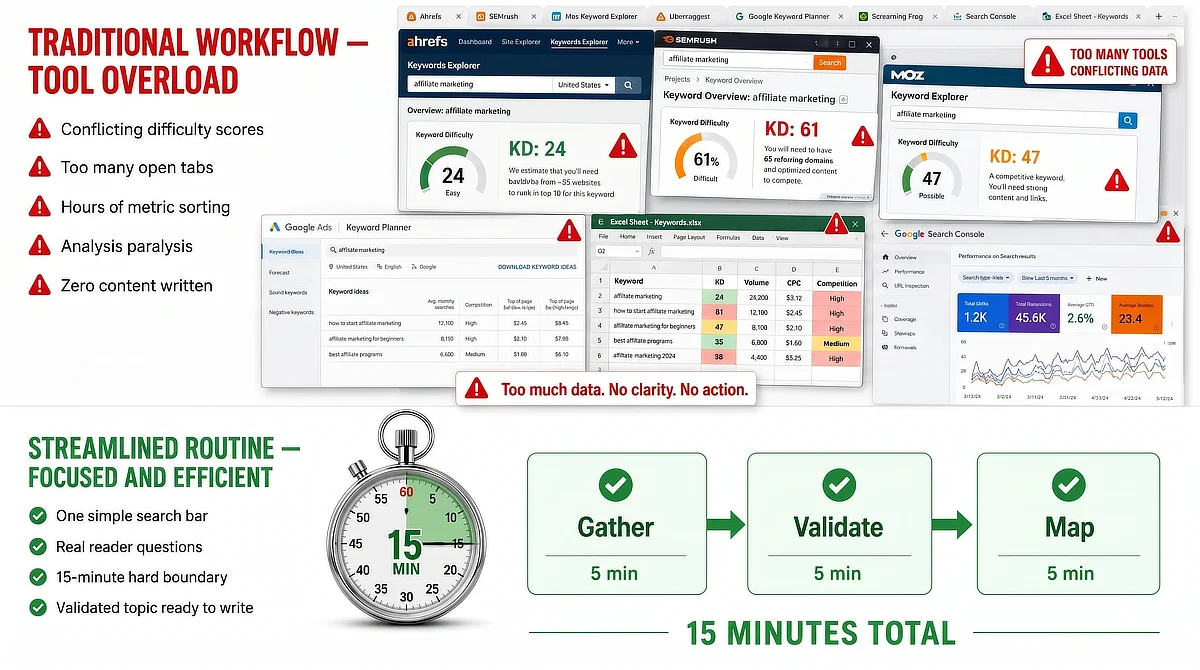
The belief that stops most beginners cold goes something like this: you cannot write a single useful article until you have keyword research completely figured out. So you open a free tool dashboard and spend your available building time staring at columns of conflicting metrics you have never seen before. Tool A gives a difficulty score of 24 for your keyword. Tool B gives it 61. You have not written a word, but you have been “researching” for two hours.
Simple keyword research does not have to work that way. The SEO software industry is built to sell subscriptions, not protect your writing time. Feeling paralyzed by three different difficulty ratings for the same phrase is not a skill gap on your end. It is the product working exactly as designed.
This guide replaces the metric-chasing spiral with a 15-minute stopwatch routine and one simple validation check called the 3-Sentence Rule. This entire process costs exactly $0. You do not need to sign up for free trials, enter a credit card, or pay for premium dashboards. All you need is a physical timer, a standard browser, and a clear decision framework that tells you in under a minute whether a topic is worth writing.
TL;DR: Simple Keyword Research for Busy Creators
Why Most Beginners Fail Before Writing a Single Word (The Tool Trap)
Here is what actually happens when someone follows standard keyword research advice for the first time. They download a free SEO tool, open the dashboard, and immediately find themselves staring at columns they cannot interpret: keyword difficulty, search volume, CPC, competition index, and estimated clicks. Each number has a different scale. Each tool uses a different formula.
This is the Metric Illusion. Two free tools can produce completely opposite difficulty ratings for the exact same keyword, not because one is right and one is wrong, but because they are each measuring something slightly different using their own proprietary scoring system. If you are trying to build a site around a realistic roadmap built around a real side-hustle pace, this kind of dashboard rabbit hole is not research. It is productive procrastination with a spreadsheet aesthetic.
The actual goal of keyword research is simpler than any tool dashboard makes it look. You are trying to find a real question that a real person typed into a search bar, one that you can answer more directly than whatever is currently ranking on page one. Search engines are not grading your metric management. They are trying to serve clear, specific answers to specific questions.
Most beginners lose their early building time to dashboards because the software makes the work feel more complex than it is. The routine in this guide puts the judgment back where it belongs: with you.
The table below compares the two approaches directly.
Comparison Factor
Metric Focus (Traditional SEO)
Relevance Focus (The Simple Routine)
Core Focus
Color-coded difficulty and volume scores
Answering real, specific reader questions
Primary Tool
Premium multi-column software dashboard
A physical stopwatch and organic Google results
Time Required
Hours of sorting, comparing, and second-guessing
A strict 15-minute building block
End Result
Analysis paralysis and unwritten content
A validated topic list ready to draft
Core Focus
Metric Focus (Traditional SEO): Color-coded difficulty and volume scores
Relevance Focus (The Simple Routine): Answering real, specific reader questions
Primary Tool
Metric Focus (Traditional SEO): Premium multi-column software dashboard
Relevance Focus (The Simple Routine): A physical stopwatch and organic Google results
Time Required
Metric Focus (Traditional SEO): Hours of sorting, comparing, and second-guessing
Relevance Focus (The Simple Routine): A strict 15-minute building block
End Result
Metric Focus (Traditional SEO): Analysis paralysis and unwritten content
Relevance Focus (The Simple Routine): A validated topic list ready to draft
The 3-Sentence Rule: Reimagining How You Choose Your Topics
Take any keyword from your research list and ask yourself one question: Can you explain the answer in three clear sentences? If yes, you have a valid topic. If you cannot get there without three paragraphs of technical setup first, the topic is too broad, too technical, or misaligned with what the searcher actually needs.
This check matters because volume numbers pull beginners toward the wrong terms. A keyword with 10,000 monthly searches sounds like an opportunity, but if your answer to it is generic content that covers the same ground as every other result on page one, you have wasted your writing time. A tightly focused question with 200 monthly searches that you can answer in three specific sentences will serve your audience better and build your momentum faster. Part of why picking the wrong niche and getting locked into a topic is so costly early on is exactly this: you end up writing broad content you cannot own, for an audience you cannot serve specifically enough.
The 3-Sentence Rule also keeps your early content exploration loose and adaptive. When you do not have to hit a volume threshold to justify writing something, you can follow genuine reader questions wherever they lead without being locked into a keyword planner’s definition of what counts as worth pursuing.
Think of the check like explaining something to a peer sitting across a table. If you need a whiteboard and forty-five minutes, the topic is wrong for where your reader is right now. If you can say it clearly in three sentences, write it.
To see this check in action, let us look at a concrete example. Suppose you are evaluating the target phrase: “how to track affiliate links in WordPress.” Here is how you run it through the 3-Sentence Rule:
- Sentence 1 (The Hook): You cannot track what you do not measure, and setting up link tracking in WordPress prevents wasted traffic.
- Sentence 2 (The Body): The simplest way to do this is by installing a free redirection plugin like Pretty Links, which turns messy raw affiliate links into clean, branded redirects.
- Sentence 3 (The Takeaway): Once installed, click “Add New” in the plugin dashboard, paste your raw link, and create a clean custom slug.
This quick test proves you have a highly actionable, writable topic. If you can write those three sentences, you are ready to write the article.
The 15-Minute Stopwatch Routine: A Step-by-Step Workflow
The point of this routine is boundary discipline. When your building time is limited and fragmented across a real week, open-ended research sessions are a budget you cannot afford. A physical timer makes the end of your research session non-negotiable, which is the only way to keep research from consuming your writing time.
Here is how the 15 minutes break down. First, set your timer and spend five minutes gathering raw queries from Google’s native interface. Next, spend five minutes applying the 3-Sentence Rule to filter out overly complex topics. Finally, use the last five minutes to sketch your core headings. This routine moves you from research to structure with zero hesitation.
When the timer rings, the research phase is closed. Do not extend it or open one more tool to check another metric. The research phase is done, and your writing session starts. That transition is the whole discipline.
The psychological shift here is real. When you know the clock is running, you stop comparing numbers and start making fast, intuitive decisions based on one question: can I answer this? That question is easier to answer in 30 seconds than any difficulty score algorithm.
Where to Look: Finding Real Reader Questions Without Premium Software
You do not need a paid subscription to find what your future readers are searching for. Google surfaces that data for free, in real time, through tools already built into the search bar you use every day.
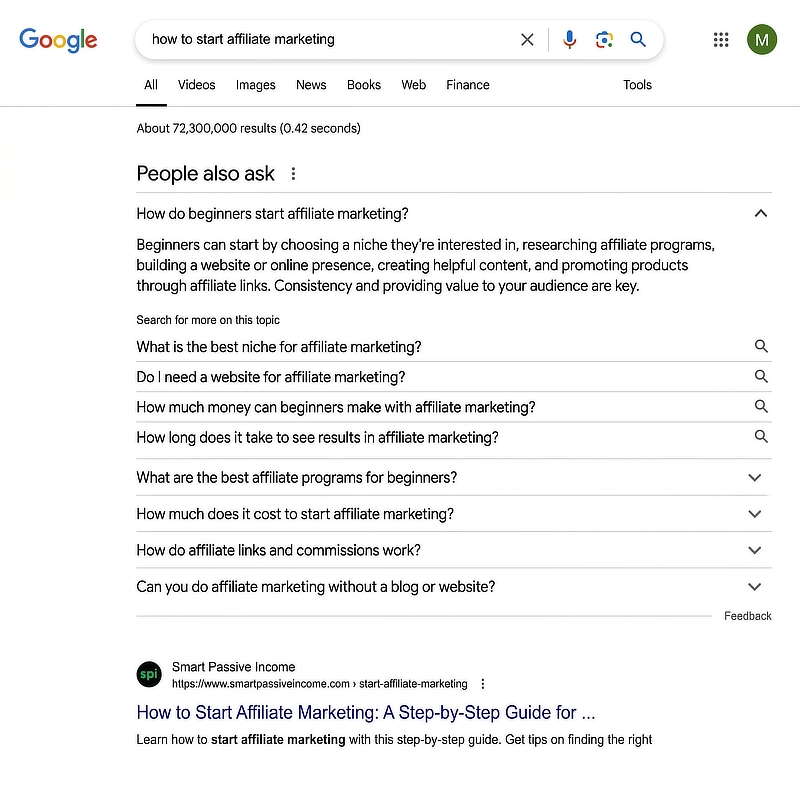
Two native methods do most of the work: the auto-suggest drop-down that appears as you type and the “People Also Ask” accordion that shows up mid-results on most informational searches. Together, they give you a direct window into the vocabulary your audience uses when they are stuck, confused, or trying to make a decision.
Mining the Google Auto-Suggest Drop-Down
Open an incognito browser window so your personal search history does not filter the results. Type your seed keyword and add a space, without pressing enter. The drop-down that appears is Google’s real-time map of the most commonly searched completions for that phrase.
You can pull much more out of this by using Google’s wildcard operator, which is just the asterisk (*) key acting as a fill-in-the-blank placeholder. Try typing “how to * affiliate marketing” or “affiliate marketing vs *” and pause before pressing enter. Each wildcard slot fills with terms that reflect how real people phrase their uncertainty. This surfaces the exact vocabulary you would never find in a database column, and it gives you the precise language that belongs in your draft headings.
Opening the People Also Ask Accordion
Run a search on your topic and look for the “People Also Ask” box below the top results. Expand one answer, and Google will instantly generate more related questions in the same box. Click a few more to grow your list.
What you are watching is Google’s own semantic map of the topic (essentially a web of how Google connects related ideas and terms in its mind), built from real search behavior. Every question that loads is a query that real people submitted. Work through the accordion for two minutes, and you will have more validated, specific topic ideas than most premium tool scans produce, and you spent nothing to get them.
Listening to Real Conversations on Forums
Search Reddit or a niche-specific community for your topic and sort by recent results. Pay close attention to how people phrase their problem, not just what the problem is. The exact words someone uses when they are stuck, the specific comparison they are trying to make, the technical barrier they cannot clear: all of that vocabulary belongs in your article headings.
Forum language is unfiltered. When someone writes a post titled “I’ve been trying to figure out why my affiliate link won’t track for three hours, and I still cannot find the answer,” that sentence tells you the emotional state, the specific problem, and the reader’s exact vocabulary in one shot. It is worth more to your topic list than any keyword estimate a database produces.
Sorting Your Topics: How to Spot a High-Intent Search in Seconds
Not all search queries carry the same value from a business standpoint. Some are exploratory: someone trying to understand a concept, building general background knowledge, or just beginning to form an interest. Others come from someone standing directly in front of a specific problem, ready to act on a clear answer.
Those are the queries worth your limited writing time.
Low-Intent Queries (The Broad Information Trap)
Low-intent queries are typically short, broad, and dominated by major media sites with high domain authority. Domain authority is Google’s internal trust score based on how established, old, and highly linked a website is, and a new affiliate site will not match it for years. Even if you write an excellent article on a broad topic, the competition for that ranking position simply is not in your favor yet. Beyond the competition, those readers are in exploration mode rather than looking for a specific recommendation to implement.
Broad traffic that does not convert to engaged reads, email signups, or affiliate clicks does not build your business in any meaningful way. It populates your analytics column and not much else.
High-Intent Queries (The Student Action Signal)
High-intent queries carry action signals: how do I, which one should I use, what is the difference between, how do I set up, is this worth it for someone just starting out. They describe a specific task, a technical barrier, or a direct comparison between two concrete options the reader needs to decide between right now.
These are what I call student questions. The person searching them is not doing background reading; they are stuck on a specific step and need a direct answer. For a site building authority post by post, a handful of highly targeted readers who find exactly what they need will move your business forward faster than thousands of brief impressions. High-intent, smaller-volume content compounds, while broad traffic chasing rarely does.
The Next Step: Translating Your 15-Minute List Into Clear Drafts
Once the timer rings, you have a short list of validated topics and a 3-sentence answer for each one. That answer is not just a validation test. It is the skeleton of your article.
Sentence one becomes your introduction hook: the specific problem you are solving and for whom. Sentence two becomes the core of your body content: the main explanation, step, or comparison that resolves the problem. Sentence three becomes your practical takeaway: the action the reader walks away ready to take. You have a working outline before you ever open a blank document.
If you are looking for an integrated testing environment that keeps your research and site building in one spot, this transition from validated topic to first draft is where a consolidated setup earns its place. You are not switching between a keyword tab, a writing tool, a hosting dashboard, and a training library. You open one workspace and write.
One last point worth making clearly: a finished 400-word post that answers a specific student question is worth more than a perfectly organized spreadsheet of topics you never write about. Completed content compounds; spreadsheets do not. Close the research tabs and open a draft. Spend your next available building session on the post you just validated.
When you are ready to make sure your research is pointed at the right audience from day one, explore our complete sandbox niche strategy to align your research with the right audience.
If you have questions about setting up your keyword timer, using the 3-sentence validation check, or escaping the trap of conflicting dashboard metrics, leave them in the comments below.

Sonia Zannoni
Hi, I’m Sonia Zannoni, creator of Click to Prosper. I share practical tools, workflows, and honest guidance to help you build an online business with more clarity and less chaos.
About Sonia
Feeling stuck between too many tools and too much advice? Start with the beginner path.
View the Blueprint