

How to Structure Your Affiliate Website Categories from Day One

Twenty categories. One post in each. That is what a lot of affiliate sites look like around month three, and it happens for a reason that feels completely logical while you are doing it. You publish a post about email marketing, so you create a category called Email Marketing. Next week you publish something about hosting, so now there is a Hosting category too.
Your category count grows at exactly the same rate as your post count, which means your affiliate website structure is not really a structure. It is a second copy of your post list.
If that is what your Posts screen looks like right now, you have not done anything strange. Categories sit right there in the sidebar every time you publish; they feel like they are asking you to describe the post, and nobody tells you they are supposed to stay still while everything else grows. The fix is also smaller than you are probably expecting. On most beginner sites, it takes about fifteen minutes.
Here is the whole thing: a three-to-five category blueprint you can set today, a decisive rule for what to do about tags, a permalink check to run before you change anything on a live site, and the cleanup routine for posts already sitting in Uncategorized.
TL;DR: Affiliate Website Structure
The Single-Post Category Trap (Why 20 Categories Hurt Early SEO)
The root of the problem is that categories look like keywords. They sit in the same publishing sidebar as your tags and your excerpt; they take text input, and the natural instinct is to describe what the post is about. So you describe every post, and you end up with a category for every post.
What you are actually doing is telling WordPress to build a new section of your website. Every category you create generates an archive page automatically, at its own URL, with its own title. A category holding one post is a live page on your site whose entire content is a link to one article.
Now multiply that. Twenty single-post categories means twenty pages that exist mainly to point at something else, and each one duplicates the title and excerpt of the post it links to. I would not tell a beginner this is going to tank a site overnight, because a small site with a few hundred URLs is not going to overwhelm anything Google does.
The real cost is quieter. You are asking a search engine to form an impression of your site from a set of pages that look unfinished, and you are asking readers to navigate a menu with twenty options that each lead to one article.
There is a simple threshold that keeps this from happening. A category earns its place only if you already have three to five posts for it, or you can name the next three or four you are going to write for it this month.
If you cannot, the post belongs inside a broader category you already have. That is the rule I apply before creating anything new, and it is the difference between a taxonomy that holds up at 100 posts and one you have to rebuild twice.
If your site is not built yet and you are reading ahead, the initial WordPress site setup is the step that comes before this one. This post assumes the site exists and the filing system does not.
The 3 to 5 Category Blueprint: Defining Your Main Content Hubs
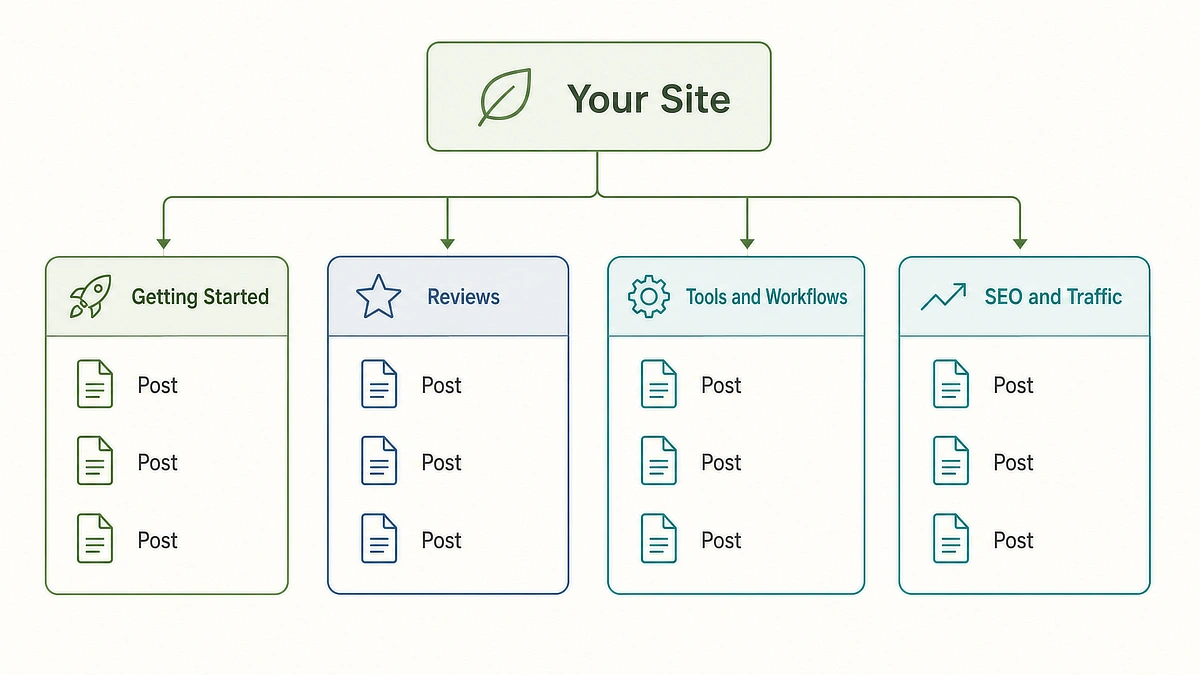
Your categories should map to the reasons people arrive, not to the products you review or the keywords you target. A beginner affiliate site usually has three or four reader situations, and those situations are your categories.
A blueprint that works for most affiliate sites looks like this:
- Getting Started for readers who have not begun yet and need the path explained in order, from picking a niche to publishing a first post.
- Reviews and Comparisons for readers with money in hand who are deciding between two named options and want an honest verdict.
- Tools and Workflows for readers who already have a site and are trying to make the building part faster or less fragmented.
- SEO and Traffic for readers who have published and are wondering why nobody is finding it.
Four categories. Every post you will ever write fits one of them, and a reader landing on any archive page finds a genuine section of a site rather than a stub.
The honest tradeoff is that broad categories give you archive pages that are less tightly focused than a narrow one would be. A category called Keyword Research for Beginners is more specific than SEO and Traffic, and in a vacuum, specific beats broad. It is not a vacuum.
Narrow categories only outperform broad ones once you have enough articles to fill them, and until then you are splitting a small library across many shelves instead of building a few that look substantial. Broad first, narrow later, is the sequence that survives.
Later is a number you can hold yourself to. Add subcategories when a main category passes roughly fifteen to twenty posts and readers are visibly struggling to find things inside it. Below that count, a subcategory takes an archive page that was starting to look credible and splits it into two that do not.
One more rule, and this one has a mechanism worth knowing. Assign each post to exactly one category.
When a post sits in three categories, it appears on three archive pages, and unless you have set a primary category in Rank Math or Yoast, the breadcrumb trail a reader follows back is whichever one WordPress picks rather than the path they came in on.
Clean structure means every post has one home, and cross-topic connections happen through links inside the article instead.
Categories vs. Tags: The Table of Contents vs. Index Framework
This is the part most beginners get stuck on, and the distinction is simpler than the WordPress interface makes it look. Categories are the table of contents at the front of a book. Tags are the index at the back.
The table of contents has a small number of entries; they are broad, and they are arranged in order so you can see the shape of the whole book. The index has hundreds of entries; they are specific, and they exist for someone hunting one detail across chapters.
WordPress’s own guidance on categories and tags frames it the same way: categories separate your topics so readers can skip what does not interest them, while tags join topics across those divisions.
Here is the practical comparison, so you can decide what to do with each one on your own site:
Feature
WordPress Categories
WordPress Tags
Purpose
Table of contents, broad structural sections
Index, specific cross-cutting details
Hierarchy
Supports parent and child levels
Flat, no hierarchy possible
Requirement
Mandatory, at least one per post
Optional, a post can have zero
Recommended count
3 to 5 across the entire site
0 to 3 per post, or unused entirely
SEO archive setting
Index, with a real written description
Noindex, recommended for early sites
Purpose
WordPress Categories: Table of contents, broad structural sections
WordPress Tags: Index, specific cross-cutting details
Hierarchy
WordPress Categories: Supports parent and child levels
WordPress Tags: Flat, no hierarchy possible
Requirement
WordPress Categories: Mandatory, at least one per post
WordPress Tags: Optional, a post can have zero
Recommended count
WordPress Categories: 3 to 5 across the entire site
WordPress Tags: 0 to 3 per post, or unused entirely
SEO archive setting
WordPress Categories: Index, with a real written description
WordPress Tags: Noindex, recommended for early sites
The trap with tags is that they cost nothing to add and generate a page every time. Ten tags on a post feels like thorough organizing, and it creates ten new archive URLs.
Do that across thirty posts and you have well over a hundred tag pages on a site with thirty articles, most of them holding one or two posts, all of them competing with your actual content for attention in search results.
So here is the decisive version. Use zero to three tags per post, or skip tags completely and set tag archives to noindex in Rank Math or whichever SEO plugin you run.
Noindex is the setting that tells search engines to leave those pages out of results entirely, which is what you want for an archive with nothing on it. On a site under fifty posts I would take that second option without much hesitation, because tags solve a discovery problem you do not have yet.
The objection I hear at this point is reasonable: can’t tags rank as keywords? In practice, almost never on a small site.
A tag archive is a list of post titles with no original writing on it, which is the weakest kind of page you can publish, and in the rare case one does start ranking, it is competing against the article you actually wanted people to read. Put your keyword work in the post, the title, and the URL, where it can win something.
The Permalink Safety Check: Verify Before Changing Any Live Categories
Do not reorganize a single published post until you have run this check. It takes about ten seconds and it is the difference between a tidy site and a set of 404 errors.
Go to Settings > Permalinks in your WordPress dashboard and look at what your post URLs contain.
If your structure is /%postname%/, you are clear. Your post URLs are built from the post title alone, so you can move articles between categories all day and nothing about the URL changes. Most affiliate sites are set up this way, and if yours is, skip to the next section and start cleaning.
If your structure includes /%category%/, stop. Your URL is yoursite.com/reviews/post-name/, which means the category is baked into the address. Move that post to a different category and the old URL stops existing the moment you save.
Anything linking to it, including your own older posts, now points at a 404. Google’s URL structure guidance is worth reading here for the broader principle: simple, readable, stable URLs are what you are protecting, and a category in the path makes stability harder because filing decisions and addresses are tied together.
If you are in the second situation, install a redirect manager first. Redirection is the free standard, and Rank Math includes one in its free tier if you already run it, which is covered alongside the rest of setting up your core WordPress plugins.
Record the old URL for every post you plan to move, make the category change, then add a 301 redirect from the old address to the new one. Do it in small batches so you can spot-check that each redirect actually fires before moving on.
There is a third option worth naming. If you have very few posts and you are early enough that almost nothing links to you yet, switching your permalink structure to /%postname%/ now, with redirects in place, buys you a site where category decisions never touch URLs again. The longer you wait, the more expensive that switch gets.
The 15-Minute Cleanup Protocol for Existing Uncategorized Posts
Now the part you can do today. This assumes you have run the permalink check above and know which situation you are in.
Step 1: Rename Uncategorized instead of deleting it
Go to Posts > Categories, hover over Uncategorized, and choose Edit. Give it the name of your largest content cluster and a clean slug, which is just the URL-friendly version of the name, so Reviews and Comparisons becomes reviews.
Every post currently sitting in it moves with the rename, which means the biggest chunk of your reassignment work is finished in one step and you never had to open a single post.
One caveat if the permalink check put you in the /%category%/ camp. Changing the slug rewrites the address of every post inside that category, exactly like moving them would, so either set your redirects up first or change the display name only and leave the slug alone.
Step 2: Create your remaining two to four categories
Same screen. Name, slug in lowercase with hyphens, and a one or two sentence description. Write the description properly, because on most themes it displays at the top of the archive page and it is the only original text that page will ever have.
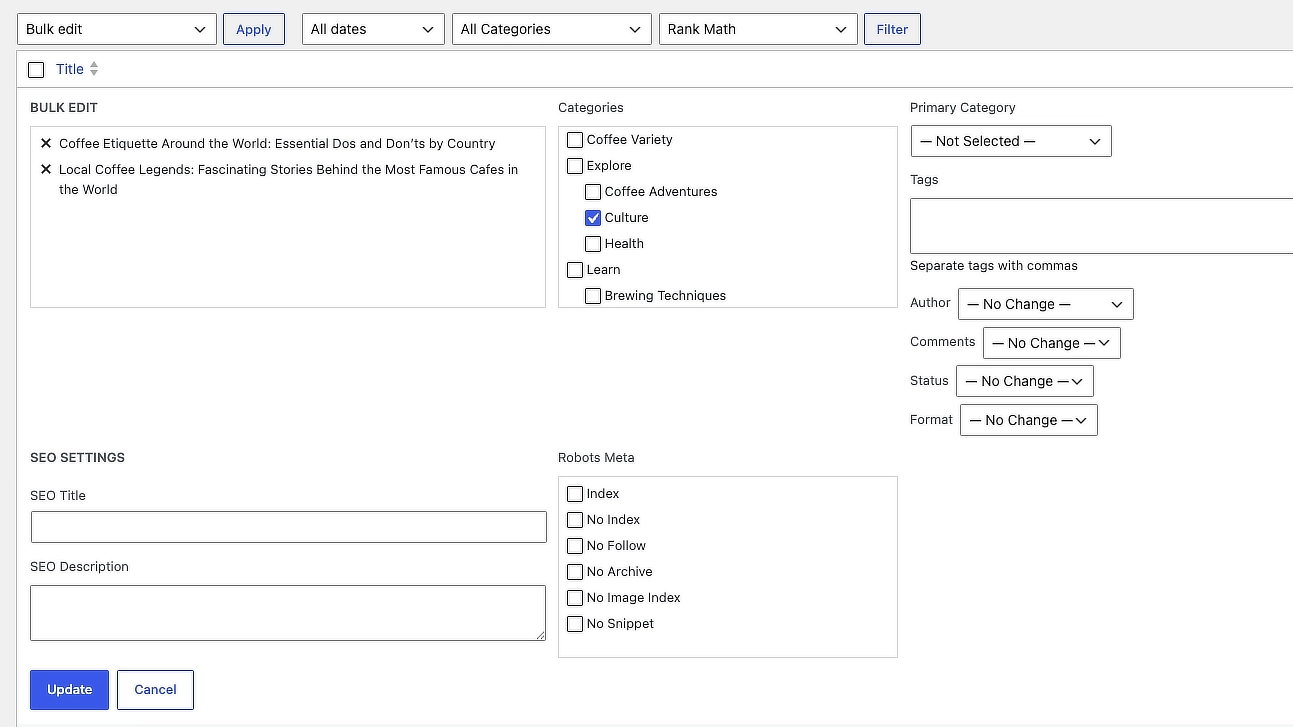
Step 3: Reassign in batches with Bulk Edit
Go to Posts > All Posts, tick the checkbox next to every post belonging to one category, choose Bulk Actions > Edit, and apply that category to the whole batch. Repeat per category.
Bulk Edit adds a category rather than replacing the old one, so use Quick Edit afterward to untick the leftover assignments and enforce your one category per post rule.
Step 4: Prune the tags
Posts > Tags, sorted by count. Anything attached to one or two posts is doing no work, so delete it. Deleting a tag does not touch the posts themselves; it only removes the label and the archive page. Then set tag archives to noindex in your SEO plugin and stop thinking about tags.
Fifteen minutes is realistic for a site under about forty posts. If you have more than that, split it: categories and the rename in one sitting, bulk reassignment in the next.
Connecting Your Category Structure to Menus and Internal Links
Your categories only pay off if readers can see them, which means your main navigation should be three to five items that match the categories you just built. Nothing else.
Keep the dropdowns shallow or skip them entirely. A mega menu listing every post inside every category looks organized and reads as noise on a phone, where most of your readers are.
The target is that any article on your site is reachable in about three clicks from the homepage, and a lean menu plus solid archive pages gets you there without any custom work.
Category cards on the homepage are the other half of this. Four cards, each with the category name, a line explaining who that section is for, and a link to the archive. It gives a first-time visitor a way to self-select instead of scrolling your reverse-chronological post list hoping something matches their problem.
Where structure stops, and something else takes over, is worth being clear about. Categories are containers. They tell a reader and a search engine how your site is organized, but they do not do much to pass authority between two related articles, because an archive page links to everything in it equally.
The work of connecting a specific post to the specific post that should come next happens inside your paragraphs, and that is a different routine with a different rhythm. Once your categories are set, connecting your posts with a simple internal linking routine is the next thing to build.
Set Your Structure Before You Publish Anything Else
You now have everything you need to make this call. Open Posts > Categories and count what is there.
If you are over five, or if any category holds a single post, you have the two problems this post exists to solve, and you know the sequence: check your permalinks, rename Uncategorized to your biggest cluster, create the two to four categories you actually need, bulk reassign, then prune the tags.
Do it before your next post goes out rather than after. Every article you publish into a messy taxonomy is one more thing to move later, and the job only gets slower from here.
How many categories does your affiliate site currently have, or are you trying to organize a site with posts stuck in Uncategorized? Drop your site structure questions in the comments below.

Sonia Zannoni
Hi, I’m Sonia Zannoni, creator of Click to Prosper. I share practical tools, workflows, and honest guidance to help you build an online business with more clarity and less chaos.
About Sonia

Feeling stuck between too many tools and too much advice? Start with the beginner path.
View the Blueprint