
Internal Linking for SEO Beginners: A Simple 10-Minute Workflow

You published the post. You proofread it twice, set the featured image, hit publish, and then closed the tab and moved on to planning the next one. That right there is the mistake. The article is now sitting on your site with nothing pointing at it, and search engines have no real way to tell what it belongs to or why it should rank.
A month later, there are no clicks, and the natural conclusion is that the writing was not good enough. Usually the writing was fine. The problem is that most advice on internal linking for seo beginners either buries you in link equity theory or tells you to install a plugin and trust whatever it decides to do.
Here is the routine I use instead. Three links per post, chosen in a specific order, done before you publish. One forward to a pillar page, one across to a sibling guide, one backward from an older article to the new one. It takes under ten minutes, and it costs nothing.
TL;DR: Internal Linking Strategy for Beginners
Why Isolated Posts Fail to Rank (The Island Content Trap)
A page with no internal links pointing at it is an orphan. Search engine crawlers find pages primarily by following links, so a post that nothing on your site references has to be discovered through your sitemap alone and then evaluated with almost no context around it. Google’s own Search Central documentation on crawlable links is direct about this: crawlers follow links to find new pages, and links they cannot follow or find do not help.
Context is the part beginners underestimate. A single post about anchor text tells a search engine almost nothing about your site. That same post, linked from a broader SEO guide and linking out to two related tutorials, tells the engine that this site covers on-page SEO in depth and that this page sits inside that coverage.
The difference shows up in how the two versions get treated. An isolated post competes on its own, with whatever authority the page has managed to earn by itself, which for a new site is close to zero. A connected post inherits some of the standing of the pages linking to it and gets read as part of a cluster.
There is a hierarchy signal in there too. When four guides all link up to the same review page, you have told search engines which page you consider the important one, without writing a word of technical markup. Links are how you rank your own content in order of priority.
So the fix is not more posts. The fix is connecting the ones you already have, on a schedule you will actually keep.
The 3-Link Rule: A 10-Minute Linking Routine
The reason most beginner linking advice fails is that it asks for judgment you do not have yet. “Link where it makes sense” is useless when you have eleven posts and no map of them. A fixed number removes the decision.
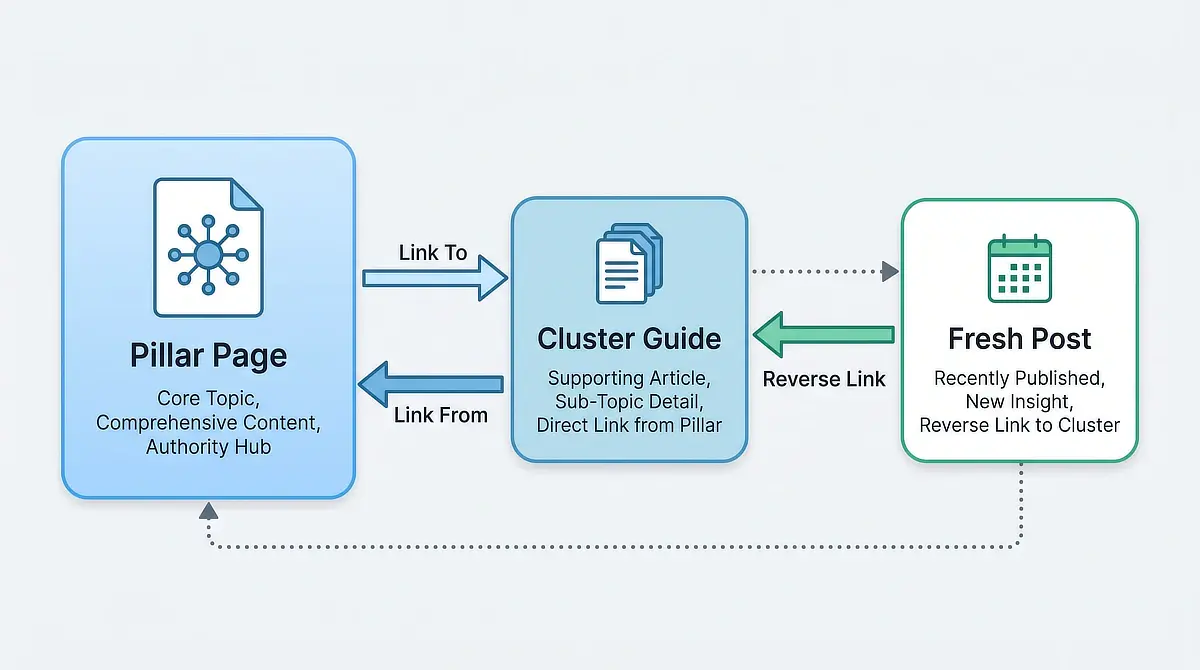
Three links per post. One forward to a pillar or review page, one across to a related guide in the same category, one backward from a published post into the new one. Same three every time, in that order, so it becomes muscle memory instead of a decision you make at eleven at night.
Before you place any of them, run a two-minute check against your own inventory. Keep a plain spreadsheet with four columns: Post Title, URL, Category, and Main Question Solved. That last column is what makes link targets obvious, because you are matching questions, not titles.
Post Title
URL
Category
Main Question Solved
How to Check Search Intent
/how-to-check-search-intent/
SEO & Traffic
How do I know if my keyword can rank?
Simple Keyword Research
/simple-keyword-research/
SEO & Traffic
How do I find low-competition keywords fast?
Wealthy Affiliate Review
/my-wealthy-affiliate-review/
Reviews
What platform handles hosting and site structure?
How to Check Search Intent
URL: /how-to-check-search-intent/
Category: SEO & Traffic
Main Question Solved: How do I know if my keyword can rank?
Simple Keyword Research
URL: /simple-keyword-research/
Category: SEO & Traffic
Main Question Solved: How do I find low-competition keywords fast?
Wealthy Affiliate Review
URL: /my-wealthy-affiliate-review/
Category: Reviews
Main Question Solved: What platform handles hosting and site structure?
Three things qualify a link target, and all three have to be true. The pages have to be topically related, the link has to be the logical next thing a reader would want, and the anchor text has to fit the sentence you are already writing. If you have to build a sentence around the link, the link is wrong.
Link 1: The Pillar Link (Feeding Your Monetization Pages)
The forward link goes to the page you most want to rank: usually a pillar guide or your main review. Every cluster post that links up to it passes a share of its own authority to that page, so ten guides pointing at one review is ten small deposits into the page that actually earns.
Place it where the reader’s problem naturally opens onto the bigger solution, not in the first paragraph and not stapled to the end. If the section is about tool overwhelm, the review link belongs right there, in the sentence where the reader is feeling it.
Link 2: The Cluster Link (Connecting Related Guides)
The sideways link goes to a sibling post in the same subcategory. This is the one that builds depth, because a cluster of guides cross-linking to each other reads as coverage of a topic rather than a scattering of one-off articles.
It also carries reader weight. Someone reading about internal linking is very likely one step away from wondering whether their target keyword was right in the first place, which is why a link to a guide on verifying user search intent before drafting belongs in a post like this one.
Link 3: The Reverse Link (Passing Authority from Existing Content)
The backward link is the one beginners skip, and it is the most valuable of the three. Your new post has no internal linking history yet. An older post already sits inside your site’s existing link structure. Adding a link from the old page to the new one gives crawlers another clear path to discover it and helps connect the new page to the rest of the topic.
This is also the only one of the three that happens after you publish, which is exactly why it gets forgotten. Put it in your checklist, not in your memory.
That checklist does not need software. A pinned note with your inventory spreadsheet and the three link types written out is enough to keep the habit alive through the weeks when you are tired and just want the post live.
How to Choose Descriptive Anchor Text That Readers and Search Engines Trust
Anchor text is the visible, clickable words in a link. It is a label, and both readers and crawlers use it to predict what is on the other side before anyone clicks.
Generic anchor text throws that prediction away. “Click here” and “read this post” describe nothing, and a screen reader user listening to a list of links hears the same three words over and over with no idea where any of them go. Descriptive anchors do double duty: they tell the reader what they are getting, and they tell search engines what the destination page is about.
Compare the two versions of the same sentence. Weak: “I wrote about keyword research recently, you can read it here.” Strong: “Most of this gets easier once you have a fast keyword research routine you can run in one sitting.” The second one carries the topic inside the words, and it would still make sense read aloud.
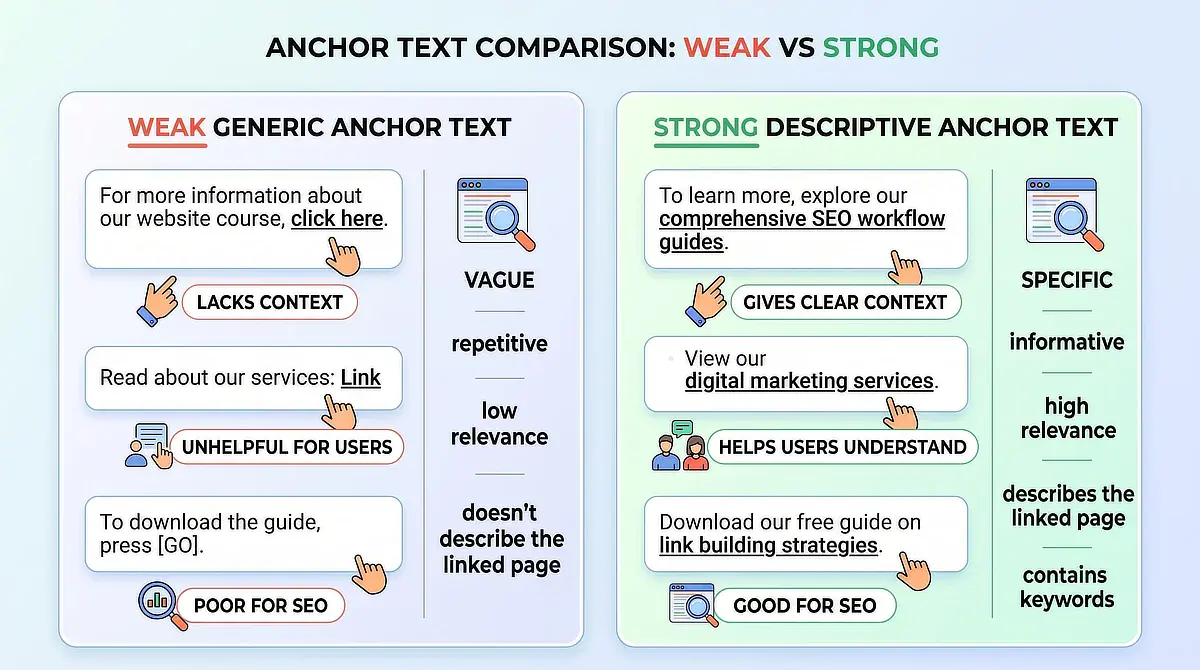
Now the objection, because it stops a lot of beginners: will descriptive anchors get read as keyword stuffing? Not if the anchor is part of a sentence you would have written anyway. Stuffing looks like the same exact-match phrase repeated as the anchor on every internal link on the site, usually in sentences that exist only to hold the link. Natural anchors vary, because the sentences around them vary.
The test is simple. Read the sentence out loud with the link removed. If it still sounds like something a person would say, the anchor is fine.
Structuring Link Hubs Without Complicated Plugins or Software
At ten to thirty posts, you do not need a link architecture. You need one hub per category and the discipline to point everything at it.
Pick the strongest page in each category, usually a pillar guide or the main review, and treat it as the hub. Every new post in that category links up to it, and the hub links back down to the two or three best posts under it. That is a working cluster, and you can hold the whole thing in your head at this size. This assumes your categories are already lean. If you have twenty of them with one post each, sort out the category structure first.
Depth matters here more than most beginners expect. Search Engine Journal has covered how crawl behavior favors pages reachable in a few clicks from the homepage, and a flat hub structure keeps almost everything within two or three clicks. Pages buried several levels deep can simply be harder for readers and search engines to reach.
This is also where the plugin question comes up. Automated interlinking plugins scan your content for keyword matches and insert links wherever they find them, which is fast and reliably produces links nobody would choose on purpose: a passing mention of “keyword research” in a post about hosting turning into a link that helps no one.
The honest tradeoff is time. Manual placement costs you a few minutes per post and gives you links that match reader intent. Automation costs you nothing and gives you links that match string patterns.
For a site under thirty posts, manual wins on both counts, and it is not close. Past a few hundred posts, the calculation shifts and some automation earns its place, but that is a problem to solve when you get there.
The other piece is site management overhead. If your hosting, your site tools, and your content planning live in five different places, the ten-minute routine can turn into a forty-minute tab hunt, which is how habits die. That is where a more consolidated setup can help.
If you are still assembling your stack piece by piece, read my complete Wealthy Affiliate review for the honest version of what an integrated platform can simplify, including what it does not do well.
The 5-Minute Reverse Link Habit: Updating Older Content for Immediate Gains
Here is the step almost every beginner routine is missing. You publish the new post, you link out from it, and then you never go back and link into it. The new page stays dependent on a sitemap crawl instead of inheriting a path from a page search engines already trust.
The routine takes about five minutes. Open your inventory, find the one published post closest in topic to the new one, and search that post for a paragraph where the new topic is already being mentioned in passing. Add one sentence with a descriptive link. Update, done.
Finding the context block is the only part that takes any thought. You are looking for a place where you already gestured at the idea and moved on, because that is where a reader would genuinely want more. If no such spot exists, the two posts probably are not in the same cluster, and you should pick a different page.
The worry that stops people here is that editing a ranking post will break its rankings. Adding a contextual sentence and a link is not the kind of change that does that. Search engines re-evaluate a page on the whole of its content and its relationships, and you have improved both. What actually risks rankings is gutting a post, changing its URL, or rewriting the section that satisfies the query. Adding one relevant sentence is not on that list.
So the full loop is: two links on the new post before publishing, then one link into it from an older post right after. Two sessions, under fifteen minutes combined, repeated on every article you put out.
Start with the last post you published. Open it, add the pillar link and the cluster link, then open one older post and point it back. If those three links take you longer than ten minutes, the bottleneck is your inventory, not your linking, and that is a spreadsheet you can build this evening.
If you have questions about choosing anchor text, structuring your first content cluster, or setting up a reverse-linking routine, drop a comment below. I read and reply to every message.

Sonia Zannoni
Hi, I’m Sonia Zannoni, creator of Click to Prosper. I share practical tools, workflows, and honest guidance to help you build an online business with more clarity and less chaos.
About Sonia
Feeling stuck between too many tools and too much advice? Start with the beginner path.
View the Blueprint