
AI Writing Tools for Affiliate Marketing: What the Free Tiers Actually Cover

Affiliate Disclosure: This post contains affiliate links. If you purchase through one of my links, I may earn a commission at no additional cost to you. Read the full Affiliate Disclosure for details.
You sign up for a free AI account and ask it for an outline. Before you’ve finished reading the result, a banner is offering you the paid plan at somewhere between $20 and $69 a month.
That’s the moment most searches for AI writing tools for affiliate marketing are really about: are free drafts good enough to rank, or are you about to build a site on something Google will ignore?
Hesitating there isn’t a lack of ambition. Your site hasn’t earned a commission yet, so a new monthly bill is a real cost, and questioning it is sound business math.
Here’s what the free tiers of the main tools give you, where each one cuts you off, and the monthly publishing volume where paying starts to make sense. You’ll also see why the big general models usually beat the pricier marketing tools built on top of them.
TL;DR: AI Writing Tools for Affiliate Marketing
The Zero-Dollar Baseline: How Free Frontier Models Changed the Math
Before comparing prices, you need a way to judge what you’re paying for. I use two filters. How much control do you get over the output? And how much text can you generate before the tool cuts you off?
Marketing pages talk about templates and “brand voice.” Neither of those decides whether your draft is any good.
On both filters, the free tiers of ChatGPT, Claude and Gemini hold up. They aren’t crippled demos. You’re writing with the same family of models the companies sell.
The free plan limits how much you can use and which model handles your heaviest requests. The writing itself is still strong enough to outline, draft sections, and build product comparisons for an affiliate blog.
The tools that charge a premium work differently. A lot of AI copywriting products are wrappers: software that sends your request to a large language model with pre-written instructions and templates added, then bills you monthly for that layer.
Sometimes the layer adds real convenience. For a solo blogger, though, you can write most of those instructions yourself in a plain chat window, and doing that costs nothing.
Then there’s ranking, which is what most people are really worried about. Google’s own guidance on how Google Search treats AI-generated content is clear. It judges the quality and helpfulness of the page, not how the page was produced. Google can’t see whether a draft came from a free account or a paid one, and it wouldn’t care if it could.
So the money you’d put into a writing subscription can go into hosting and your domain, which your site can’t run without. If you’ve already started using free AI tools for your niche research, the same approach carries into drafting. Next is what each free plan actually allows.
Free Tier Limits Put to the Test: ChatGPT, Claude, and Gemini
These three companies all offer a real free plan, but each one sets its limits differently. Knowing where each limit is lets you plan around it before it interrupts a writing session.
ChatGPT Free ($0 a month). You get limited access to OpenAI’s current flagship model, plus web search, file uploads and custom GPTs, each with its own limits. Once you hit the flagship cap, ChatGPT switches you to a lighter model until the cap resets. You can keep working, but the output gets noticeably thinner on longer, more complex sections. The ChatGPT pricing page lists the current allowances.
Claude Free ($0 a month). You get Anthropic’s current mid-tier model, which writes some of the most natural long-form prose of the three. Usage is measured in session windows that reset every five hours.
How many messages fit in a window depends on how long your messages and pasted documents are. A long thread with a full brief pasted in uses up the allowance much faster than short exchanges. The Claude plans and pricing page explains the current session rules.
Google Gemini Free ($0 a month). Gemini gives generous daily use of its fast model and more limited access to its more capable one. Google Search is built in, and it connects easily to Google Docs. Its weak spot is output quality with loose prompts: vague requests tend to come back as bland summaries. Tell it the exact angle, audience and length you want and the drafts get much better.
Here’s how those three compare with the specialized tools covered in the next section:
Tool
Free Plan Allowance
Paid Tier Price
The Practical Catch for Beginners
ChatGPT
Capped flagship model access, then a lighter model
$20 per month (Plus)
Output gets thinner once you drop to the lighter model
Claude
Current mid-tier model, five-hour session windows
$20 per month (Pro)
A long drafting session can hit the limit partway through
Google Gemini
Generous fast-model use, limited access to the more capable model
$19.99 per month (Google AI Pro)
Needs specific prompt constraints to avoid bland summaries
Copy.ai
2,000 words per month
$29 per month (Chat)
The free words run out after one or two articles
Jasper
No free tier (7-day trial only)
$59 to $69 per month (Pro)
Credit card required up front, then a high monthly cost
Rytr
10,000 characters per month (roughly 1,500 words)
$9 to $29 per month
Runs out before you finish one full-length post
Koala Writer
5,000-word one-time trial
$9 to $49+ per month
No monthly free allowance after the trial
ChatGPT
Free Plan Allowance: Capped flagship model access, then a lighter model
Paid Tier Price: $20 per month (Plus)
The Practical Catch for Beginners: Output gets thinner once you drop to the lighter model
Claude
Free Plan Allowance: Current mid-tier model, five-hour session windows
Paid Tier Price: $20 per month (Pro)
The Practical Catch for Beginners: A long drafting session can hit the limit partway through
Google Gemini
Free Plan Allowance: Generous fast-model use, limited access to the more capable model
Paid Tier Price: $19.99 per month (Google AI Pro)
The Practical Catch for Beginners: Needs specific prompt constraints to avoid bland summaries
Copy.ai
Free Plan Allowance: 2,000 words per month
Paid Tier Price: $29 per month (Chat)
The Practical Catch for Beginners: The free words run out after one or two articles
Jasper
Free Plan Allowance: No free tier (7-day trial only)
Paid Tier Price: $59 to $69 per month (Pro)
The Practical Catch for Beginners: Credit card required up front, then a high monthly cost
Rytr
Free Plan Allowance: 10,000 characters per month (roughly 1,500 words)
Paid Tier Price: $9 to $29 per month
The Practical Catch for Beginners: Runs out before you finish one full-length post
Koala Writer
Free Plan Allowance: 5,000-word one-time trial
Paid Tier Price: $9 to $49+ per month
The Practical Catch for Beginners: No monthly free allowance after the trial
Pricing and free plan details last checked: September 2026. This category changes quickly, so we recheck this comparison whenever any of these tools changes its free plan or lowest paid price, because either change moves the upgrade threshold.
In practice, each tool fails in its own way. Claude may cut you off in the middle of a long session. ChatGPT keeps going but with weaker output. Gemini works fine as long as you tell it exactly what you want.
These are different kinds of limits, which is why combining two tools works better than paying to upgrade one of them.
The Specialized Tool Trap: Why Jasper, Copy.ai, and Rytr Cost More Than They Deliver
This is the category that shows up in most “best AI writer” lists, and the pricing tells you who these tools are built for.
Jasper is priced for marketing teams. The Pro plan costs $59 to $69 a month per seat, depending on billing. There’s no permanent free plan, only a 7-day trial that asks for a credit card.
Features like team workflows and brand voice settings make sense for a company with ten people writing ad copy. A one-person affiliate site pays for them and never uses them.
Copy.ai has a free plan, but at 2,000 words a month it covers roughly one blog post. The next step is $29 a month for the Chat plan. The workflow plans for businesses cost far more, up to around $1,000 a month.
Rytr is cheaper, with paid plans from $9 to $29 a month. Its free plan allows 10,000 characters a month, about 1,500 words, which runs out before you finish one full-length affiliate article.
Koala Writer gives you a one-time 5,000-word trial when you sign up. After that you’re on a paid plan, starting at $9 and scaling to $49 or more a month depending on volume.
There’s a quality problem too, not just a cost problem. Template tools send every request through the same built-in instructions, so product reviews from different users start to sound alike. They use the same “Pros and Cons” layout, the same enthusiastic transitions and the same safe verdicts.
A reader who has seen a few AI-written reviews recognizes the pattern in seconds. You end up spending time removing the template’s habits before the post sounds like you.
A plain chat window doesn’t have that problem, because you write the instructions. If you’re already structuring an honest affiliate product review, you can give that structure to a free model directly and skip the template.
It also helps to know why these tools get recommended so often. Many of them run affiliate programs that pay bloggers a recurring commission for every subscriber they refer.
A post pushing a $59 monthly tool may be earning its author money every month you stay subscribed. That doesn’t make every recommendation dishonest, but it explains why so few of those posts tell you to start free.
The 4-Post Monthly Threshold: Who Should Stay Free and Who Needs to Pay
Whether to pay comes down to how many words you draft each month.
A realistic part-time publishing pace is 2 to 4 articles a month. At 1,500 to 2,500 words each, that’s somewhere between 3,000 and 10,000 drafted words a month. Even that top figure, spread across a few sessions a week, fits within the free allowances of two tools combined. You’d only run into trouble if you tried to draft all four posts in one sitting.
So the decision splits into three groups:
- Stay free: You publish 4 or fewer posts a month, you’re still building toward your first 20 or so published articles, or you write around a full-time job. You won’t run out of free capacity if you pace your sessions.
- The middle ground: You publish 5 to 14 posts a month and keep hitting the same limit. One $20 plan for the tool you rely on most is a reasonable upgrade. Keep the second tool free.
- Pay: You run your sites full time and publish 15 or more articles a month, you manage several monetized sites or client sites, or you need API access, which lets your own software or scripts connect to the AI directly.
Most beginners fall into the first group. This site’s realistic 24-month affiliate timeline shows why that’s fine: early results come from publishing consistently over months, not from producing more words per week.
The other worry is penalties: that Google treats free-tool drafts as spam. It doesn’t.
Google’s guidance on creating helpful, people-first content asks whether a page shows real knowledge, answers the reader’s question, and leaves them satisfied. A paid subscription doesn’t help with any of those. What matters is how much judgment and editing you add after the draft.
The Two-Tool Free Rotation Workflow for Part-Time Builders
The way to stay free without getting stuck is to split the work between two tools based on what each does best.
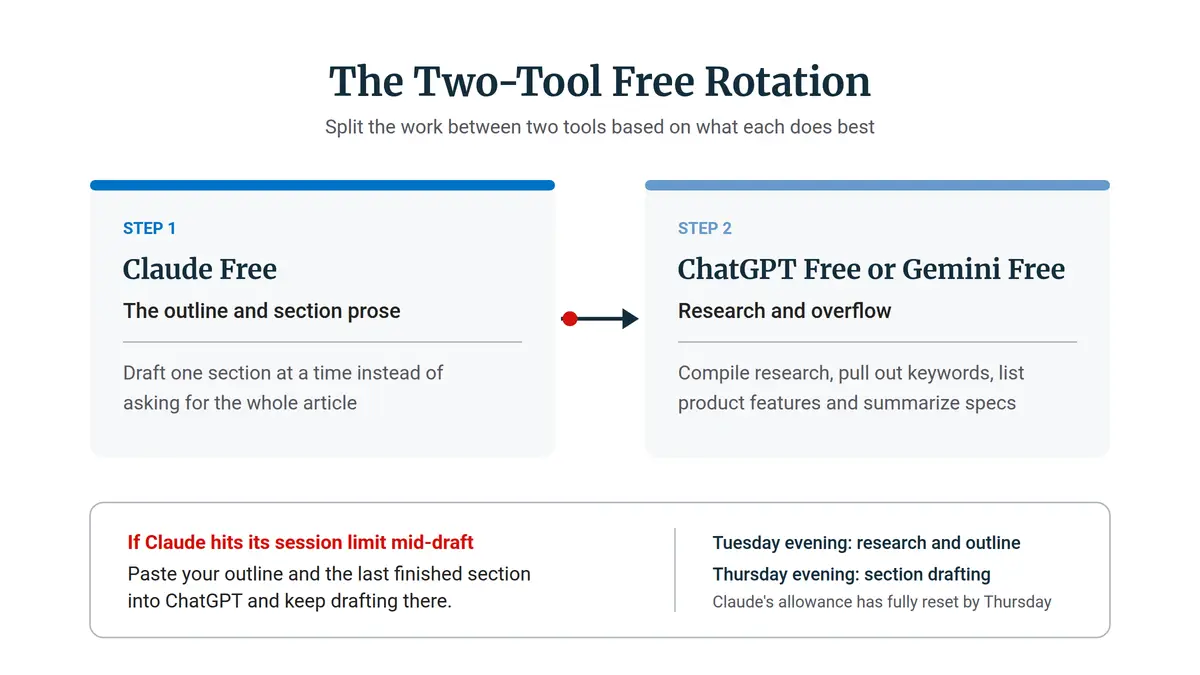
Step 1: Claude Free for the outline and section prose. Flow and nuance matter most here, and Claude handles them well. Draft one section at a time instead of asking for the whole article, so each window of usage goes further. Short, focused prompts also give you better sections than one huge request.
Step 2: ChatGPT Free or Gemini Free for research and overflow. Use the second tool to compile research, pull out keywords, list product features, and summarize specs. If Claude hits its session limit mid-draft, paste your outline and the last finished section into ChatGPT and keep drafting there. The prose may need a little more editing, but you keep going.
Spreading the work across the week also keeps you from hitting limits. One pattern that works: research and outline on Tuesday evening, then section drafting on Thursday evening. Tuesday is mostly research in ChatGPT, Thursday is mostly drafting in Claude, and Claude’s allowance has fully reset by Thursday. On that schedule, you’ll rarely see a usage limit.
A finished draft still isn’t a finished post. It needs your judgment, your examples, and your voice before it goes live, and that step decides whether it ranks. The guide on editing your AI draft so it sounds like you covers that part.
The Software Budget Stack: Keeping Startup Overhead Lean
The last question is what these subscriptions do to your total costs. The core costs of a new affiliate site are small: about $12 a year for a domain and $5 to $15 a month for basic hosting. At the low end, that’s under $100 a year.
Subscriptions add up quickly on top of that. ChatGPT Plus and a $29 keyword tool together come to about $600 a year. Add Jasper at $59 to $69 a month, and you’re looking at roughly $1,300 to $1,400 a year, all before your site earns a dollar. A single $20 AI plan by itself costs more per year than basic hosting and a domain combined.
Keeping early costs low matters because affiliate income takes time. Traffic from search usually builds slowly over a site’s first year or two, and a site costing $100 a month is much harder to keep going through that stretch than one costing $10. The sites that make it are often the ones whose owners could afford to wait.
There’s another option. Some people prefer one bill that covers hosting, training, and writing tools, instead of managing separate subscriptions. An integrated platform with bundled hosting and content tools is one way to do that.
Whether it’s worth it depends on how much each separate subscription would cost you and how much you value having everything in one place. The beginner affiliate cost breakdown compares both routes over three years.
Right now, you can draft a full month of affiliate content without paying for a writing tool. Your first step is simple: look at how many posts you actually published last month and match that number to the three groups above.
If you’re in the first group and still paying for an AI writing plan, cancel it before the next billing date, because at that volume the free tiers already cover what you draft.
Which AI tool are you using to draft your blog posts, and have you ever hit its free usage limit during an evening writing session? Let me know in the comments below.

Sonia Zannoni
Hi, I’m Sonia Zannoni, creator of Click to Prosper. I share practical tools, workflows, and honest guidance to help you build an online business with more clarity and less chaos.
About Sonia

Feeling stuck between too many tools and too much advice? Start with the beginner path.
View the Blueprint