
Is GeneratePress Premium Worth It? A Beginner’s Cost and Feature Check

Affiliate Disclosure: This post contains affiliate links. If you purchase through one of my links, I may earn a commission at no additional cost to you. Read the full Affiliate Disclosure for details.
Your first handful of posts are live, and the site looks bare next to the ones outranking you. Every tutorial points at the same fix: buy the premium theme. So you go looking for one answer: Is GeneratePress Premium worth it? And you get a wall of yes, with almost none of it explaining what the paid version would actually change on your site.
Hesitating here is the right instinct, not a lack of commitment. Paying $59 to $149 a year for software before the site has earned a dollar deserves a real reason, and “my site looks plain” is not one.
The free theme and the paid version render your text, headings, and images identically. Premium changes what you can build, not how finished a single article looks.
This review covers what each product in the GeneratePress family costs, what the free theme handles on its own, and the specific limits that make the upgrade start paying for itself. By the end, you should be able to tell which side of that line your site is on.
TL;DR: Is GeneratePress Premium Worth It?
The Real Decision: When Software Upgrades Help and When They Distract
Every affiliate tutorial comes with a shopping list, and the theme upgrade usually sits near the top of it. Buying things feels like progress, and in the first few months it is often the only kind of progress available.
A purchase gives you something to show for the evening. A published article gives you nothing to show for about six months, which is exactly why the purchase is so tempting.
So before looking at a single price, run every recurring subscription through one filter: does this remove work that is currently stopping you from publishing? Not work that irritates you. Work that stops you.
Theme software usually fails that filter, and the reason is worth being precise about. Search rankings come from what your content covers and how much authority your domain has earned.
A theme license changes neither. What premium theme features change is how fast you can build and repeat a layout, which is a production problem, not a traffic problem.
Three numbers tell you whether a design purchase is actually working:
- Cost per site, per year. A $59 license on one site is $59 of pure cost. The same license across four monetized sites is under $15 each, and that is a different decision entirely.
- Design hours the tool removes. Estimate the time you currently spend hand-formatting the same elements across posts. If the honest answer is twenty minutes a month, the license is not buying back much.
- Publishing volume after the purchase. If your output does not rise in the two months following a design purchase, the tool solved a problem you did not have.
The order you buy things in matters more than the individual purchases, and design software sits further down that order than most tutorials suggest. I have mapped the sequence separately in the plugins that actually earn a place on an affiliate site, so I will not repeat it here.
Product Architecture: Understanding GeneratePress, GenerateBlocks, and GP One
Part of the confusion around this decision is that “GeneratePress Premium” is not one product. It is a family of four, sold separately and as a bundle, and the naming does not make the boundaries obvious.
Start with the theme split. GeneratePress itself is a free WordPress theme hosted on WordPress.org, currently at version 3.6.1 with more than 500,000 active installs. GP Premium is not a different theme. It is a plugin, $59 a year, that switches on additional modules inside the theme you already have.
The block split runs on a parallel track. GenerateBlocks is a free plugin that adds layout blocks to the WordPress editor. GenerateBlocks Pro, $99 a year, adds design patterns and advanced styling on top of it. The two tracks are independent, so you can run the free theme with the Pro blocks, or the premium theme with the free blocks, in any combination you like.
GeneratePress One at $149 a year bundles GP Premium, GenerateBlocks Pro, and GenerateCloud, a plugin that lets you host your own pattern library on one site and pull those patterns into your other sites.
GenerateCloud costs $99 a year on its own and requires GenerateBlocks Pro to function. Every paid tier covers up to 500 sites and carries a 30-day money-back guarantee.
Here is how the four tiers compare on cost, coverage, and who each one is actually built for.
Tier / Product
Annual Cost (USD)
Site Limit
Core Inclusions
Ideal User
GeneratePress (free)
$0
Unlimited
Core lightweight theme, dynamic typography, 60+ colour controls, layout and header options
Zero-revenue beginners under 20 posts
GP Premium
$59/year
Up to 500
Theme Builder and Block Elements, hook system, archive columns and masonry, Site Library (60+ starter sites), local font manager, mobile header, secondary nav, 1 year of updates and support
Bloggers with 20+ posts needing site-wide automated elements
GenerateBlocks Pro
$99/year
Up to 500
300+ design patterns, global styles, custom attributes, advanced query loop controls, CSS effects, 20+ starter sites (requires GP Premium)
Designers and developers needing advanced block control
GeneratePress One
$149/year
Up to 500
GP Premium plus GenerateBlocks Pro plus GenerateCloud, priority support
Multi-site operators, freelancers, agencies
GeneratePress (free)
Annual Cost (USD): $0
Site Limit: Unlimited
Core Inclusions: Core lightweight theme, dynamic typography, 60+ colour controls, layout and header options
Ideal User: Zero-revenue beginners under 20 posts
GP Premium
Annual Cost (USD): $59/year
Site Limit: Up to 500
Core Inclusions: Theme Builder and Block Elements, hook system, archive columns and masonry, Site Library (60+ starter sites), local font manager, mobile header, secondary nav, 1 year of updates and support
Ideal User: Bloggers with 20+ posts needing site-wide automated elements
GenerateBlocks Pro
Annual Cost (USD): $99/year
Site Limit: Up to 500
Core Inclusions: 300+ design patterns, global styles, custom attributes, advanced query loop controls, CSS effects, 20+ starter sites (requires GP Premium)
Ideal User: Designers and developers needing advanced block control
GeneratePress One
Annual Cost (USD): $149/year
Site Limit: Up to 500
Core Inclusions: GP Premium plus GenerateBlocks Pro plus GenerateCloud, priority support
Ideal User: Multi-site operators, freelancers, agencies
You will still find posts recommending the GeneratePress lifetime license. It was real, it cost $249, and GeneratePress stopped selling it on June 1, 2024. Existing holders keep their access.
New buyers cannot get one at any price, so any article still telling you to grab the lifetime deal is out of date and worth treating as a signal about how current the rest of that article is.
Current plans and terms are listed on the official GeneratePress pricing page. That gap in availability is exactly why discounted “lifetime” GP Premium keys turn up on GPL resale sites. Skip them. A resold key gives you no update channel from the developer, and an unpatched plugin sitting in your WordPress install is the kind of security problem you do not notice until it matters.
If you are weighing these figures against an all-in-one platform where hosting and design arrive bundled, a single year of theme licensing is the wrong unit to compare. The three-year cost breakdown of standalone WordPress hosting versus all-in-one platforms works through the full stack over a realistic timeline.
The Free Baseline: What You Can Build Without Spending a Dollar
The most useful thing to understand before spending anything is that the free version is not a crippled trial. It is the same theme, with fewer modules switched on.
A fresh GeneratePress install adds less than 10KB gzipped to a page by the developer’s own measurement, and the theme’s own front-end scripts do not lean on jQuery, an older script library plenty of themes still load whether the page needs it or not. That matters for one specific reason.
Page weight and script bloat are what push Largest Contentful Paint, the measure of how long your main content takes to appear on screen, into the range Google treats as poor, so starting near zero means your images and plugins get the whole performance budget instead of spending part of it on the theme.
Google’s page experience and Core Web Vitals documentation is the reference worth reading here, and it is also honest that page experience is not a substitute for content quality.
What the free theme cannot do is guarantee you pass Core Web Vitals. Nothing can. An oversized hero image, slow hosting, and four analytics scripts will fail the assessment on any theme in existence. The theme simply stops being the reason you fail, which is all you can reasonably ask of it.
Inside the Customizer, the free version already hands you the controls most new bloggers assume are paywalled:
- Dynamic typography, so you can set font family, size, and line height per element rather than accepting the defaults across the whole site.
- 60+ colour controls, enough to apply a full brand palette to headings, links, buttons, and backgrounds without touching CSS.
- Container width and layout controls, including sidebar position and content width, which is what actually makes an article feel readable on a wide screen.
- Header configuration, covering logo placement, navigation position, and header alignment, so the top of your site stops looking like a default install.
Pair the free theme with the free GenerateBlocks plugin, and you get the layout pieces most articles need: containers, grids, headlines, buttons, and a Query Loop block that pulls posts dynamically. That last one is worth knowing about before you reach for your card, because the free Query Loop lets you build a post grid on a page you design yourself, which covers a decent share of what people assume requires Premium.
If you are still setting WordPress up and want the installation steps rather than the theme evaluation, the step-by-step guide to building a website on Wealthy Affiliate covers that ground. And if you want to test this foundation on your own site before deciding anything, you can install GeneratePress at no cost from the official WordPress.org theme directory.
The Premium Ceiling: The Specific Limits That Justify Upgrading
Two ceilings send people to the paid version, and neither of them is about how an individual article looks.
The Theme Builder and Block Elements
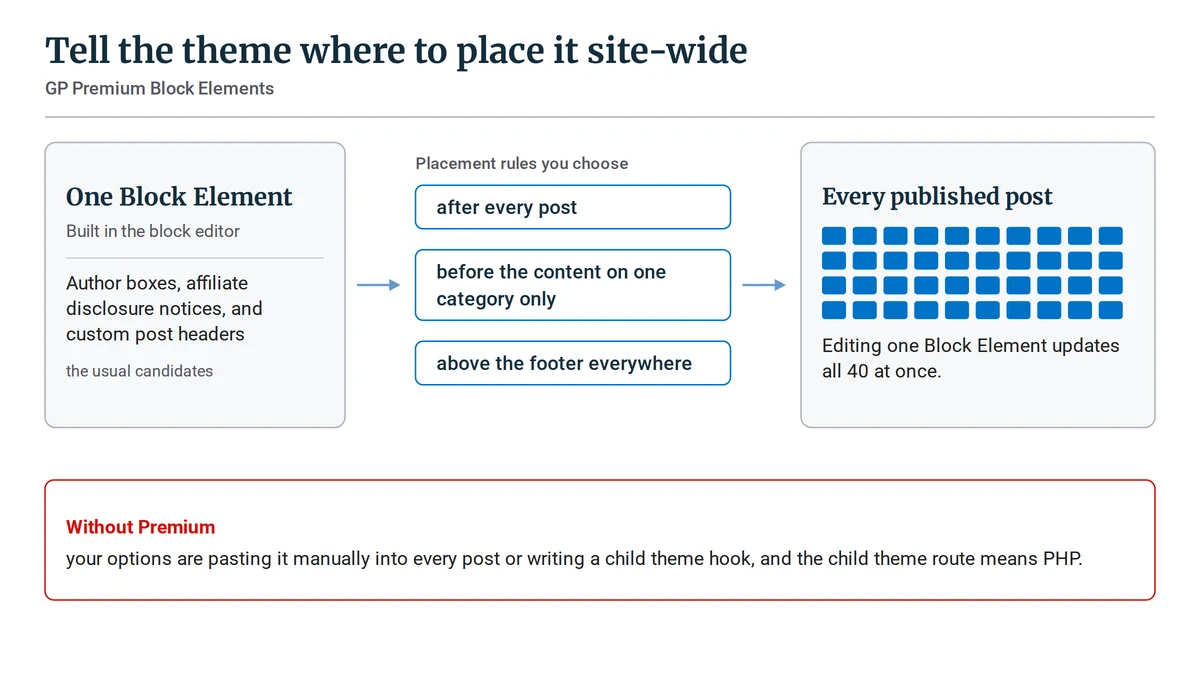
GP Premium’s Elements system lets you build a piece of content in the block editor and tell the theme where to place it site-wide: after every post, before the content on one category only, above the footer everywhere. Author boxes, affiliate disclosure notices, and custom post headers are the usual candidates.
The reason this is worth money is arithmetic, not aesthetics. If you have 40 published posts and your FTC disclosure needs rewording, editing each post by hand is a lost evening, plus the two you forget. Editing one Block Element updates all 40 at once. Without Premium, your options are pasting it manually into every post or writing a child theme hook, and the child theme route means PHP.
The second ceiling is your category and blog archive pages. The free theme lists posts in a single column, and it does not offer multi-column post grids, masonry layouts, or per-archive featured image sizing. Premium’s blog module adds all three.
This one has a workaround worth knowing before you pay for it. The free Query Loop block can build a post grid on a page you create yourself, so if all you want is one curated “Start Here” page with a grid on it, you do not need Premium.
What you cannot change without it is the actual category archive template, and that is the page readers land on from your menu and from search.
Secondary navigation and the mobile header become relevant later, when your topic clusters outgrow a single menu row. A site with three categories does not need either. A site with nine, where the main menu has started swallowing things, usually does. Getting the structure right early removes some of that pressure, which is what structuring your affiliate website categories from day one is for.
Premium also includes the Site Library, 60+ pre-built starter sites you import and then edit, plus a local font manager that serves Google Fonts from your own server. The starter sites save a weekend if you have no design instinct and would rather modify something finished than build from a blank Customizer.
The local font manager matters mainly if you want to avoid sending EU visitors’ IP addresses to a third party, which is a live GDPR consideration for some owners and irrelevant to others.
GenerateBlocks Pro and GeneratePress One: Do Beginners Need the Full Bundle?
GenerateBlocks Pro adds 300+ pre-built design patterns, global styles that let you change one setting and update every instance, custom attributes, more advanced query loop controls, and CSS effects like shadows and transitions. It also unlocks 20+ starter sites, though those require GP Premium as well, which is a detail the pricing page states plainly and most reviews skip.
None of it writes a better review. Affiliate content converts on clear comparisons, verdicts the reader believes, and links that go where they say they go. A box shadow has never rescued a vague recommendation.
The pricing does something counterintuitive here, though, and it changes the shape of the decision. GP Premium and GenerateBlocks Pro bought separately come to $158 a year. GeneratePress One costs $149 and includes GenerateCloud on top.
So if you have decided you want GenerateBlocks Pro at all, the two standalone licenses are the more expensive route. The real fork is not $59 versus $149 with options in between. It is $59, or $149, and very little reason to stop halfway.
That makes the bundle good value for the people it was designed for: freelancers building client sites, agencies, and operators running several monetized domains where a 500-site allowance covers real projects rather than sitting unused.
For one blog earning nothing yet, the extra $90 a year buys design capability you will not touch for a year or more. Recurring costs are the quiet thing that decides whether a site is profitable in year two, and $90 is roughly a month and a half of hosting you could have kept.
The Cost and Action Matrix: Who Should Upgrade and Who Should Stay on Free
Sorting yourself takes two facts: how many articles you have published, and whether the site has earned anything yet.
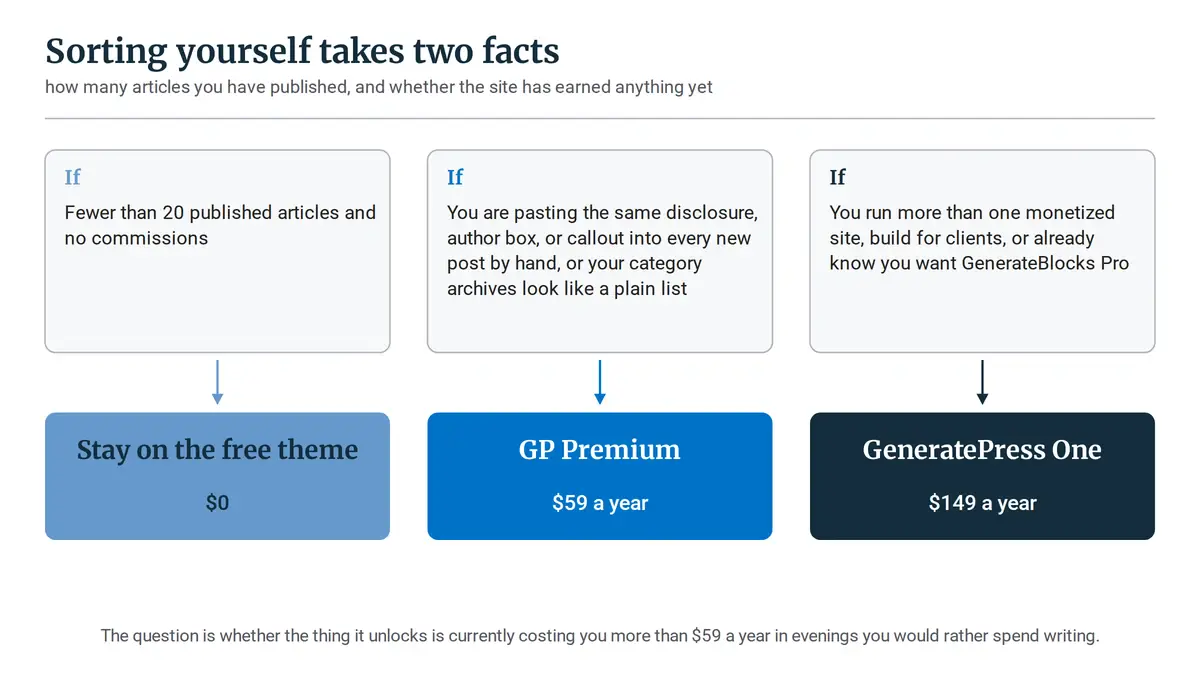
Stay on the free theme if you have fewer than 20 published articles and no commissions. At that stage, your bottleneck is article count, not layout capability, and the free theme paired with free GenerateBlocks will not slow your rankings by a single position. Keep the $59 and spend the evening writing post 21.
Upgrade to GP Premium at $59 a year when you hit one of two specific symptoms: you are pasting the same disclosure, author box, or callout into every new post by hand, or your category archives look like a plain list, and you want them to work as a proper entry point.
Both are production problems that Premium removes permanently, and both tend to show up somewhere past the 20-post mark with search traffic starting to arrive.
Buy GeneratePress One at $149 a year if you run more than one monetized site, build for clients, or already know you want GenerateBlocks Pro. In that last case, the bundle is the cheaper purchase, not the bigger one.
Whichever profile fits, the sequence matters more than the individual line item, which is why the staged plugin upgrade ladder for an affiliate site is worth checking before you add another annual renewal to the calendar.
The question is not whether the premium version is good software. It is. The question is whether the thing it unlocks is currently costing you more than $59 a year in evenings you would rather spend writing.
If your blog has reached the stage where manual layout work is eating into writing hours, review current plan terms on the official GeneratePress pricing page and check the 30-day refund window before you commit. If it has not, keep the money and publish.
Are you currently running the free GeneratePress theme, or trying to decide whether to upgrade to GP Premium or the full bundle? Tell me where your site is right now in the comments below.

Sonia Zannoni
Hi, I’m Sonia Zannoni, creator of Click to Prosper. I share practical tools, workflows, and honest guidance to help you build an online business with more clarity and less chaos.
About Sonia
Feeling stuck between too many tools and too much advice? Start with the beginner path.
View the Blueprint